



Key Takeaways
- BTCPay Server costs about $10 a month in hosting and 0% per sale. It is the cheapest option by a wide margin, and you run the server yourself.
- BitPay costs $1,125 a month on $50,000 of sales at its entry rate. You pay for daily bank settlement and a brand that has run since 2011.
- Coinbase Commerce closed on March 31, 2026 for merchants outside the US and Singapore. Its replacement, Coinbase Business, is custodial and only open to US and Singapore companies.
- CoinGate charges 1% and pays out in euros or dollars, but it does not serve US merchants. NOWPayments charges 1% too, but its terms exclude the US, UK, EU, UAE, and Russia.
- Lightning settles in seconds for fractions of a cent. On-chain Bitcoin takes 10 to 60 minutes, so a busy shop needs a processor with LightningIt fails at a busy till
.
You want to take Bitcoin in your store, and every comparison article hands you the same three names. One of those names shut down in March 2026, and most guides never got the memo.
This guide has bitcoin payment processors compared side by side, on the numbers that matter in November 2026. Real fees from the pricing pages, real settlement times, and real limits on who can even sign up.

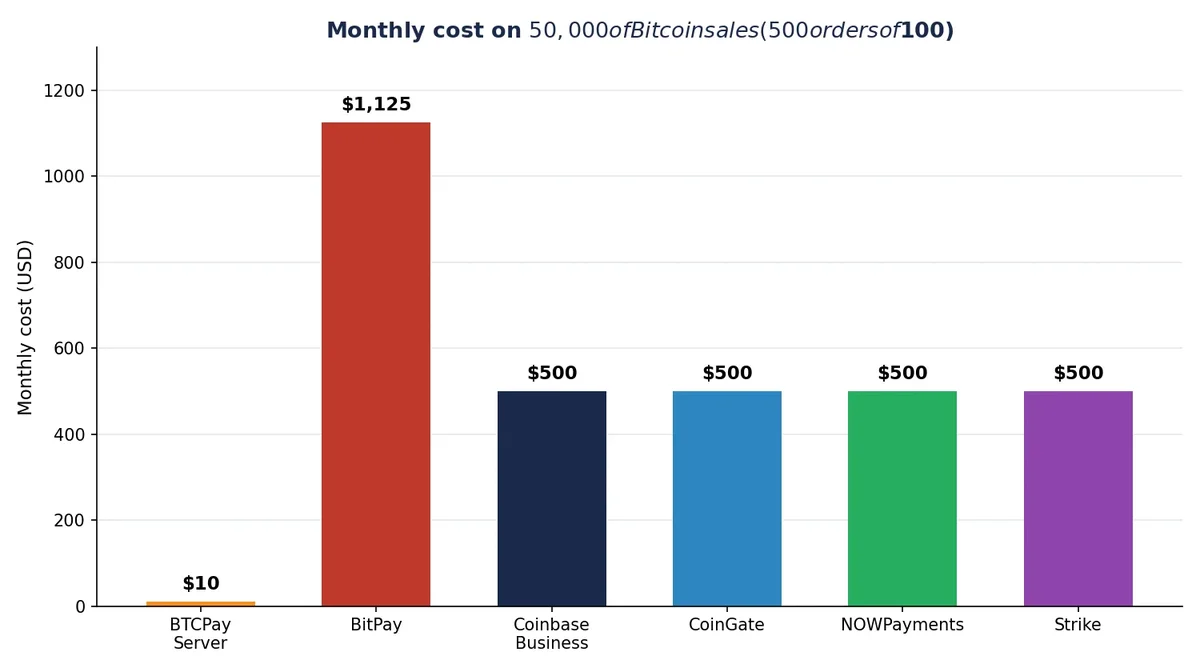
We ran the math on $50,000 of monthly sales at a $100 average order. The gap between the cheapest and the priciest option is $1,115 a month, or $13,380 a year.
- Key Takeaways
- The Short Answer: Which Processor Wins in 2026?
- The Fee Math on $50,000 a Month
- BTCPay Server: Free, But You Run It
- BitPay: The Old Reliable That Costs the Most
- Coinbase Commerce Is Gone: What Replaced It
- CoinGate: The Best Fiat Option in Europe
- NOWPayments: Cheap, Wide, With a Catch
- Strike: Lightning First, Bitcoin Only
- The Full Comparison Table
- How to Pick in 5 Minutes
- 5 Mistakes Merchants Make
- FAQs
- What is the cheapest Bitcoin payment processor?
- Is Coinbase Commerce still working?
- How much does BitPay charge per transaction?
- Do I need Lightning to accept Bitcoin in a store?
- Can I accept Bitcoin payments without KYC?
- Which processor is best for a small online shop?
- The Bottom Line
- Sources
That gap pays for a lot of hosting. Keep reading, and you will know which processor fits your shop in five minutes.
The Short Answer: Which Processor Wins in 2026?
If you can handle a little setup, use BTCPay Server. It costs 0% per sale, it holds no funds for you, and nobody can freeze your account.
If you need dollars in your bank every morning and you sell in the US, use BitPay or Strike. BitPay costs more, but it has settled fiat for merchants since 2011.
If you sell in Europe and want euros in your bank, use CoinGate. It charges 1% and it holds a MiCA license from the Bank of Lithuania.

If you are outside the US and Singapore, forget Coinbase Commerce. It is gone, and the replacement will not take you.
The Fee Math on $50,000 a Month
Fee pages hide the real cost behind a single percentage. A 1% fee sounds small until you multiply it by a year of sales.
With bitcoin payment processors compared on $50,000 a month of sales and 500 orders at $100 each, the gap is easy to see. Every number below comes from a pricing page read in November 2026.
| Processor | Fee per sale | Monthly cost on $50,000 | Yearly cost |
|---|---|---|---|
| BTCPay Server | 0% | About $10 (hosting) | About $120 |
| BitPay | 2% + $0.25 | $1,125 | $13,500 |
| Coinbase Business | 1% flat | $500 | $6,000 |
| CoinGate | 1% flat | $500 | $6,000 |
| NOWPayments | 1% (1.5% converted) | $500 ($750) | $6,000 ($9,000) |
| Strike | 1% (0.49% at volume) | $500 ($245) | $6,000 ($2,940) |
What the Math Assumes
The $50,000 figure assumes 500 orders of $100. Bigger orders make the flat 25 cent BitPay fee matter less, and smaller orders make it matter more.
BTCPay Server has no per-sale fee at all, so its cost is just the server. A basic VPS runs about $10 a month, and Lightning fees are fractions of a cent per payment.
On-chain fees are the wild card. A busy shop that takes on-chain payments can pay $0.50 to $2 per sale in network fees, which is why Lightning matters so much at the till.
The Cost of One $100 Order
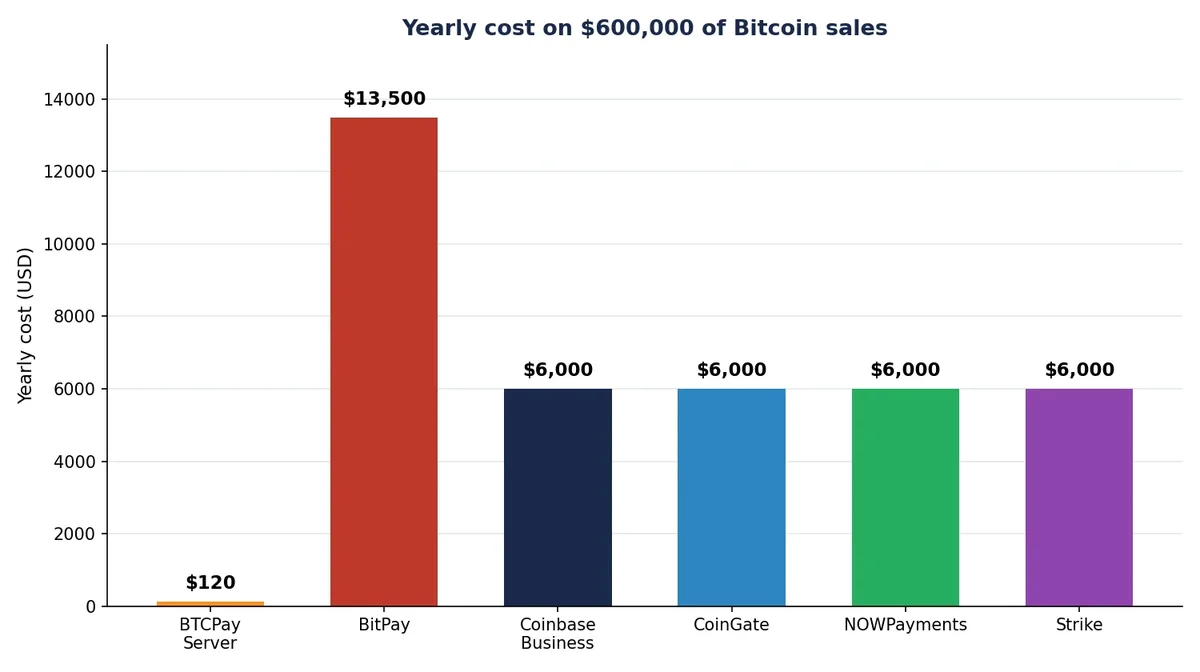
One order shows the same gap in miniature. BTCPay Server costs about 2 cents of hosting per order, BitPay costs $2.25, and the 1% processors cost $1.00.
Over a year, that $2.25 per order adds up to $13,500 on $600,000 of sales. The 1% options cost $6,000 over the same year, and BTCPay Server costs about $120.
BTCPay Server: Free, But You Run It
BTCPay Server is free, open-source software you run on your own server. It is not a company, so there is no account to freeze and no percentage taken from your sales.
You install it on a VPS, connect your own Bitcoin wallet, and payments land straight in that wallet. The software is MIT licensed, and the code is public on GitHub.
The trade is work. You handle hosting, updates, backups, and your Lightning channels.
A basic VPS costs about $10 a month. The setup takes an afternoon for most store owners.
For the full walkthrough, our step-by-step BTCPay Server setup guide covers the install from a blank server to your first live payment.
BTCPay Server supports Lightning out of the box, and it plugs into WooCommerce, Shopify, PrestaShop, and 30 other platforms. It takes Bitcoin only, which is fine if Bitcoin is what your customers pay with.
BitPay: The Old Reliable That Costs the Most
BitPay has processed crypto payments since 2011, longer than any other processor on this list. Big brands use it, and it settles fiat to your bank every business day.
That track record costs money. Under $500,000 a month, BitPay charges 2% plus 25 cents per sale.
The rate falls to 1.5% plus 25 cents between $500,000 and $999,999. Above $1 million, it drops to 1% plus 25 cents.
On $50,000 a month, that entry rate costs $1,125. You get dollars, euros, or pounds in your bank, plus invoices, refunds, and a dashboard your accountant will like.
BitPay needs full KYC before you can take a single payment. You hand over ID, business papers, and bank details, and approval takes 2 to 5 days.
One more limit: BitPay takes Bitcoin on chain only for merchant payments, with no Lightning option in its published flow. At a busy till, that 10 to 60 minute wait matters, so read our guide to accepting Bitcoin payments in a physical store before you pick a counter setup.
Coinbase Commerce Is Gone: What Replaced It
Here is the fact most comparison articles still get wrong. Coinbase Commerce closed on March 31, 2026 for merchants outside the US and Singapore.
The old Commerce dashboard is permanently gone. You cannot create charges, and you cannot log in to the merchant portal anymore.
Coinbase moved merchants to Coinbase Business, a custodial account where Coinbase holds the funds. Business charges a flat 1% per transaction, but it only takes companies with a legal entity in the US or Singapore.
If your business sits anywhere else, Coinbase Business will not take you. Coinbase says it plans to expand to more countries, but no date is public.
The old Commerce product charged 1% and let merchants hold their own keys. The new product costs the same 1% and holds the money for you.
That swap from self-custody to custody is the real change. It is the reason most merchants outside the US and Singapore had to move.
CoinGate: The Best Fiat Option in Europe
CoinGate is the strongest pick for a European shop that wants euros in the bank. It charges a flat 1% with no monthly fee, and it pays out in EUR, GBP, or USD.
It became the first Lithuanian company to hold a MiCA license in December 2025, and it serves businesses in all 27 EU countries. Payouts run weekly by default, and SEPA transfers are free.
Lightning comes switched on by default in the CoinGate plugins, so customers can pay in seconds. It takes 70-plus coins, not just Bitcoin.
The catch is geography. CoinGate does not serve US merchants.
Its supported-countries list leaves the US out. If you sell from the US, look at BitPay or Strike instead.
NOWPayments: Cheap, Wide, With a Catch
NOWPayments wins on coin choice, with 350-plus coins and a simple hosted widget. Setup takes about 15 minutes, and there is no monthly fee.
Its pricing page now lists 1% for payments kept in the same coin, and 1.5% when the payment is converted or fixed at a set rate. That is a rise from the 0.5% rate older guides still quote, so check the live page before you budget.
The catch sits in the terms. NOWPayments does not serve residents or citizens of the US, UK, EU, UAE, or Russia.
It can also close an account at any time. That rules out most Western shops.
If your business sits outside those regions and you want the widest coin list at a low fee, NOWPayments is hard to beat. Just read the terms first, and keep a backup processor ready.
Strike: Lightning First, Bitcoin Only
Strike takes only Bitcoin, on chain and over Lightning, and it settles in dollars fast. It charges 1% per sale, falling to 0.49% at higher volumes.
Its edge is speed at the till. Lightning payments settle in seconds, and Strike turns them into cash in your bank without the card networks in the middle.
Strike plugs into Shopify, NCR, and Blackhawk systems, so it fits shops that already run those tills. If you want altcoins, look elsewhere, because Strike is Bitcoin only.
If you sell on Shopify and your customers pay in Bitcoin, our guide to accept Bitcoin payments on Shopify shows how the checkout looks live.
The Full Comparison Table
Here is the full picture, with bitcoin payment processors compared on the five things that decide the pick: fee, Lightning, fiat settlement, KYC, and fit.
Read the table once, then jump to the five-minute picker below it. OpenNode earns its row with a first $10,000 of sales at no fee, which suits a shop that is just testing Bitcoin payments.
| Processor | Fee | Lightning | Fiat settlement | KYC | Best for |
|---|---|---|---|---|---|
| BTCPay Server | 0% + about $10 hosting | Yes, native | No, BTC to your wallet | None | Technical owners who want zero fees |
| BitPay | 2% + $0.25 under $500k a month | No | Yes, daily to bank | Full | US shops that need fiat every day |
| Coinbase Business | 1% flat | No, stablecoin checkout | Yes, USD | Full KYB | US and Singapore companies that want the Coinbase brand |
| CoinGate | 1% flat | Yes, default on | Yes, weekly EUR or USD | Full | EU shops that want fiat payouts |
| NOWPayments | 1% (1.5% converted) | Partial | Via partners | Light | Shops outside the US, UK, and EU that want 350+ coins |
| Strike | 1% (0.49% at volume) | Yes, native | Yes, instant USD | Full | US Shopify shops, Bitcoin only |
| OpenNode | 1%, first $10,000 free | Yes, native | Yes, USD | Full | Bitcoin-only shops starting out |
How to Pick in 5 Minutes
Answer three questions, and the list shrinks to one name. First, where is your business registered?
If you are in the US, your live options are BTCPay Server, BitPay, Strike, and Coinbase Business. If you are in the EU, CoinGate leads for fiat payouts, and BitPay works there too.
If you are elsewhere, check the terms first. NOWPayments and CoinGate both exclude whole regions.
Second, decide if you need fiat in your bank. If yes, cross out BTCPay Server.
If the answer is no, BTCPay Server wins on price by a mile.
Third, decide if you can run a server. If the answer is no, pick a hosted option and pay the 1%.
That is the whole decision.
Most shops land on BTCPay Server or a 1% hosted option, and the fee math above shows why. If you run WordPress, you can also accept Bitcoin on WordPress without WooCommerce using a simple plugin setup. If you run a BigCommerce store, set up Bitcoin payments on BigCommerce with BitPay or BTCPay Server.
Test with a $5 payment from your own wallet before you announce it. A broken checkout costs more than any fee.
5 Mistakes Merchants Make
Most bad picks come from the same five mistakes. Each one is easy to avoid once you know it exists.
Building on a dead product. Guides that still recommend Coinbase Commerce are out of date.
The portal closed on March 31, 2026. No setup built on it will work.
Comparing only the headline rate. A 1% fee is not the full cost.
Conversion, payout, and network fees can push the real number higher. Add them up before you sign.
Ignoring settlement time. On-chain Bitcoin takes 10 to 60 minutes to confirm.
That works for an online order. It fails at a busy till, so check the Lightning column first.
For the counter setup, see Bitcoin point of sale systems explained.
Skipping the KYC clock. Hosted processors need ID and business papers before your first sale.
BitPay approval takes 2 to 5 days. Start the application before your launch date.
Taking fiat settlement for granted. CoinGate does not serve the US, and NOWPayments excludes the US, UK, EU, UAE, and Russia.
If your country is on the exclusion list, the fee does not matter. You cannot sign up, so check the list first.
Our complete business guide to accepting Bitcoin payments walks through the full setup once you have picked a processor.
FAQs
What is the cheapest Bitcoin payment processor?
BTCPay Server. It charges 0% per sale, and your only cost is about $10 a month for a server, with no company taking a cut.
Is Coinbase Commerce still working?
No. Coinbase closed the Commerce merchant portal on March 31, 2026 for merchants outside the US and Singapore, and the replacement is Coinbase Business, a custodial account that charges 1%.
How much does BitPay charge per transaction?
BitPay charges 2% plus 25 cents per sale for merchants under $500,000 a month. The rate drops to 1.5% plus 25 cents up to $999,999, and to 1% plus 25 cents above $1 million a month.
Do I need Lightning to accept Bitcoin in a store?
Yes, for a busy counter. Lightning settles in under two seconds with fees near zero, while on-chain Bitcoin takes 10 to 60 minutes.
Can I accept Bitcoin payments without KYC?
Yes, with BTCPay Server, where payments go straight to your wallet and no company asks for your ID. Hosted processors like BitPay, CoinGate, and Strike all require identity checks before you can take payments.
Which processor is best for a small online shop?
A small shop that sells worldwide should start with BTCPay Server if it can handle basic setup, or CoinGate if it needs euros in the bank. Both cost far less than card networks, which charge 2.5% to 3.5% per sale, so test with a small order first.
The Bottom Line
Most comparison articles still list Coinbase Commerce as a live 1% option. It is not, and building on it wastes your setup time.
With bitcoin payment processors compared on real fees, the choice in 2026 is simple. Pay 0% and run your own server with BTCPay Server, or pay 1% and let a hosted processor handle the work.
BitPay earns its 2% only if you need daily fiat settlement from a brand that has run since 2011. For everyone else, the 1% options or BTCPay Server keep more of every sale.
Pick one, test it with a $5 payment from your own wallet, and go live this week. If you want to see the full picture first, our guide to how Lightning payments work and where they fail shows why speed matters at the till.