



Key Takeaways
- You can accept Bitcoin on WordPress without WooCommerce. Four routes work today: a plain QR code, a BTCPay Server pay button, a NOWPayments button, and the Super Duper Crypto Gateway plugin.
- On a $50 sale, a plain QR code, BTCPay Server, and Super Duper Crypto Gateway all keep the full $50. NOWPayments keeps $49.75 after its 0.5% fee, and BitPay QuickPay keeps $49.00 after its 1% fee.
- On-chain Bitcoin takes 10 to 60 minutes to confirm, so it is too slow for a live sale. Lightning confirms in under 2 seconds, so use a Lightning option when a customer stands in front of you or waits on a checkout page.
- Never reuse one Bitcoin address for every sale. A fresh address per sale protects your privacy and stops anyone from adding up your total income from one public address.
- Pick the route that fits your site, not the one with the most features. A simple site with a few sales a month does best with a payment button or a QR code.
Yes, you can accept Bitcoin on WordPress without WooCommerce. You do not need a shop plugin, a cart, or a checkout page to take Bitcoin payments.
Almost every WordPress guide assumes you run WooCommerce. That leaves out bloggers, coaches, course sellers, and small service sites that just need a simple way to get paid in Bitcoin.

This guide shows you how to accept Bitcoin on WordPress without WooCommerce, step by step. It covers the four routes that actually work in 2026, the fee math on a real $50 sale, and what to do when a payment fails.
- Key Takeaways
- What You Need Before You Start
- The 4 Routes at a Glance
- Route 1: A Plain QR Code
- Route 2: A BTCPay Server Pay Button
- Route 3: A NOWPayments Button
- Route 4: Super Duper Crypto Gateway
- Bonus Route: OpenReceive for Lightning Payments
- The $50 Sale Test: What Each Route Really Keeps
- Step by Step: A Simple Site in One Afternoon
- When a Payment Fails: What to Do
- Common Mistakes to Avoid
- Frequently Asked Questions
- Sources
- The Bottom Line
If you do run a WooCommerce store, our WooCommerce Bitcoin guide walks through that setup instead. This guide is for everyone else.
For the full picture of taking Bitcoin as a business, start with our complete guide to accepting Bitcoin payments.
What You Need Before You Start
Three things sit under every setup in this guide. Get these right first, and the rest is easy.
First, you need a Bitcoin wallet you control. A hardware wallet or a reputable software wallet works fine for most small sites.

Write down your recovery phrase on paper and store it somewhere safe. Never share it with anyone, and never type it into a website.
Second, decide what happens to the Bitcoin after it arrives. You can hold it as Bitcoin, or you can convert it to dollars right away.
Holding it means you ride the price up and down. Converting it means your budget stays stable, and a hosted processor handles the conversion for you.
Third, make sure your site runs over HTTPS with a valid SSL certificate. A payment button on a plain HTTP page will scare customers away, and some processors will refuse to work without it.
Most WordPress hosts include a free SSL certificate. Check for the padlock icon in your browser before you add any payment button.
The 4 Routes at a Glance
Every no-WooCommerce route falls into one of four groups. The table below compares them side by side so you can pick in under a minute.
Read the fee column with care. A 0% fee does not always mean zero cost, since self-hosting has its own price, and the buyer still pays the Bitcoin network fee on every route.
| Route | Fee on a $50 sale | Who holds the coins | Setup effort | Best for |
|---|---|---|---|---|
| Plain QR code | $0 | You | 5 minutes | Tips, donations, one-off sales |
| BTCPay Server pay button | $0 | You | 1 to 2 hours | Regular sales, full control |
| NOWPayments button | $0.25 (0.5%) | You, via the processor | 15 minutes | Fast setup, many coins |
| Super Duper Crypto Gateway | $0 | You | 30 minutes | Forms, bookings, memberships |
Two of the four routes cost you nothing per sale. The other two charge a small cut in exchange for an easier setup or automatic conversion to dollars.
Keep this table in mind as you read the details below. Each route section explains the setup, the real cost, and the catch that the table cannot show.
Route 1: A Plain QR Code
A plain QR code is the simplest way to accept Bitcoin on WordPress without WooCommerce. You show a code, the customer scans it, and the Bitcoin lands in your wallet.
No plugin, no account, and no processor sit in the middle. That also means no automatic order matching, so this route fits tips, donations, and one-off sales better than a busy store.
When a QR Code Is Enough
A QR code works well when you sell a small number of items at fixed prices. A coach who sells a $50 session, a writer who sells a $20 ebook, or a blogger who takes tips all fit this pattern.
It works poorly when you need to track dozens of orders a day. You would have to match each payment to each customer by hand, and that gets old fast.
How to Set It Up
Open your Bitcoin wallet and copy a receiving address. Most wallets can turn that address into a QR code for you, or you can paste the address into any free QR generator.
Add an image block to your WordPress page and upload the QR code image. Write the price next to it in plain text, for example “Pay $50 in Bitcoin, scan the code, and send the exact amount shown in your wallet.”
Add your Bitcoin address as text under the code as well. Some customers pay from a desktop wallet and prefer to copy and paste the address instead of scanning.
Use a fresh address for each sale when your wallet supports it. Reusing one address for every customer lets anyone add up your income by looking at that address on a block explorer.
Test the code yourself before you publish the page. Send a tiny test payment from your own wallet and confirm it arrives.
Route 2: A BTCPay Server Pay Button
BTCPay Server is free, open-source software you run yourself. It takes no fee of its own, and it turns your WordPress site into a Bitcoin checkout without WooCommerce.
The pay button is the key piece. You create it inside BTCPay Server, copy a small block of HTML, and paste it into a WordPress Custom HTML block.
A visitor clicks the button, BTCPay Server shows an invoice, and the customer pays by scanning a QR code or with Lightning.
Our BTCPay Server setup guide walks through the full install. The short version is below, so you can see the whole path before you commit.
What It Costs
BTCPay Server itself charges 0%. The cost is the server it runs on, which usually runs $10 to $70 a month depending on the host and the size you pick.
That makes it the cheapest route per sale once your volume grows, and the most expensive route to start if you only take a few payments a month. A site with two sales a month should pick a simpler route and switch later.
How to Set It Up
First, deploy BTCPay Server on a small virtual server. The official docs cover the Docker install, and several hosts offer a one-click BTCPay Server image.
Next, create a store inside BTCPay Server and connect your Bitcoin wallet. BTCPay Server never holds your coins, so your wallet stays in your control.
Then open Apps, create a new app, and pick Payment Button. Set the price, the currency, and the button text, then copy the HTML it generates.
Paste that HTML into a Custom HTML block on any WordPress page or post. Publish the page, click the button yourself, and run a small test payment before you tell customers about it.
One limit is worth knowing. The standard pay button uses a fixed amount, so it does not let the customer type their own price.
If you need custom amounts, create a Point of Sale app instead, turn on the custom amount option, remove the products from the template, and embed that button. The official BTCPay Server docs explain this workaround in their Apps section.
Route 3: A NOWPayments Button
NOWPayments is a hosted processor, so you trade a small fee for a fast setup. You open an account, generate a button, and paste it into WordPress.
No server, no install, and no technical skill are needed.
The button supports more than 300 cryptocurrencies, so a customer can pay in Bitcoin, Ethereum, or a stablecoin while you still receive the coin you chose. That breadth is the main reason small sites pick NOWPayments over a Bitcoin-only tool.
What It Costs
NOWPayments charges 0.5% on same-coin payments for verified accounts. An unverified account pays 1%, and payments that involve a conversion cost 1% as well.
Some pages on the NOWPayments site listed a 1% same-coin fee in October 2026, so the rate has moved before. Check the live pricing page before you commit, and treat 0.5% as the verified-account rate, not a promise.
There is no monthly fee and no setup fee. The blockchain network fee is separate, and the customer usually pays it.
How to Set It Up
Create a NOWPayments account and complete the basic verification to get the 0.5% rate. Add your Bitcoin wallet address as the payout address, since NOWPayments is non-custodial and sends the coins to a wallet you control.
Open Payment Tools in the dashboard and pick the payment button or donation widget. Set the amount, the accepted coins, and the page the customer sees after paying.
Copy the HTML snippet it gives you. In WordPress, add a Custom HTML block to the page where the button should appear and paste the code in.
Publish the page and run a test payment with a small amount. Confirm the coins arrive in your wallet and the success page loads the way you expect.
One warning matters here. NOWPayments terms exclude residents and citizens of the United States, the United Kingdom, the European Union, the UAE, and Russia.
If you live in one of those places, pick a different route from this guide.
Route 4: Super Duper Crypto Gateway
Super Duper Crypto Gateway is the newest route in this guide, and it is the one most guides miss. It is a free WordPress plugin that works without WooCommerce, which is rare, since almost every crypto plugin assumes you run a shop.
The plugin is non-custodial by design. There is no account to open, no API key to paste, and no third party that can freeze your funds.
The customer pays from their own wallet straight to your address, and the plugin watches the blockchain to confirm the money really arrived.
How It Works Without WooCommerce
Other plugins, such as a form plugin, a booking plugin, or a membership plugin, can ask Super Duper Crypto Gateway to take a payment. The plugin then handles the payment and tells the other plugin when the blockchain confirms it.
For Bitcoin, the payment page shows a QR code and an exact amount. The customer pays from any wallet app, and the plugin finds the payment on the blockchain by itself.
Nothing has to be typed, and nothing has to be pasted.
The plugin also covers Solana, Tron, and the major EVM chains through a browser wallet. Bitcoin needs no browser extension at all, which keeps it simple for customers who only hold Bitcoin.
How to Set It Up
Go to Plugins, then Add Plugin, in your WordPress dashboard. Search for Super Duper Crypto Gateway, install it, and activate it.
Open the plugin settings and turn on the Bitcoin payment method. Paste in the Bitcoin address you control, and repeat the step for any other coin you want to accept.
Connect it to the form or booking plugin you already use. The plugin acts as the payment provider for that plugin, so the customer picks Bitcoin at the same step where they would normally pick a card.
Run a test payment before you go live. Send a small amount from your own wallet and check that the order or booking flips to paid after the blockchain confirms it.
The plugin page on WordPress.org lists the full details, including the supported networks and the fact that it loads no script from a third party. It was last updated on August 30, 2026.
Bonus Route: OpenReceive for Lightning Payments
OpenReceive is a newer free plugin that deserves a mention, because it solves the speed problem that on-chain Bitcoin has. It is open source under the MIT license, and it runs inside the site you already have.
It connects to your wallet with a receive-only code that can create invoices and read incoming payments, but can never spend your funds. Even a compromised server cannot spend your money, which is a strong safety property for a small site.
Each payment lands in your own wallet in seconds, over Lightning. A real test run on November 6, 2026 paid a $5 order with 6,584 sats, and the coins landed a second later.
The setup needs 64-bit PHP 8.2 or newer with the GMP and sodium extensions, so check with your host first. Install the plugin, paste your receive-only code from a wallet such as Rizful or Alby Hub, and turn it on.
OpenReceive suits you if you want Bitcoin in your own wallet and you care about speed. It does not suit you if you want dollars in your bank, since you receive Bitcoin and hold the price risk yourself.
The $50 Sale Test: What Each Route Really Keeps
Fees sound small until you run them on a real sale. This test takes one $50 sale and runs it through every route in this guide, so you can see the exact difference.
A plain QR code keeps the full $50. BTCPay Server keeps the full $50, and Super Duper Crypto Gateway keeps the full $50.
NOWPayments keeps $49.75 after its 0.5% fee, and BitPay QuickPay keeps $49.00 after its 1% fee.
Compare that with a typical card processor, which takes about 2.9% plus 30 cents on the same sale and keeps $48.25 for itself. Every Bitcoin route in this guide beats a card on fees, even the most expensive one.
The chart below shows the same numbers at a glance. The asterisk on Super Duper Crypto Gateway means the plugin takes no fee, while the buyer still pays the small Bitcoin network fee to send the payment.
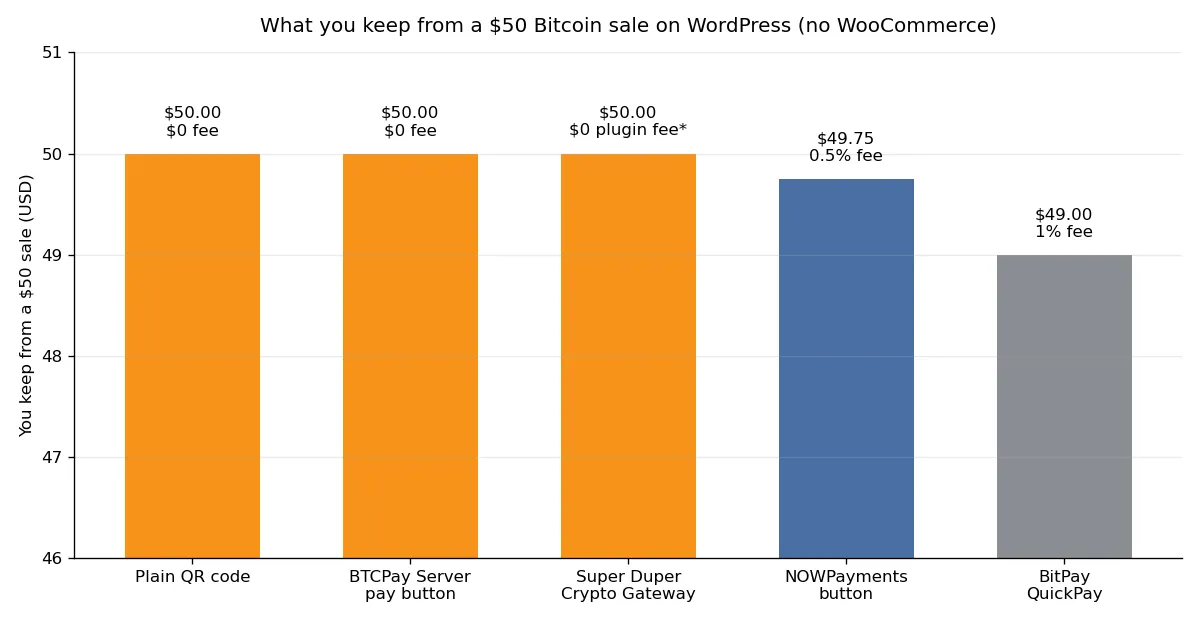
Chart: what you keep from a $50 Bitcoin sale on WordPress without WooCommerce. Plain QR code $50.00, BTCPay Server pay button $50.00, Super Duper Crypto Gateway $50.00, NOWPayments button $49.75, BitPay QuickPay $49.00.
Fees checked November 2026.
Now scale those numbers up. On $1,000 of monthly sales, NOWPayments costs you $5, and BitPay QuickPay costs you $10.
On $10,000 of monthly sales, those become $50 and $100 every month.
That is when the free routes earn their setup time. A BTCPay Server host at $20 a month beats a 1% processor once you pass $2,000 in monthly sales, and the gap only grows from there.
Fees are not the whole story, though. A route that costs nothing but takes two hours to set up is a bad deal for a site that sells twice a month.
Match the route to your volume, not just to the fee column.
Step by Step: A Simple Site in One Afternoon
You can go live in a single afternoon with any route in this guide. The steps below use the three most common simple sites, so pick the one that matches yours.
Do the test payment every time. A button that looks right but never completes a payment is worse than no button at all, because it costs you a sale and a customer.
A Donation Page
Create a page called Donate and write two short paragraphs about what the money supports. Add a NOWPayments donation widget or a BTCPay Server pay button with a few fixed amounts, such as $5, $25, and $50.
For a fuller donation setup with tax receipts and donor forms, read our guide to accepting Bitcoin donations on your website. It runs the same fee math on a $500 gift and covers the donor tax rules.
A Digital Download
Create a page for your ebook, template, or course. Add a payment button for the exact price, and set the redirect page to your download page in the button settings.
With BitPay QuickPay, the button generator lets you enter a redirect URL for digital goods. With a plain QR code, write the download link on the thank-you page and email it to the buyer after you see the payment.
Keep the file behind a link that is hard to guess. A public link on a normal page will spread fast once one buyer shares it.
A Booking Form
Install a form plugin such as WPForms or Gravity Forms and build your booking form. Connect Super Duper Crypto Gateway as the payment provider, so the customer picks Bitcoin at the payment step.
Set the form to mark the booking as pending until the payment confirms. That stops a customer from booking a slot they never paid for, and it stops you from holding a slot for a payment that never arrives.
Freelancers who bill clients in Bitcoin face the same choices. Our freelancer Bitcoin guide covers invoices, rate setting, and keeping more of each payment.
When a Payment Fails: What to Do
Most guides stop at the happy path, where the customer pays and the money arrives. Real payments fail, and a small site needs a plan for that moment.
Use this checklist when a payment goes wrong. It covers the four failures that actually happen, and it tells you the fix for each one.
- The customer paid the wrong amount. Check the transaction on a block explorer, then ask for the difference if they underpaid or refund the extra from your wallet if they overpaid.
- The payment never arrived. Ask the customer for the transaction ID and look it up on a block explorer: if no transaction exists, send a fresh invoice, and if it exists without confirmations yet, wait, since on-chain payments can take up to an hour when the network is busy.
- The invoice expired. BitPay locks its exchange rate for 15 minutes, so send a new invoice with a fresh rate and tell the customer to pay promptly this time.
- The order says unpaid after a confirmed payment. Look for the payment in your processor or wallet first, and if the coins arrived but the order never updated, mark it as paid by hand and fix the setting that missed it.
Write your refund policy on the payment page before your first sale. Bitcoin payments cannot be reversed, so a clear policy that says refunds go out by hand from your wallet saves arguments later.
Keep a simple record of every sale: the date, the amount in dollars, the amount in Bitcoin, and the transaction ID. That record is what your accountant will ask for, and it takes seconds to keep when you do it at the time of the sale.
Common Mistakes to Avoid
The first mistake is publishing a payment page without a test payment. Every route in this guide can fail silently, and only a real test shows you the full path a customer walks.
The second mistake is reusing one Bitcoin address for every sale. It leaks your total income to anyone who looks, and it makes your bookkeeping harder.
Use fresh addresses, or use a processor that generates one per sale.
The third mistake is promising instant delivery for an on-chain payment. On-chain Bitcoin needs 10 to 60 minutes to confirm, so tell the customer the delivery time up front or offer Lightning for instant confirmation.
The fourth mistake is forgetting the tax record. Most countries tax Bitcoin income at its dollar value on the day you receive it.
Write down that value for each sale, or your year-end return becomes a guessing game.
The fifth mistake is hiding the Bitcoin option. A small “Pay with Bitcoin” button at the bottom of a page gets no clicks.
Put it next to the card button, where the customer makes the choice.
Shoppers who already spend Bitcoin look for the option before they buy. Our guide to where you can spend Bitcoin in 2026 shows how those buyers think, and it is a useful read before you write your payment page.
The video above walks through four well-known processors and then shows a real payment made without one, straight into the store’s own wallet. It is a good watch before you pick a route, since it shows the trade-offs in action.
Frequently Asked Questions
Can I accept Bitcoin on WordPress without WooCommerce?
Yes. You can use a plain QR code, a BTCPay Server pay button, a NOWPayments button, or the Super Duper Crypto Gateway plugin.
None of these need WooCommerce, a cart, or a checkout plugin.
What is the cheapest way to accept Bitcoin on WordPress?
A plain QR code or a BTCPay Server pay button costs 0% per sale. The QR code is free to set up, while BTCPay Server needs a server that usually costs $10 to $70 a month.
Super Duper Crypto Gateway also takes no fee per sale.
Do I need a merchant account to accept Bitcoin?
No. Bitcoin payments go wallet to wallet, so no merchant account or bank approval is needed.
Hosted processors such as NOWPayments and BitPay ask you to open an account with them, but that is not a bank merchant account.
How long does a Bitcoin payment take to confirm?
An on-chain Bitcoin payment takes 10 to 60 minutes to confirm, depending on network traffic and the fee the sender paid. A Lightning payment confirms in under 2 seconds, so use Lightning when the customer waits for the result.
Can I accept Bitcoin donations without a store?
Yes. A donation page with a QR code or a NOWPayments donation widget works without any store plugin.
BTCPay Server also has a built-in donation page with custom amounts and your own branding.
What happens if a customer pays the wrong amount?
Check the transaction on a block explorer first. If they underpaid, ask for the difference.
If they overpaid, refund the extra from your wallet or offer it as credit. Bitcoin payments cannot be reversed, so refunds always go out by hand.
Sources
- Super Duper Crypto Gateway, WordPress.org plugin directory
- BTCPay Server Apps, including the Payment Button, BTCPay Server docs
- How to Accept Crypto Payments on Your Website, Megalith Lightning Docs
The Bottom Line
You do not need WooCommerce to accept Bitcoin on WordPress. A QR code takes five minutes, a NOWPayments button takes fifteen, and a BTCPay Server pay button takes an afternoon and then costs you nothing per sale.
Start with the simplest route that fits your sales volume. You can switch to a cheaper route later, and your customers will not notice the change as long as the button works.
Run the test payment, write down the sale, and publish the page. That is the whole job, and a simple site can finish it today.
If your site grows into a full store later, the WooCommerce setup is waiting for you. Until then, the four routes in this guide cover everything a simple WordPress site needs.