



Yes, you can accept Bitcoin on your BigCommerce store, and you can be live in under an hour. You have two real routes in 2026: BitPay, the native integration that settles in fiat, and BTCPay Server, the free self-hosted option that pays you in Bitcoin.
Pick BitPay if you want the easy setup and daily bank deposits. Pick BTCPay Server if you want zero processing fees and no middleman touching your money.

This guide walks you through both, step by step, with the real fee math so you can decide with numbers instead of guesses.
- Two live routes, and one dead end
- Route 1: Set up BitPay on BigCommerce
- Route 2: Set up BTCPay Server on BigCommerce
- BitPay vs BTCPay on BigCommerce: side by side
- The fee math: what $50,000 a month actually costs
- Test your setup before you go live
- What your customers see at checkout
- Refunds, taxes and the fine print
- Mistakes that cost BigCommerce merchants money
- My take: which route should you pick?
- Frequently Asked Questions
- Does BigCommerce accept Bitcoin natively?
- How much does BitPay charge on BigCommerce?
- Can I accept Bitcoin on BigCommerce without paying fees?
- Do my customers need a BitPay account to pay with Bitcoin?
- Can I accept Lightning payments on BigCommerce?
- Is Coinbase Commerce still available on BigCommerce?
- The bottom line
- Sources
Key takeaways
- BigCommerce has no built-in Bitcoin checkout. You connect BitPay or BTCPay Server.
- BitPay takes about 30 minutes to set up and charges 1% to 2% plus $0.25 per order.
- BTCPay Server charges 0% in processing fees, but you run the server yourself.
- Coinbase Commerce shut down on March 31, 2026 for merchants outside the US and Singapore. Do not build on it.
- Test with a real small payment before you announce Bitcoin checkout to customers.
Two live routes, and one dead end
BigCommerce does not process Bitcoin itself. It gives you the hooks, and a payment processor does the crypto part.
That is the first thing most guides get wrong, because they talk about BigCommerce as if it accepts Bitcoin out of the box. You need one of two live routes, and you need to avoid a third option that looks alive in old guides but is dead in 2026.
BitPay: the easy route
BitPay is the native integration. You create a BitPay business account, paste an API token into your BigCommerce payment settings, and you are done.
BitPay converts each payment to fiat and deposits it in your bank every business day, so you never hold crypto and never watch the Bitcoin price. The price of that comfort is a fee of 1% to 2% plus $0.25 per transaction, and your customers must log into a BitPay account to check out.

BTCPay Server: the free route
BTCPay Server is free, open-source software you run on your own server. Payments go straight from your customer to your own wallet, with no processing fee and no KYC form.
It supports both on-chain Bitcoin and Lightning, so a customer can pay in under two seconds with a Lightning wallet. The trade-off is work, because you install a plugin, create a BigCommerce app, set permissions, and create an offline payment method.
The dead end: Coinbase Commerce
Coinbase Commerce was the easy self-custodial option for years, and plenty of BigCommerce guides still recommend it. Those guides are out of date, because Coinbase folded Commerce into Coinbase Business and closed the Commerce portal on March 31, 2026 for merchants outside the United States and Singapore.
Coinbase Business is a custodial account, and it only accepts companies with a legal entity in the US or Singapore. If your business sits anywhere else, Coinbase has no merchant product for you right now, so check the date on any guide that still tells you to install Coinbase Commerce, because it is pointing you at a closed door.
Our comparison of BTCPay, BitPay and Coinbase Commerce breaks down exactly what changed and what replaced it.
Route 1: Set up BitPay on BigCommerce
This is the route to pick if you want Bitcoin live today with the least fuss. The whole job takes about 30 minutes, plus whatever time BitPay takes to approve your merchant account.
Before you start, check two requirements from BigCommerce. Your store must use Optimized One-Page Checkout or Custom Checkout, and your store must sit in a country BitPay supports.
BitPay supports payment processing in nearly 230 countries and territories, though US stores must also sit in a supported state.
- Create a BitPay business account. Apply on the BitPay site and wait for approval. Once approved, you get immediate access to your merchant dashboard.
- Create an API token. In your BitPay dashboard, create a token and leave the “Required Authentication” checkbox unchecked. Give the token a clear label, such as “BigCommerce store”, so you can find it later.
- Open your BigCommerce payment settings. In the BigCommerce control panel, go to Settings, then Payments. Open the Online Payment Methods section and click Set up next to BitPay.
- Paste the token and set your preferences. Enter the API token from BitPay. Set a display name for checkout, such as “Pay with Bitcoin”, and turn on test mode if you want to try it without moving real money.
- Enable and save. Click Enable, then Save. BitPay now appears as a payment method at checkout.
- Run a test payment. Place a small real order and pay it with Bitcoin. Check that the order lands in BigCommerce and the payment shows in your BitPay dashboard before you tell customers about it.
That is the whole setup. BitPay settles automatically every business day, depositing the previous business day’s payments to your bank or crypto wallet, depending on your settlement preference.
You can find the wider picture, including settlement and accounting across every major platform, in our complete guide to accepting Bitcoin payments.
Route 2: Set up BTCPay Server on BigCommerce
This route takes more effort, and it pays you back every single month. BTCPay Server charges zero processing fees, and nobody in the middle can freeze your funds or demand documents.
You need three things before you start: a BigCommerce account, a BTCPay Server instance running version 2.0.0 or later, and a BTCPay store with a wallet already set up. If you have never run BTCPay at all, read our guide to paying with Bitcoin over Lightning first, because the wallet setup is the part most beginners rush.
- Install the BigCommerce plugin on BTCPay Server. In your BTCPay instance, go to Plugins, then Add New, and install BigCommerce. Restart BTCPay Server, and BigCommerce should appear in your plugin list.
- Create a BigCommerce app. Go to the BigCommerce developer portal and create an app. Copy the callback URLs from your BTCPay BigCommerce plugin page into the app’s auth, load, and uninstall URL fields.
- Set the app permissions. Grant Modify access to Orders, Order Transactions, Content, Checkout Content, Carts, and Checkouts, and Read-Only access to Information and Settings. Without these scopes, the integration fails silently.
- Connect the app to BTCPay. Copy the app’s client ID and secret from the developer portal into the BTCPay BigCommerce plugin settings. One app credential works for one BTCPay store only, so do not reuse it across stores.
- Install the app on your store. In BigCommerce, go to Apps, then Develop, open your new app, and click Install. Confirm the PCI-DSS acknowledgement.
- Check the checkout script. Go to Storefront, then Script Manager, and confirm a script named btcpay-checkout exists with today’s install date. If it is missing, recheck your permissions and install again.
- Create the offline payment method. Go to Settings, then Setup, then Payments, then Additional providers. Open the Money Order offline method and rename its display name to something containing the word Bitcoin, such as “Bitcoin / Lightning Network”, because BTCPay only detects the method when the name includes Bitcoin.
- Run a test payment. Place a small order, choose “Bitcoin / Lightning Network” at checkout, and pay the invoice. The invoice and payment should appear in your BTCPay instance, and the order should update in BigCommerce.
Eight steps sounds like a lot, and it is more than BitPay’s six. Most of it is one-time work, and once it runs, checkout is automatic, with every satoshi landing in your wallet and no fee taken off the top.
BitPay vs BTCPay on BigCommerce: side by side
The two routes solve the same problem in opposite ways. One rents you convenience, and the other gives you control.
This table puts the real differences in one place, so you can compare them without reading two sales pages.
| Feature | BitPay | BTCPay Server |
|---|---|---|
| Processing fee | 1% to 2% plus $0.25 per order | 0% |
| Setup time | About 30 minutes | 1 to 2 hours, plus server setup |
| Settlement | Fiat to your bank, every business day | Bitcoin straight to your wallet |
| KYC | Yes, business verification required | None |
| Lightning support | Ask BitPay about current support | Yes, built in |
| Customer checkout | Needs a BitPay account login | Scan a QR code with any wallet |
| Refunds | In the BitPay dashboard only | You control refunds from your wallet |
| Price risk | None, BitPay converts to fiat | You hold Bitcoin until you sell it |
The table hides one honest trade. BTCPay is free, but you hold Bitcoin, so a price drop between sale and conversion is your loss.
BitPay removes that risk and charges you for it. There is no free lunch here, only a choice about who carries the risk.
The fee math: what $50,000 a month actually costs
Percentages hide the real cost. Let us run the numbers on a store doing $50,000 in monthly sales across 500 orders of $100 each, which is a normal shape for a mid-size BigCommerce shop.
BitPay at 2% plus $0.25 per order costs $1,000 in percentage fees plus $125 in per-order fees, or $1,125 a month. Credit cards at the standard 2.9% plus $0.30 cost $1,450 plus $150, or $1,600 a month.
BTCPay Server costs $0 in processing fees, and your only cost is the server hosting, which runs a few dollars a month for a small setup.
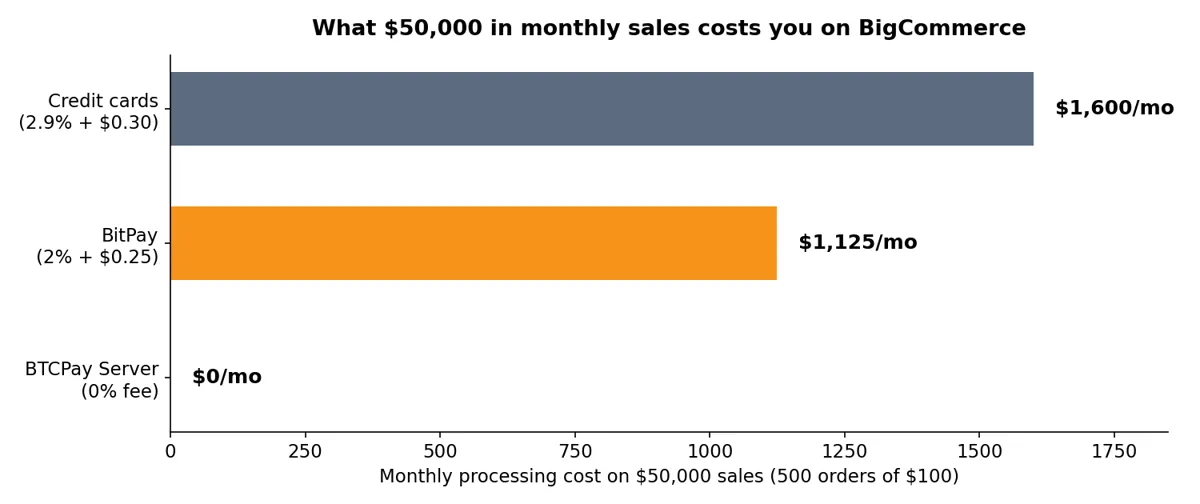
Over a year, the gap between BitPay and BTCPay is $13,500 on this volume. That is the real price of convenience.
If your store does $5,000 a month instead, the gap shrinks to about $112 a month, and BitPay’s simplicity starts to look like good value. Volume decides this argument, not ideology.
One more honest note: if you pick BTCPay and hold the Bitcoin, you also skip the card fees on those orders entirely, but you take on price risk. Some merchants convert to fiat daily through an exchange, which adds a small exchange fee of its own, yet the total usually stays far below BitPay’s cut.
Test your setup before you go live
Do not announce Bitcoin payments until you have run a real payment end to end. A broken checkout that a customer finds first is worse than no Bitcoin option at all.
Run this checklist in order, and do not skip the refund test.
Test transaction checklist
- Place a test order for a cheap product and choose the Bitcoin option at checkout.
- Pay the invoice from a real wallet, not a screenshot, and confirm the QR code scans.
- Check the order status updates to paid in BigCommerce without manual work.
- Check the payment appears in your BitPay dashboard or your BTCPay instance.
- Confirm the settlement: fiat in your bank for BitPay, Bitcoin in your wallet for BTCPay.
- Test a refund on the test order so you know the flow before a real customer asks.
- Test on mobile, because most crypto buyers pay from their phones.
If any step fails, fix it before you go live. The most common failure on the BTCPay route is the offline payment method name missing the word Bitcoin, so check that first.
On the BitPay route, the most common failure is an API token created with Required Authentication checked, which blocks the connection.
What your customers see at checkout
Your customer’s experience decides whether Bitcoin payments actually get used. A clean checkout earns repeat crypto buyers, and a clumsy one sends them back to their cards.

With BitPay, the customer picks BitPay at checkout and logs into their BitPay account. They choose a wallet and a coin, then scan a QR code or copy the payment details into their wallet.
They see the dollar amount and the exchange rate before they confirm. BitPay supports Bitcoin, Ethereum, Litecoin, Bitcoin Cash, Dogecoin, and several stablecoins, and customers can pay from more than 100 wallets.
With BTCPay Server, the customer picks “Bitcoin / Lightning Network” and clicks “Pay with Bitcoin”. A QR code pops up, they scan it with any wallet, and they pay.
There is no account, no login, and no redirect to a third-party page. The Lightning option settles in under two seconds, while an on-chain payment needs network confirmations that take 10 to 60 minutes.
That confirmation gap matters more than most merchants expect. If you also sell in person, our Bitcoin point of sale setup explains why on-chain payments fail at a busy till and Lightning saves the sale.
The same logic applies online: a customer waiting an hour for a confirmation email is a customer who might never come back.
Refunds, taxes and the fine print
Refunds work differently on each route, and you need to know the flow before your first refund request lands. With BitPay, refunds happen only in the BitPay merchant dashboard, not inside BigCommerce.
Process the refund in BitPay, then mark the BigCommerce order as refunded externally so your records match. With BTCPay Server, you refund from your own wallet, so you control the timing and the amount.
Either way, agree on a refund policy in advance: refund in Bitcoin at the original rate, or refund the fiat value at the time of the refund. Pick one, write it down, and show it on your store, because Bitcoin’s price moves between purchase and refund.
Taxes are your responsibility on both routes. BitPay gives you clean fiat settlement records, which your accountant will love.
BTCPay gives you CSV exports of every invoice, and you need to record the fiat value of each sale at the time it happened. Talk to a crypto-aware accountant before your first tax year with Bitcoin sales, not after it.
Two limits are worth knowing. BitPay does not support recurring payments or manual capture on BigCommerce, so subscription products need a different setup.
And if you sell to customers in countries BitPay does not support, those buyers simply will not see the option at checkout.
Mistakes that cost BigCommerce merchants money
Most Bitcoin payment setups fail on small, avoidable errors. Here are the ones I see most often, and they all cost real money or real customers.
First, merchants copy a setup from a 2024 guide and install Coinbase Commerce. That product is closed, so their checkout button leads nowhere, and they only find out when a customer complains.
Second, merchants pick BitPay and never notice the customer login requirement. Shoppers who do not have a BitPay account hit a wall at checkout and abandon the cart.
Third, merchants on the BTCPay route skip the test payment. The btcpay-checkout script fails to install, or the offline method name lacks the word Bitcoin, and the option never appears at checkout.
Fourth, merchants accept Bitcoin and hold all of it without a plan. A 20% price drop wipes out the margin on a month of sales, so decide your rule in advance: convert daily, convert weekly, or hold a fixed share and convert the rest.
Fifth, merchants forget that Bitcoin buyers are a small audience. Fewer than 5% of transactions at most stores come from crypto, so Bitcoin checkout is a bonus channel, not a replacement for cards.
Promote it to the crypto audience you already have, and keep your card checkout excellent for everyone else. If you want to understand where those buyers actually spend, our look at where people actually spend Bitcoin in 2026 shows which categories pull real crypto volume.
My take: which route should you pick?
Here is my honest opinion after comparing both routes on the same store. If you do under $10,000 a month in sales, take BitPay and move on.
The fee is small at that volume, the setup is fast, and your time is better spent on products and marketing than on server maintenance. If you do over $20,000 a month, or you already run a server, take BTCPay Server.
The fee savings pay for the setup time in the first month, and you keep full control of your money. The Lightning support alone is worth it if your customers pay from mobile wallets.
If you sit between those numbers, ask one question: do your customers already use Bitcoin? A store selling to crypto-native buyers will see real volume, and BTCPay pays off fast.
A general store adding Bitcoin as a nice-to-have will see a handful of orders a month, and BitPay’s simplicity wins. Either way, do not build on Coinbase Commerce, and do not skip the test payment.
Frequently Asked Questions
These are the questions BigCommerce store owners ask most, answered with the numbers from this guide.
Does BigCommerce accept Bitcoin natively?
Not on its own. BigCommerce has no built-in Bitcoin checkout, so you connect BitPay as a native payment method or BTCPay Server through its plugin and an offline payment method, and either way your customers see a Bitcoin option at checkout.
How much does BitPay charge on BigCommerce?
BitPay charges 1% to 2% plus $0.25 per transaction, and recent pricing pages put stores under $500,000 in monthly volume at 2%. On $50,000 of monthly sales across 500 orders, that works out to about $1,125 a month.
Can I accept Bitcoin on BigCommerce without paying fees?
Yes, with BTCPay Server. The software charges 0% in processing fees, payments go straight to your own wallet, and your only costs are hosting and the normal Bitcoin network fee your customers pay to send a payment.
Do my customers need a BitPay account to pay with Bitcoin?
Yes, if you use BitPay. BigCommerce states that shoppers must log into BitPay or create an account before they can check out, and that extra step loses some buyers, which is the main reason to consider BTCPay Server, where customers just scan a QR code with any wallet.
Can I accept Lightning payments on BigCommerce?
Yes, through BTCPay Server, which supports Lightning alongside on-chain Bitcoin, and Lightning payments settle in under two seconds. BitPay settles Bitcoin payments in fiat to your bank, so ask BitPay about Lightning support for your store before you advertise instant settlement.
Is Coinbase Commerce still available on BigCommerce?
No, not for most merchants. Coinbase closed the Commerce portal on March 31, 2026 for merchants outside the United States and Singapore, pointed them to Coinbase Business, a custodial account open only in those two countries, and older guides still list Commerce, so check the date on anything you read.
The bottom line
Accepting Bitcoin on BigCommerce is a solved problem in 2026, and it takes less than a day to set up either way. BitPay gives you speed and fiat settlement for a percentage, while BTCPay Server gives you zero fees and full control for a few hours of setup.
Pick the route that fits your volume, run the test payment, and write down your refund and conversion rules before the first real order arrives. If you want the wider picture first, start with our complete business guide to accepting Bitcoin payments, or see how people use the coins they hold in our guide to spending Bitcoin in everyday life.
Then come back here, follow the steps, and take your first Bitcoin order this week.