



Yes, you can take Lightning payments at your business today, and the easiest route may already be switched on. If you sell through Square in the United States, Square now turns Bitcoin payments on by default for eligible sellers.
Your customer scans a QR code, the payment settles in seconds, and you receive dollars unless you choose bitcoin instead.

This guide shows you how to accept lightning payments for business in 2026, compares the three real setup paths side by side, and works out what each one costs on a real month of sales. The three paths are Square, a free Lightning address, and a self-hosted BTCPay Server.
- How to Accept Lightning Payments for Business: The 3 Paths at a Glance
- What Lightning Actually Is, in Plain Words
- Path 1: Square Turns Lightning On for You
- Path 2: A Lightning Address Costs Almost Nothing
- Path 3: BTCPay Server, the Zero-Fee Route You Run Yourself
- What Lightning Costs on a Real Month of Sales
- Refunds, Taxes, and Bookkeeping
- Mistakes That Cost New Lightning Merchants Money
- Which Path Should You Pick?
- Frequently Asked Questions
- Do I need to hold Bitcoin to accept Lightning payments?
- How much does it cost to accept Lightning payments?
- Is Square Lightning available outside the US?
- What is a Lightning address?
- Can customers pay with any Bitcoin wallet?
- What happens if a customer wants a refund?
- The Bottom Line
- Sources
Most guides on this topic push one tool and stop there. That is not enough, because the right path depends on where you sell, how much you sell, and whether you want dollars in the bank or bitcoin in your wallet.
One deadline matters more than the rest. Square charges a 0% processing fee on Bitcoin payments through December 31, 2026, then a flat 1% from January 1, 2027.
That leaves 41 days of free processing from today, November 20. If you already use Square, that window is the cheapest way to test Lightning with real customers.
Key takeaways
- Square now turns Lightning payments on by default for eligible US sellers, with a 0% fee through December 31, 2026 and 1% after that.
- A Lightning address is the fastest free start for a small shop or online seller, and it works from any Lightning wallet.
- BTCPay Server charges no processing fee at all, but you host it yourself and you manage your own payment channels.
- On $10,000 of Bitcoin sales in a month, cards cost about $350, Square costs $0 in 2026 and $100 in 2027, and BTCPay Server costs about $10 in hosting.
- Lightning payments settle in seconds, carry no chargebacks, and work best for sales under $600, which is Square’s per-payment cap.
How to Accept Lightning Payments for Business: The 3 Paths at a Glance
Every realistic way to take Lightning payments in 2026 falls into one of three buckets. You either use a checkout you already have, you publish a payment address, or you run your own payment server.

The table below compares the three paths on the points that decide the choice: fee, settlement, setup effort, and who holds the money. Read it first, then use the walkthrough for the path that fits your shop.
| Path | Processing fee | You receive | Setup effort | Best for |
|---|---|---|---|---|
| Square (default-on) | 0% through Dec 31, 2026, then 1% | USD by default, or bitcoin if you choose | None for eligible US sellers, it is already on | US shops that already ring sales up on Square |
| Lightning address | Near zero, a fraction of a cent per payment | Bitcoin to your wallet | Minutes, no code and no server | Market stalls, makers, and online sellers who want the fastest start |
| BTCPay Server | 0% (hosting about $5 to $10 a month) | Bitcoin to your own wallet | Technical, a few hours the first time | Sellers who want full control and zero fees at any volume |
If you want the short answer, here it is. If you already use Square in the US, check whether Bitcoin payments are on and start there.
If you sell anywhere else, or you want the fastest free start, get a Lightning address today. If you take serious volume and you hate paying fees, invest the afternoon in BTCPay Server.
What Lightning Actually Is, in Plain Words
The Lightning Network is a payment layer that sits on top of Bitcoin. It moves small payments off the main Bitcoin blockchain and settles them between wallets in under a second.
Think of it like a bar tab. Two wallets open a channel, pass payments back and forth instantly, and only the final balance touches the main blockchain.
The customer never waits for a block confirmation at your counter.
That speed is the whole point for a business. A normal Bitcoin payment needs about 10 minutes for its first confirmation, and nobody wants a queue of customers waiting that long.
Lightning clears the payment before the customer puts the phone away.
Lightning also removes chargebacks. Once a Lightning payment confirms, the customer cannot reverse it through a bank.
That alone saves some sellers more than the fee savings.
Why on-chain Bitcoin alone does not work at a till
On-chain Bitcoin works fine for a large online order that a customer places from home. The customer can wait for confirmations, and the seller ships after the payment clears.
It fails at a physical counter. A coffee buyer will not wait 10 minutes, and a seller cannot hand over goods on an unconfirmed payment.
Lightning exists to fix exactly that gap, and every serious merchant setup in 2026 runs on it.
The network has grown up fast. Public Lightning capacity passed 5,000 BTC in 2026, which means the network can now carry far larger merchant volume than it could a few years ago.
Your $50 sale is a rounding error on that capacity.
Path 1: Square Turns Lightning On for You
Square is the biggest change in merchant Bitcoin payments this year, and most sellers did not have to do anything to get it. Square began auto-enabling Bitcoin payments for eligible US sellers on March 30, 2026, and targeted November 10, 2026 to finish the rollout across its network of more than four million sellers.
The mechanics are simple. When a customer chooses Bitcoin at checkout, your Square screen shows a Lightning QR code.
The customer scans it with Cash App or any Lightning wallet, and the payment settles in seconds. You receive US dollars by default, because Square converts the bitcoin at the moment of payment.
You can also choose to keep the bitcoin instead. Square lets you hold bitcoin in your Square wallet, and you can convert up to 50% of your eligible daily card sales into bitcoin as well.
That choice is yours, and you can change it later.
Here is my honest take. Square is the right first step for almost every US shop that already uses it, because the setup cost is zero and the fee is zero until the end of the year.
The catch is the limits: each payment caps at about $600, each seller faces a daily ceiling near $20,000, and the feature is not available to businesses in New York. If your average sale sits under $600, none of that will bother you.
How to check Square in your shop today
Open Square Dashboard and go to Banking, then Bitcoin. Eligible sellers see Bitcoin payments already enabled, with a choice between dollar settlement and bitcoin settlement.
If you see a “Get started” button instead, tap it and verify your business to finish the setup.
In the Square POS app, Bitcoin appears under Settings, then Checkout, then Payment. You can reorder it there or tap the X to turn it off.
Make sure you run the latest version of the app, because older versions do not show the option.
Then run one small test sale. Buy something cheap from your own shop with a Lightning wallet, or ask a friend to pay you $1 in bitcoin.
Watch the payment land in your Square Dashboard before you tell customers about it.
What Square costs, and the 41-day window
Square charges 0% in processing fees on Bitcoin payments through December 31, 2026. From January 1, 2027, the fee becomes a flat 1% per transaction.
There is no per-payment fixed fee on top.
That window is worth real money. A shop that takes $10,000 a month in Bitcoin sales pays $0 in fees through the end of the year, then $100 a month from January.
The same sales on cards at 2.9% plus 30 cents would cost about $350 a month, every month.
Do not wait until December to switch it on. The 41 days from today are free testing time, and every Bitcoin sale you take in that window costs you nothing in processing fees.
Set it up now, learn how the QR flow feels at your counter, and decide in January whether the 1% fee still beats your card rate.
Path 2: A Lightning Address Costs Almost Nothing
A Lightning address looks like an email address, for example yourshop@wallet.example. A customer types it into any Lightning wallet, enters an amount, and pays.
No checkout integration, no server, and no monthly bill.
You get one free from a Lightning wallet that supports addresses. Alby, Blink, and similar wallets hand you an address in minutes, and some offer one tied to your own domain if you want your brand on it.
Pick a wallet with a good uptime record, because a wallet that goes down takes your payment address down with it.
This path fits a market stall, a maker selling online, a freelancer, or any business that takes payments one at a time. It also works as a tip jar or donation link on a website, which is why creators love it.
Our guide to accepting Bitcoin donations on your website covers the same pattern in more detail.
The honest limit is scale. A Lightning address gives you no order records, no automatic receipts, and no refund button.
You match each payment to a sale by hand. That is fine for ten sales a day and painful for a hundred, so treat this path as a starting point, not a forever system.
How to set up a Lightning address in an afternoon
First, pick a wallet that issues Lightning addresses and install it on the phone you keep at the counter. Alby and Blink are the usual starting points, and both work without a technical setup.
Next, copy your address from the wallet’s receive screen and put it where customers can find it. Print it as a QR code for the counter, add it to your website’s payment page, and drop it in your email signature.
Then test it with a $1 payment from a second wallet before you publish it. Confirm the sats land in your wallet and the notification shows the amount clearly.
If the wallet asks you to fund an inbound channel first, send a small amount of bitcoin to it and wait for the channel to open.
Finally, decide what you do with the bitcoin. Either hold it in the wallet or move it to your main wallet or exchange at the end of each day.
Write that routine down, because a daily habit beats a monthly scramble at tax time.
Path 3: BTCPay Server, the Zero-Fee Route You Run Yourself
BTCPay Server is free, open-source software that turns a small server into your own payment processor. You run it, you hold the keys, and nobody takes a cut of your sales.
The only cost is hosting, which runs about $5 to $10 a month on a basic virtual server.
It plugs into the checkouts sellers already use. It has a free plugin for WooCommerce, works with Shopify, and ships a point-of-sale app you can run on a tablet at the counter.
If you sell on WordPress, our WooCommerce Bitcoin payments guide walks through the store side of the setup.
Lightning is native in BTCPay Server, not an add-on. You connect a Lightning node, either the one built into BTCPay Server or an external one, and Lightning appears as a payment option next to on-chain Bitcoin at checkout.
Our step-by-step BTCPay Server setup guide covers the full install.
Here is my honest take. BTCPay Server is the best deal in this guide if you take real volume, and the worst choice if you hate technical work.
The software is free, the fees are zero, and the control is total. The price is your time: a few hours to set up, plus channel management that never fully goes away.
What you need before you start
You need a virtual server, a domain name, and about $20 to $50 worth of bitcoin to fund your first channels. You also need patience for a first sync, because the Bitcoin node inside BTCPay Server must download the blockchain before Lightning works.
The official BTCPay Server documentation covers the Lightning setup options in detail, including which node software to pick. LND is the most common choice, Core Lightning is the modular alternative, and both work fine for a shop.
Pick one and stick with it.
Start with two or three channels of 0.01 to 0.05 BTC each, opened to well-connected nodes. That gives your shop enough room to receive payments from day one.
Test a payment to yourself from a separate wallet before you put the checkout live.
Channel liquidity in plain words
Channels are the one idea that trips up new Lightning merchants, so here it is in plain words. A Lightning channel is a pipe between your node and the rest of the network, and it can only carry as much as the bitcoin locked inside it.
To receive payments, your channel needs empty space on your side. That empty space is called inbound liquidity.
If a customer tries to pay you $200 but your channel only has $50 of receiving room, the payment fails.
You fix that by opening larger channels, or by buying inbound liquidity from a marketplace like Magma. A hosted processor hides this problem from you, which is exactly why many sellers start hosted and move to BTCPay Server later, once volume makes the saving worth the work.
What Lightning Costs on a Real Month of Sales
Fees only make sense on real numbers, so here is a worked month. Imagine your shop takes $10,000 in Bitcoin sales across 200 orders of $50 each.
That is a realistic month for a small shop testing crypto payments.
Cards would cost about $350 on that month: 2.9% of $10,000 is $290, plus 30 cents on each of the 200 orders adds $60. Square Lightning costs $0 in 2026 and $100 from January 2027.
BTCPay Server costs about $10 in hosting and nothing in processing fees. CoinGate and BitPay each charge 1%, which is $100 on the same month.
The chart below shows the same month at a glance. The gap between cards and any Lightning route is the money you keep, and it grows with every extra sale.
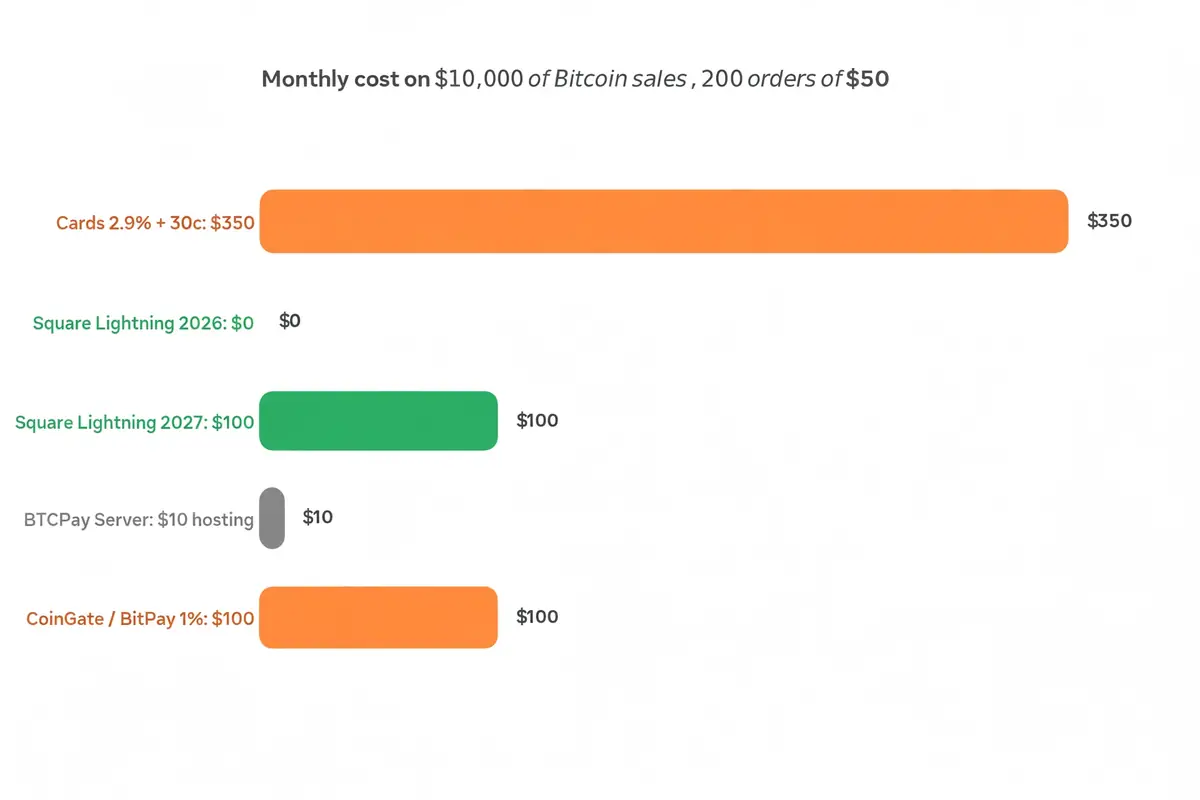
Two details keep the comparison honest. First, Square’s $0 only lasts through December 31, 2026, so budget $100 a month from January if you stay on Square.
Second, BTCPay Server’s $10 is hosting, not a fee, and it stays flat whether you take $1,000 or $100,000 in a month. At high volume, that flat cost is the cheapest route in this guide by a wide margin.
Run the same maths on your own numbers before you choose. If your average order is $20, card fees bite harder per sale.
If your average order is $800, Square’s $600 cap rules it out and BTCPay Server or a hosted processor is the answer.
Refunds, Taxes, and Bookkeeping
Lightning payments do not reverse, so your refund process needs a plan before your first sale. Tell customers at the counter that Bitcoin refunds go back to their wallet, and keep a simple log of the sale amount, the date, and the wallet address you refund to.
Most processors handle this for you. Square records each Bitcoin payment in your Dashboard like any other sale, so a refund follows your normal Square process.
BTCPay Server leaves the refund to you, so build the habit of noting the customer’s Lightning address or invoice details on every sale you might need to reverse.
Bookkeeping is simpler than sellers fear. Record each sale in dollars at the moment it happens, because that is the number your tax return needs.
If you settle in dollars through Square, your Dashboard already shows that number. If you hold bitcoin, record the dollar value on the day of the sale and keep the wallet records for the conversion later.
How to handle a refund
Ask the customer for a Lightning invoice for the refund amount, or for their Lightning address. Pay it from the same wallet that received the sale, and note the refund against the original order number.
Do not hand over cash for a Bitcoin sale unless your policy says so in writing. A cash refund for a Lightning payment creates two records for one sale, and that is where bookkeeping mistakes start.
How to record the sale
Write down the date, the dollar amount, the payment method, and the order number. That is enough for most small shops.
If you hold bitcoin, add the amount of bitcoin received and the price you used for the conversion.
Keep those records in the same place as your card sales, not in a separate crypto notebook. Your accountant will thank you, and your tax return will take hours instead of days.
Mistakes That Cost New Lightning Merchants Money
The first mistake is turning Lightning on and telling nobody. Put a small “Bitcoin accepted” sign at the register, add the option to your website, and mention it on your social pages.
Customers cannot pay with a method they do not know you take.
The second mistake is skipping the test payment. Every path in this guide has a step that can fail quietly, from an unopened channel to a wallet that needs funding.
A $1 test from a second wallet catches all of it before a real customer stands at your counter.
The third mistake is ignoring the caps. Square limits each payment to about $600 and each day to about $20,000.
If you sell high-ticket items, a customer will hit that wall mid-sale, so route large orders to BTCPay Server or a hosted processor instead.
The fourth mistake is treating a Lightning wallet like a bank account. A custodial wallet holds your money for you, which means a service outage can lock you out of your funds.
Move takings to a wallet you control at the end of each day, and keep your seed phrase backed up somewhere safe.
The fifth mistake is forgetting the fee window. Square’s 0% rate ends on December 31, 2026.
Sellers who set it up now get six free weeks of testing, while sellers who wait until January pay 1% from their first sale. The setup takes minutes, so there is no reason to wait.
Which Path Should You Pick?
If you already run Square in the US, the answer is easy. Turn Bitcoin payments on, run a test sale, and use the free window through December to learn how your customers react.
You can switch to a different path later without losing anything.
If you sell outside the US, or your shop is too small for a full checkout, start with a Lightning address. It costs nothing, it takes an afternoon, and it tells you whether your customers even want to pay in bitcoin before you invest more time.
If you take serious volume and you care about fees, invest the afternoon in BTCPay Server. The setup is the hardest part of this guide, but it is also the only path where your fee stays at zero no matter how much you sell.
That maths gets better every month.
For a fuller picture of the wider choice, read our complete guide to accepting Bitcoin payments, which covers on-chain payments, processors, and the full merchant setup. Our Bitcoin payment processors compared guide puts BTCPay Server, BitPay, and Coinbase Commerce side by side, and our Bitcoin point of sale systems guide covers the counter hardware.
If you sell in person, our guide to accepting Bitcoin in a physical store covers the till setup, and our platform guides for Squarespace and Wix cover the online store side.
Frequently Asked Questions
These are the questions sellers ask most before they switch Lightning on. The answers use the same numbers as the rest of this guide.
Do I need to hold Bitcoin to accept Lightning payments?
No. Square and most hosted processors convert each payment to dollars the moment it lands, so you never touch bitcoin unless you choose to, while the Lightning address and BTCPay Server paths pay you in bitcoin by default.
How much does it cost to accept Lightning payments?
Square charges 0% through December 31, 2026 and 1% from January 1, 2027. BTCPay Server charges no processing fee, only about $5 to $10 a month in hosting, while a Lightning address costs almost nothing beyond tiny routing fees of a fraction of a cent per payment.
Is Square Lightning available outside the US?
No, not yet. Square Bitcoin payments are available to eligible US businesses only, and businesses in New York are excluded.
Sellers outside the US should use a Lightning address, a hosted processor, or BTCPay Server instead.
What is a Lightning address?
A Lightning address looks like an email address, for example yourshop@wallet.example. Anyone can pay it from any Lightning wallet without you generating a new invoice each time, which makes it the simplest way to receive Lightning payments.
Can customers pay with any Bitcoin wallet?
They need a Lightning-enabled wallet, such as Cash App, Phoenix, or any wallet that supports Lightning invoices. A wallet that only holds on-chain bitcoin cannot pay a Lightning invoice, so tell customers to use a Lightning wallet before they reach the till.
What happens if a customer wants a refund?
Lightning payments cannot be reversed, so you send the refund yourself. Ask the customer for a Lightning invoice or a Lightning address for the refund amount, then pay it from the wallet that received the sale and record it against the original order number.
The Bottom Line
Accepting Lightning payments stopped being a technical project in 2026. Square turns it on by default for eligible US sellers, a Lightning address takes an afternoon, and BTCPay Server removes the fee entirely for sellers willing to run it.
The cheapest move today is the simplest one. If you use Square, check that Bitcoin payments are on and take a test payment before December 31, while the fee is still 0%.
If you do not use Square, get a Lightning address this week and learn whether your customers want it. Either way, you will know within a month whether Lightning earns its place at your counter.