



Yes, you can take Bitcoin on a Wix store, but Wix itself will not process the coins for you. Wix has no built-in Bitcoin checkout, so you connect a third-party route and let it handle the crypto side.
This guide shows you how to accept Bitcoin payments on Wix in 2026, compares the six real routes side by side, and walks you through the best pick step by step.

Most guides on this topic push a single gateway and stop there. That is not enough, because the right route depends on where you want the money to land, what country you sell from, and how much you want to pay per order.
- How to Accept Bitcoin Payments on Wix: The 6 Routes at a Glance
- What You Need Before You Start
- Route 1: Bankful, the Built-In Wix Option
- Route 2: BTCPay Server, the Free Self-Hosted Route
- Route 3: CoinGate, the Licensed Route for Europe
- Route 4: NOWPayments, the Widest Coin Choice
- Route 5: BitPay, the Daily Fiat Settlement Route
- Route 6: A Wallet Address and Payment Links, the No-Gateway Route
- What Each Route Really Costs: A Worked Example
- Which Route Should You Pick?
- Refunds, Volatility and Taxes: What to Plan For
- Common Mistakes to Avoid
- FAQs
- Does Wix accept Bitcoin payments natively?
- What is the cheapest way to accept Bitcoin on Wix?
- Can customers pay with Lightning on Wix?
- Do I need a Business plan on Wix to take Bitcoin?
- Will I get paid in Bitcoin or in dollars?
- Is accepting Bitcoin on Wix legal?
- Sources
Below you will find every route, the real fee on a $100 order for each one, and a full setup walkthrough for the route most sellers should pick.
Key takeaways
- Wix has no native Bitcoin checkout. Every route below adds a third-party service.
- Bankful is the only route listed inside Wix’s own payment settings, but it charges 3.95% plus 20 cents per crypto order.
- BTCPay Server charges no processing fee at all, but you host it yourself and it needs a Wix plan with eCommerce.
- On a $100 order, fees run from $0 with BTCPay Server to $4.15 with Bankful.
- Pick the route by where you want the money to land: your own wallet, or your bank account.
How to Accept Bitcoin Payments on Wix: The 6 Routes at a Glance
Think of Wix as the shop front and the gateway as the till. Wix owns the store, the cart and the order records.
The gateway owns the Bitcoin payment, the conversion and the payout. You need both, and the table below shows how the six realistic options compare.
If you only need the short answer, here it is. Sellers who want the simplest setup should start with Bankful or CoinGate.

Sellers who want the lowest fees and full control should use BTCPay Server. Sellers who want dollars in the bank every day should look at BitPay.
The rest of this guide explains each route in full, so you can check the trade-offs before you commit.
| Route | Fee per order | You receive | Setup effort | Best for |
|---|---|---|---|---|
| Bankful | 3.95% + 20 cents | Fiat to your bank | Easy, inside Wix settings | Sellers in supported countries who want the simplest setup |
| BTCPay Server | 0% (hosting separate) | Bitcoin to your wallet | Technical, uses Velo code | Sellers who want full control and zero fees |
| CoinGate | 1% | Crypto or EUR, USD, GBP | Easy, official plugin | EU sellers who want licensed fiat settlement |
| NOWPayments | 1% (1.5% with auto-conversion) | Crypto or fiat | Easy | Stores whose customers pay in many different coins |
| BitPay | 2% + 25 cents | Fiat to your bank, daily | Easy | US sellers who want next-day bank payouts |
| Manual wallet address | 0% (customer pays the network fee) | Bitcoin to your wallet | Easy, but manual | Tiny stores and one-off sales |
Fees change, so treat the numbers above as the published rates at the time of writing and confirm them during sign-up. The worked example later in this guide turns these rates into real dollar amounts, so you can see what each route costs on your own sales volume.
If you run a store on another platform too, our complete business guide to accepting Bitcoin payments covers the same decision for every major platform.
What You Need Before You Start
You need three things before any route will work: a Wix plan that supports payments, a place for the money to land, and a business location the gateway accepts. Sort these out first and the setup itself takes less than an hour for most routes.
Check your country early. Bankful only supports 16 countries, and every gateway has its own list of places it will not serve.
A route that looks perfect on paper is useless if it cannot onboard your business.
A Wix Plan That Accepts Payments
You must upgrade to a Premium or Studio plan that supports payments before Wix lets you take any money online. The free plan cannot accept payments at all.
The BTCPay Server route also needs a plan with eCommerce, such as Core or Business, because it uses Wix Velo, the coding layer that only those plans include.
A Bitcoin Wallet You Control
Routes that settle in Bitcoin pay straight into a wallet you own. Set one up before you start, write down the recovery phrase on paper, and store it somewhere safe.
Never share the recovery phrase with a gateway, a support agent, or anyone else. A gateway only ever needs a receiving address or an extended public key, which can receive funds but can never spend them.
A Bank Account for Fiat Payouts
Routes that settle in fiat pay into a bank account in your business name. The gateway will ask for identity documents and business details during verification, and payouts can take a few days to arrive while checks run.
If you choose Bankful, the currency in your Wix account must match the currency in your Bankful account, or transactions may be declined.
Route 1: Bankful, the Built-In Wix Option
Bankful is the only Bitcoin route Wix lists in its own support docs, and it connects from inside your Wix dashboard. It also accepts cards and wallets, so one provider can cover all your payment methods.
The catch is the price: crypto payments cost 3.95% plus 20 cents per transaction, the highest fee of any route in this guide.
Bankful supports Austria, Belgium, Bulgaria, Canada, Croatia, Cyprus, France, Germany, Ireland, Italy, Puerto Rico, Romania, Sweden, Switzerland, the United Kingdom and the United States. If your business sits outside that list, skip to another route.
- Open your Wix dashboard and go to Settings, then Accept Payments.
- Check your business location at the top right and fix it if it is wrong.
- Click See More Payment Options.
- Click Connect next to Bankful.
- Create a new Bankful account or sign in to one you already have, then finish the identity checks.
- Inside your Bankful account, turn on Bitcoin payment processing.
- Back in Wix, click Manage next to Bankful and use the toggles to turn on cryptocurrency payments.
- Place a test order and pay it with a small amount of Bitcoin to confirm the full flow works.
Bankful suits sellers who want Bitcoin live today with no code and no extra tools. It does not suit sellers who watch every cent of margin, because that 3.95% fee adds up fast.
On $5,000 of monthly sales it costs about $207.50, as the worked example below shows.
Route 2: BTCPay Server, the Free Self-Hosted Route
BTCPay Server is free, open-source software that you run on your own server. Payments go straight to your wallet, with no processor in the middle and no processing fee.
It also supports the Lightning Network, so customers can pay small amounts fast and cheaply. Our comparison of BTCPay vs BitPay vs Coinbase Commerce explains this trade-off in more depth.
The trade-off is real work. You host the software, you keep it updated, and you handle Bitcoin price swings yourself, because BTCPay Server does not convert to fiat.
It is the best pick for sellers with some technical skill who want full control.
- Set up BTCPay Server version 1.10.0 or later on a server you control, reachable from the internet at a public domain.
- Create a store inside BTCPay Server, then generate an API key and a webhook secret.
- Open your Wix Editor, click the code icon, and create a payment provider service plugin (PPSP).
- Copy the BTCPay.js and BTCPay-config.js files from the BTCPay Server GitHub repository into the plugin, replacing the example code.
- Add the http-functions.js file to the backend folder of your Wix site.
- Publish the site so the plugin goes live.
- Go to Settings, then Accept Payments, and open the Bitcoin Payments with BTCPay option.
- Enter your BTCPay URL, API key, store ID and webhook secret, then save.
- Add products to the cart, check out, and choose Bitcoin Payments with BTCPay to test the full flow.
If the code steps look daunting, ask a developer for an hour of help. The setup is a one-time job, and after that you pay no processing fees at all.
That is why BTCPay Server is the best pick in this guide for sellers who plan to take Bitcoin for years.
Route 3: CoinGate, the Licensed Route for Europe
CoinGate is a Lithuanian gateway that has processed payments since 2014 and holds a MiCA crypto-asset service provider authorization from the Bank of Lithuania, plus a payment institution licence. That matters if you sell into Europe and want a licensed counterparty handling your money.
It charges 1% per transaction with no monthly fee, and it offers an official Wix plugin.
You can keep the coins, settle in stablecoins, or convert to euros, dollars or pounds, with automatic weekly bank settlement on the standard plan. It also supports Lightning payments, so small orders settle almost instantly.
- Create a CoinGate business account and finish the identity verification.
- Install the CoinGate integration for Wix and connect it with your API credentials.
- Choose your settlement: keep crypto, settle in stablecoins, or convert to EUR, USD or GBP.
- Set your payout details for bank settlement if you chose fiat.
- Place a test order and confirm the payment lands where you expect it.
CoinGate suits EU sellers who want low fees and licensed fiat settlement without running their own server. It is also the strongest option if your customers pay in Bitcoin, Ethereum, Litecoin or stablecoins rather than long-tail altcoins.
Route 4: NOWPayments, the Widest Coin Choice
NOWPayments accepts more than 350 cryptocurrencies, the widest coverage of any gateway in this guide. That helps if your customers pay in niche altcoins rather than Bitcoin alone.
It charges 1% for payments without conversion and 1.5% for auto-converted or fixed-rate payments, plus the network fee.
You can receive payouts to your own wallet or let NOWPayments convert the payment to the coin or fiat you prefer. Its Wix setup uses payment links or buttons, plus an API route through Velo for developers.
- Create a NOWPayments account and finish verification.
- Add your payout wallet address in the dashboard.
- Choose whether payouts stay in crypto or auto-convert to your preferred currency.
- Add the NOWPayments payment button or payment link to your Wix store pages or checkout flow.
- Place a test order in a small amount and confirm the payout arrives.
NOWPayments suits stores whose customers pay in many different coins. If your customers almost all pay in Bitcoin, CoinGate or BTCPay Server will cost you less and give you a cleaner setup.
Route 5: BitPay, the Daily Fiat Settlement Route
BitPay has run since 2011, which makes it one of the longest-running crypto payment processors. It settles fiat to your bank every day, which suits US sellers who want cash flow they can plan around.
The fee is tiered by monthly volume: 2% plus 25 cents under $500,000 a month, 1.5% plus 25 cents from $500,000, and 1% plus 25 cents at $1,000,000 or more.
BitPay lists a Wix integration in its developer docs. Most small sellers will pay the 2% tier, which is double CoinGate’s 1%, so weigh the daily settlement against the higher fee.
- Apply for a BitPay merchant account and finish the business verification.
- Connect BitPay through your Wix payment settings.
- Choose fiat settlement and link your bank account.
- Place a test order and confirm the payout reaches your bank on schedule.
BitPay suits US sellers with steady volume who value next-day money in the bank over the lowest fee. If you sell mostly to Europe, CoinGate usually wins on price and licensing.
Route 6: A Wallet Address and Payment Links, the No-Gateway Route
You can skip gateways entirely and take Bitcoin straight to your own wallet. Add a “Pay with Bitcoin” button to a product page, show a fresh receiving address and a QR code with the exact amount, and mark the order paid by hand once you see the payment on the blockchain.
Newer non-custodial button tools work the same way, but a plain wallet address needs no account at all.
This route costs nothing in processing fees, and the customer pays the network fee. The trade-offs are manual work and no automatic order confirmation.
It suits tiny stores, one-off sales and sellers testing whether anyone even wants to pay in Bitcoin.
- Generate a fresh receiving address for the order in your own wallet. Never reuse one address for every order.
- Add the address and a QR code to the product or checkout page, with the exact Bitcoin amount and a short payment window.
- Tell the customer to send the exact amount and to contact you after paying.
- Check the payment on a block explorer, wait for enough confirmations, then mark the order paid and ship it.
Use this route to learn what your customers actually do. If Bitcoin orders grow past a handful a month, move to a gateway so orders confirm themselves.
Our Magento Bitcoin guide and our BigCommerce Bitcoin guide show the same pattern on other platforms, and the lesson is the same everywhere: manual works until volume makes it painful.
A video walkthrough of connecting a crypto payment provider in Wix. Watch it alongside the steps above.
What Each Route Really Costs: A Worked Example
Percentages hide the real cost, so here is the same $100 order priced through every route. The numbers below come from the published fees quoted in this guide, and the chart shows them at a glance.
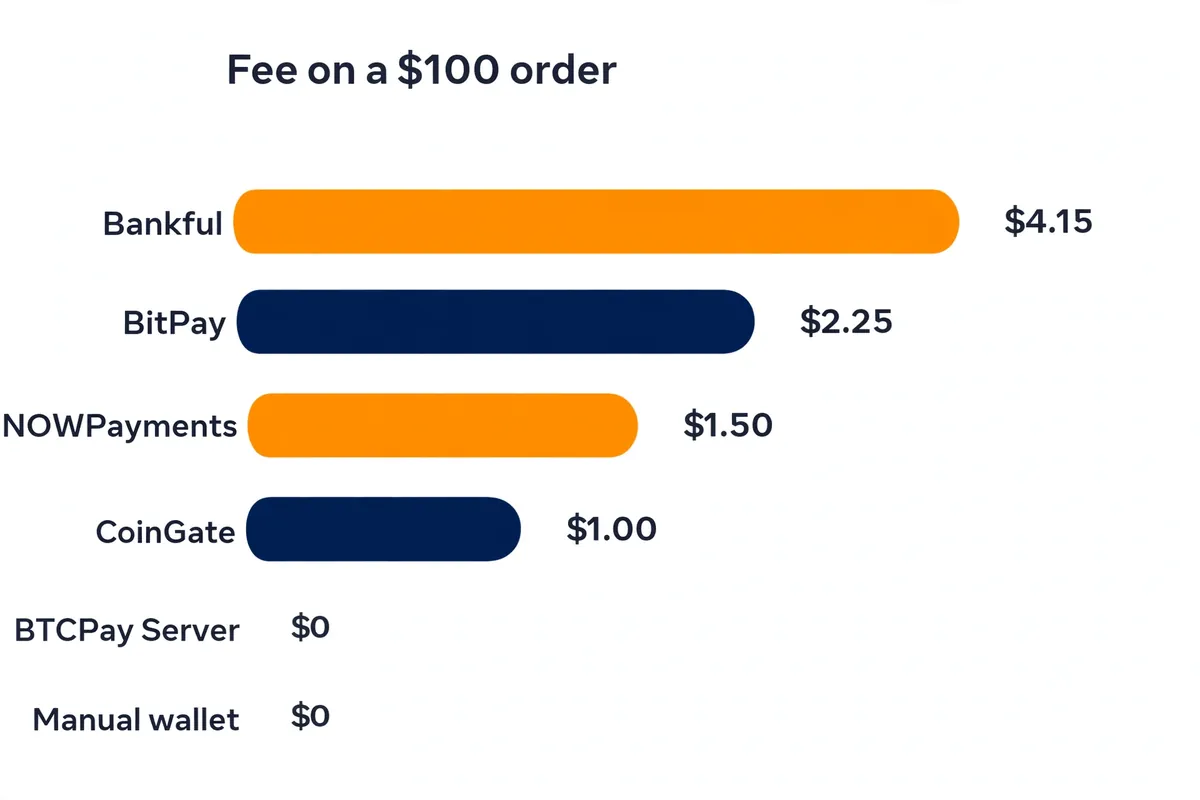
| Route | Fee on a $100 order | Fee on $5,000 a month (50 orders) |
|---|---|---|
| Bankful | $4.15 | $207.50 |
| BitPay | $2.25 | $112.50 |
| NOWPayments (auto-converted) | $1.50 | $75.00 |
| NOWPayments (no conversion) | $1.00 | $50.00 |
| CoinGate | $1.00 | $50.00 |
| BTCPay Server | $0 in processing fees | $0 in processing fees (hosting separate) |
| Manual wallet address | $0 in processing fees | $0 in processing fees |
The gap is bigger than it looks. Bankful costs $157.50 more than CoinGate on $5,000 of monthly sales, and $207.50 more than BTCPay Server.
That is real money for a small store, and it repeats every month. The manual route looks free, but it costs your time on every order, and time is the one fee no table shows.
Two details sit outside the table. CoinGate adds small payout charges for crypto payouts and conversions, and its SWIFT withdrawals carry a 0.50% fee with a 50 euro minimum.
NOWPayments adds the network fee on top of its percentage. Read the fee page of your chosen gateway before you commit, and re-check it once a year.
Which Route Should You Pick?
Start from where you want the money to end up. If you want Bitcoin in your own wallet, pick BTCPay Server or the manual route.
If you want dollars or euros in your bank, pick CoinGate, BitPay or Bankful. That single question removes half the options at once.
Then weigh skill against fees. BTCPay Server wins on cost and control, but it needs hosting and code.
CoinGate wins for most sellers: 1% fees, an official plugin, licensed fiat settlement, and no server to run. Bankful wins only on simplicity, and you pay for that simplicity on every order.
Finally, check your country and your customers. A gateway that cannot onboard your business is not an option at all.
A gateway that only accepts Bitcoin is fine if your customers pay in Bitcoin, but a poor fit if they pay in twenty different coins. Our Squarespace Bitcoin guide makes the same decision for Squarespace sellers, and the logic transfers directly: match the route to your money, your skill and your customers, in that order.
Refunds, Volatility and Taxes: What to Plan For
Plan for refunds before your first Bitcoin sale. Gateways lock the exchange rate for a short window, usually a few minutes, while the customer pays.
If you refund later, the gateway’s refund tool sends the crypto back, often at the current rate rather than the original one. Write your refund policy down and show it at checkout, so nobody argues about the amount later.
Volatility cuts both ways. If you settle in fiat, the gateway converts at payment time and you never hold the coins.
If you settle in Bitcoin, the value can move between the sale and the day you spend or sell it. Decide in advance whether you hold Bitcoin as a treasury or convert everything, and do not improvise per order.
Taxes depend on your country. In many places, receiving Bitcoin counts as income at its value when received, and spending or converting it later can trigger a second tax event.
Keep a record of every order: date, amount in Bitcoin, exchange rate used, and payout received. A local accountant who understands crypto will save you more than this guide can.
Common Mistakes to Avoid
The most common mistake is reusing one wallet address for every order. It links all your sales together on a public blockchain and makes bookkeeping messy.
Generate a fresh address for each order, or let a gateway do it for you.
The second mistake is picking a gateway before checking availability. Bankful only serves 16 countries, and every gateway has its own exclusions.
Confirm your country is supported during sign-up, not after you have rebuilt your checkout.
The third mistake is skipping the test order. A button that looks right can still fail at the last step: a currency mismatch, a missing webhook, or a settlement setting pointing at the wrong account.
Spend a few dollars on a real test payment and confirm the money lands where you expect it. If you also sell in person, our Bitcoin point of sale guide covers the same test-first habit for counter sales.
The fourth mistake is forgetting the customer. Most shoppers have never paid in Bitcoin, so add a short line at checkout explaining what happens next: they will see an amount and a QR code, they pay from their wallet, and the order confirms in a few minutes.
A confused customer abandons the cart.
FAQs
These are the questions Wix sellers ask most about Bitcoin payments. Each answer uses the same facts as the guide above, so nothing here contradicts the main text.
Does Wix accept Bitcoin payments natively?
No. Wix has no built-in Bitcoin checkout, and Wix Payments does not include a crypto option.
You add Bitcoin through a third-party route such as Bankful, BTCPay Server, CoinGate, NOWPayments or BitPay, or by taking payment straight to your own wallet address.
What is the cheapest way to accept Bitcoin on Wix?
BTCPay Server is the cheapest route, because it charges no processing fee at all and payments go straight to your wallet. You pay only for hosting the software yourself.
The manual wallet address route also charges no processing fee, but you confirm every order by hand.
Can customers pay with Lightning on Wix?
Yes. BTCPay Server supports Lightning payments, and CoinGate supports Lightning too.
Lightning suits small orders because payments settle almost instantly and cost very little. Our guide on how to pay with Bitcoin Lightning explains how the network works from the customer side.
Do I need a Business plan on Wix to take Bitcoin?
You need a Premium or Studio plan that supports payments before Wix lets you take any money online. The BTCPay Server route also needs a plan with eCommerce, such as Core or Business, because it uses Wix Velo.
The other routes work on any paid plan that supports payments.
Will I get paid in Bitcoin or in dollars?
It depends on the route you pick. BTCPay Server and the manual wallet route pay you in Bitcoin.
Bankful and BitPay pay fiat to your bank. CoinGate and NOWPayments let you choose: keep the crypto, settle in stablecoins, or convert to euros, dollars or pounds.
Is accepting Bitcoin on Wix legal?
In most countries, yes, but the rules differ by place. Some countries restrict crypto payments or treat them as taxable events, and some gateways will not serve certain countries at all.
Check your local rules and talk to an accountant before you take your first Bitcoin order.