



Learning how to price products in Bitcoin as a merchant starts with one rule. Price your products in dollars, then convert to Bitcoin at checkout.
Bitcoin moves too fast to serve as a price tag. On 21 November 2026, one Bitcoin trades near $58,000, down about 30 percent in a month and about 6 percent in a single day.

A price you set on Monday can be wrong by Friday, so your checkout needs to do the converting, not your price list.
- How to Price Products in Bitcoin As a Merchant: Two Methods That Work
- Why Bitcoin Makes a Bad Price Tag
- The 5-Step Setup: From Price List to Paid Order
- Sats and Cents: How to Round Bitcoin Prices So They Look Clean
- What a $50 Sale Really Earns You
- Rate Locks and Expiry Windows: How Long Your Price Stays Valid
- Lightning or On-Chain? Match the Rail to the Order Size
- Refunds When the Bitcoin Price Moves
- 5 Mistakes Merchants Make When Pricing in Bitcoin
- Frequently Asked Questions
- Should I list prices in Bitcoin or in dollars?
- How do I convert a dollar price into Bitcoin?
- How many sats is $50 worth right now?
- What fees do Bitcoin payment gateways charge?
- How long does a Bitcoin price quote stay valid?
- How do refunds work when the Bitcoin price moves?
- Sources
This guide shows you the full setup. You will learn the two pricing methods, how to round prices to clean sats, what each gateway keeps from a real $50 sale, how long a quoted price stays valid, and how refunds work when the price moves.
Key takeaways
- Keep your price list in fiat and let your gateway convert to Bitcoin at checkout. Fixed Bitcoin prices go stale within hours.
- At about $58,000 per Bitcoin, a $50 product costs about 86,200 sats. Round to the nearest 100 sats and the dollar price stays within a few cents.
- BTCPay Server keeps the full $50 on a $50 sale. Coinbase Commerce keeps $49.50, and a card keeps $48.25.
- Most gateways lock the quoted rate for 15 to 60 minutes. Tell buyers the clock is ticking before they pay.
- Refund the original dollar amount at the refund-time rate, never the original Bitcoin amount.
How to Price Products in Bitcoin As a Merchant: Two Methods That Work
Every merchant who takes Bitcoin picks one of two methods. The first anchors prices in fiat and converts at checkout.
The second lists prices in Bitcoin and updates them by hand.
Only the first method scales. The second one turns pricing into a daily chore, and it still leaves you exposed every time the market jumps while a customer shops.

Method 1: Price in fiat, convert at checkout
You keep every price in dollars, euros, or your local currency. When a customer picks Bitcoin at checkout, your gateway converts the total at the live rate and shows the exact Bitcoin amount.
The customer sees one number and one QR code. You receive the exact fiat value of the sale, or the exact Bitcoin amount, depending on how you set settlement.
This is how every serious gateway works. BTCPay Server, Coinbase Commerce, Strike, and BitPay all convert at the moment of payment, so the price on your shelf never goes stale.
Method 2: Price in Bitcoin and reprice often
You list a fixed Bitcoin amount on each product, such as 0.00086 BTC for a $50 item. You update those amounts whenever the market moves enough to matter.
This method works for one-off items, such as a single piece of art or a ticket with a fixed Bitcoin price. It fails for a real catalog, because a store with 200 products needs constant repricing and still shows wrong prices between updates.
Use it only when the Bitcoin price itself is the point. A limited item sold for exactly 0.01 BTC, for example, is a marketing choice, not a pricing system.
| Method | Best for | Volatility risk | Upkeep |
|---|---|---|---|
| Fiat price, convert at checkout | Any store with more than a few products | Near zero with instant conversion | Set it once |
| Fixed Bitcoin price | One-off items, Bitcoin-priced drops | High, you absorb every move | Reprice daily or more |
Why Bitcoin Makes a Bad Price Tag
Bitcoin educator Andreas Antonopoulos put it bluntly. Bitcoin is a store of value, not a good unit of account.
He is right, and the numbers prove it. Bitcoin fell about 30 percent in the 30 days before 21 November 2026.
A merchant who priced a product at 0.001 BTC in late October watched that price tag lose nearly a third of its value by late November.
Your suppliers still charge you in fiat. Your rent, your staff, and your tax bill all arrive in fiat.
A price tag in Bitcoin disconnects your revenue from every cost you actually pay.
Fiat-anchored pricing fixes this. Your shelf price stays steady, your gateway converts at the live rate, and the customer pays the fair Bitcoin amount for that minute.
The 5-Step Setup: From Price List to Paid Order
Setting up Bitcoin pricing takes an afternoon, not a rebuild. Follow these five steps in order, and test a real payment before you go live.
- Pick your settlement choice first: dollars in the bank, or Bitcoin in your wallet. Instant conversion removes volatility, while holding Bitcoin keeps the upside and the risk, and our complete business guide to accepting Bitcoin payments walks through this choice in detail.
- Pick a gateway that matches that choice: BTCPay Server costs nothing per sale if you self-host it, while hosted gateways charge 0.3 to 1 percent. Our Bitcoin payment processors compared side by side lists the current fees for each one.
- Turn on Bitcoin at checkout: most platforms need a plugin or a toggle, not code. WooCommerce, Shopify, Wix, and Squarespace all have a path, and the gateway shows the converted Bitcoin amount automatically.
- Set your rate source and expiry window: choose a price feed such as Kraken or CoinGecko in your gateway settings, then set how long a quoted price stays valid. Fifteen minutes is a sane default.
- Run a test purchase for a small amount: buy your cheapest item with Bitcoin, watch the conversion, and confirm the order lands correctly in your system. Fix anything odd now, not after a real customer pays.
Our guide to set up BTCPay Server covers the zero-fee route step by step. If you sell in person, read our Bitcoin point of sale systems explained guide for the counter setup.
Sats and Cents: How to Round Bitcoin Prices So They Look Clean
One Bitcoin equals 100 million sats. At about $58,000 per Bitcoin, one sat is worth about $0.00058, and one dollar buys about 1,724 sats.
Raw conversions look ugly. A $50 product costs 86,207 sats, and a $10 product costs 17,241 sats.
Nobody wants to read numbers like that on a checkout screen.
Round to the nearest 100 sats. The dollar price barely moves, and the Bitcoin amount turns into a clean number your customers can read at a glance.
| Product price | Exact sats at $58,000 | Rounded to nearest 100 sats | Rounded price in dollars |
|---|---|---|---|
| $5 | 8,621 | 8,600 | $4.99 |
| $10 | 17,241 | 17,200 | $9.98 |
| $25 | 43,103 | 43,100 | $25.00 |
| $50 | 86,207 | 86,200 | $50.00 |
| $100 | 172,414 | 172,400 | $99.99 |
| $250 | 431,034 | 431,000 | $249.98 |
Most gateways round for you, so check your settings before you round by hand. If your gateway already rounds to the nearest sat, leave it alone and let the software handle the display.
For very small items, sats beat Bitcoin decimals every time. A $2 coffee is 3,448 sats, which reads far better than 0.00003448 BTC.
What a $50 Sale Really Earns You
Fees decide whether Bitcoin payments save you money or cost you money. Here is what each option keeps from a single $50 sale, worked out at a Bitcoin price of about $58,000 on 21 November 2026.
A $50 product converts to 0.00086207 BTC, or about 86,207 sats. Each gateway takes its cut from that amount, and the table shows what lands in your account.
| Payment option | Fee | Fee in sats | You keep |
|---|---|---|---|
| BTCPay Server | 0% (plus about $10 to $16 a month hosting) | 0 | $50.00 |
| Strike | 0.3% | 259 | $49.85 |
| Coinbase Commerce | 1% | 862 | $49.50 |
| NOWPayments | 1% (1.5% with auto-conversion) | 862 (1,293) | $49.50 ($49.25) |
| BitPay | 1 to 2% by volume, plus $0.25 | about 2,155 | $48.75 |
| Credit card | 2.9% plus $0.30 | n/a | $48.25 |
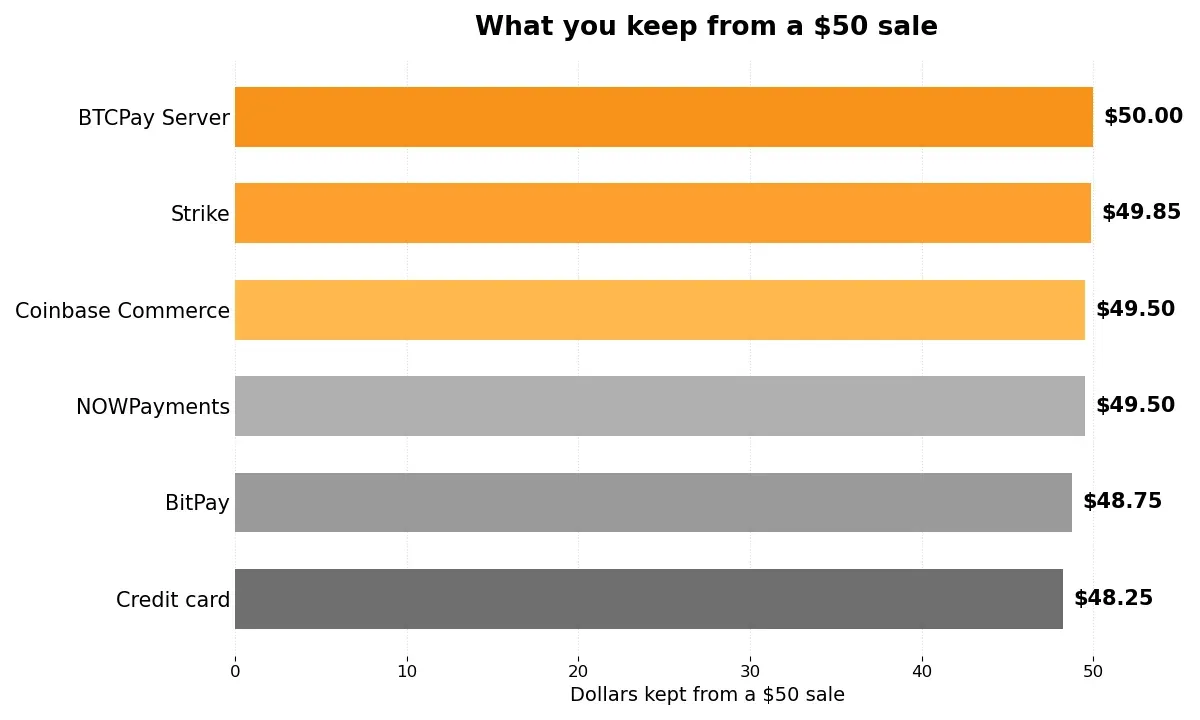
What you keep from a $50 sale at a Bitcoin price of about $58,000. BTCPay Server keeps the full amount because it charges no per-sale fee.
The monthly view: $10,000 in Bitcoin sales
One sale hides the real gap, so scale it up. Two hundred $50 orders add up to $10,000 in a month.
BTCPay Server costs about $10 to $16 in hosting, so you keep about $9,984. Strike takes about $30, so you keep about $9,970.
Coinbase Commerce takes $100, so you keep $9,900.
Cards take the most by far. The 2.9 percent fee costs $290, and the $0.30 per-order fee adds another $60, so you keep $9,650.
Bitcoin saves you about $250 to $334 a month at this volume, before you count the chargebacks that Bitcoin removes entirely.
Square deserves a mention for US sellers. It charges 0 percent on Bitcoin payments through 31 December 2026, then 1 percent from 1 January 2027.
If you already run Square, that free window is the cheapest way to start.
Rate Locks and Expiry Windows: How Long Your Price Stays Valid
A Bitcoin quote is a snapshot, not a promise. The price can move while your customer stares at the QR code, so every gateway locks the rate for a short window and then expires the invoice.
Most gateways lock the rate for 15 to 60 minutes. BTCPay Server invoices expire after 15 minutes by default.
Hosted gateways usually give the buyer more time, closer to an hour.
Pick a window that fits how your customers pay. Fifteen minutes suits online checkout, where the buyer pays at once.
An in-store sale can use a shorter window, because the customer stands at the counter with their phone already open.
Never promise a fixed Bitcoin price. If your checkout shows 0.00086 BTC, that number dies when the invoice expires.
Show the expiry timer next to the amount, and generate a fresh quote when the old one lapses.
When an invoice expires unpaid, do not chase the customer for the old amount. Cancel it, create a new invoice at the live rate, and let the customer pay the fresh quote.
Watch your rate source too. Two gateways can quote slightly different prices at the same minute, because they pull from different exchanges.
Pick one source, such as Kraken or CoinGecko, and use it everywhere so your books stay consistent.
Lightning or On-Chain? Match the Rail to the Order Size
Bitcoin has two payment rails, and your prices should respect both. Lightning settles in under a second with fees below a cent.
On-chain payments take 10 to 60 minutes and cost $1 to $5 in network fees.
That difference changes which orders make sense on each rail. A $5 coffee paid on-chain can lose a fifth of its value to the network fee alone.
Lightning for small orders
Use Lightning for anything under about $100. The payment confirms before the customer puts their phone away, and the fee is too small to show up in your pricing.
Most gateways route small payments to Lightning automatically. Our guide to accept Lightning payments for business compares Square, Lightning Address, and BTCPay Server for this exact job.
On-chain for large orders
Use on-chain payments for larger orders, where a $1 to $5 network fee is a rounding error. Wait for confirmations before you ship, and scale the wait to the order size.
One confirmation, about 10 minutes, suits orders under $100. Three confirmations, about 30 minutes, suit orders from $100 to $1,000.
Six confirmations, about an hour, remain the standard for orders over $1,000.
Refunds When the Bitcoin Price Moves
Refunds trip up new Bitcoin merchants more than any other issue. The rule is simple: refund the original fiat amount, converted at the refund-time rate.
Say a customer buys a $50 product and Bitcoin jumps 10 percent before they ask for a refund. You refund $50 worth of Bitcoin at the new rate, which is fewer sats than they paid.
You do not refund the original Bitcoin amount, because that would hand the customer a $5 profit from your refund policy.
The reverse also holds. If Bitcoin falls 10 percent, the customer receives more sats than they paid, because $50 still buys $50 worth of Bitcoin.
Either way, the dollar amount stays fair.
Write this rule into your terms before your first sale. State that you price refunds in the original currency and pay them in Bitcoin at the exchange rate on the day you process the refund.
Clear terms stop most refund arguments before they start.
If you also sell services, the same rule covers invoices. Our guide on how to invoice clients in Bitcoin shows how to set the rate-lock and expiry window on an invoice, so the amount stays fair on both sides.
5 Mistakes Merchants Make When Pricing in Bitcoin
Mistake 1: Listing fixed Bitcoin prices and forgetting them turns a calm-market price into a discount or a surcharge after one volatile week. Anchor prices in fiat and let the gateway convert.
Mistake 2: Eating the gateway fee instead of pricing for it costs $100 on $10,000 of monthly sales at a 1 percent fee. Know your fee before you set your margin, not after.
Mistake 3: Forgetting the network fee on small on-chain orders can eat a small sale whole, since the fee runs $1 to $5. Route small orders to Lightning, or set a minimum for on-chain payments.
Mistake 4: Quoting a price with no expiry invites the buyer to pay hours later at a stale rate. Always show the expiry timer and re-quote when it lapses.
Mistake 5: Refunding the original Bitcoin amount turns every refund into a bet on the Bitcoin price. Refund the fiat amount at the refund-time rate, and put that rule in your terms.
Frequently Asked Questions
These are the questions merchants ask most about Bitcoin pricing. Each answer uses the same numbers as the guide above.
Should I list prices in Bitcoin or in dollars?
List prices in dollars, or your local currency, and convert to Bitcoin at checkout. Bitcoin moves too fast to work as a price tag, and your costs are all priced in fiat anyway.
How do I convert a dollar price into Bitcoin?
Divide the dollar price by the current Bitcoin price. At about $58,000 per Bitcoin, a $50 product costs 50 divided by 58,000, which equals about 0.000862 BTC, or 86,200 sats after rounding.
How many sats is $50 worth right now?
At about $58,000 per Bitcoin on 21 November 2026, $50 equals about 86,200 sats. The exact number moves with the market, so treat any figure as a snapshot of the day you read it.
What fees do Bitcoin payment gateways charge?
BTCPay Server charges 0 percent plus hosting of about $10 to $16 a month. Strike charges 0.3 percent, Coinbase Commerce charges 1 percent, NOWPayments charges 1 percent, or 1.5 percent with auto-conversion, and BitPay charges 1 to 2 percent by volume.
Cards charge about 2.9 percent plus $0.30, which costs more than every Bitcoin option above.
How long does a Bitcoin price quote stay valid?
Most gateways lock the quoted rate for 15 to 60 minutes. BTCPay Server invoices expire after 15 minutes by default, while hosted gateways usually allow closer to an hour.
Show the expiry timer next to the amount, and create a fresh invoice when the old one lapses.
How do refunds work when the Bitcoin price moves?
Refund the original fiat amount, converted at the rate on the day you process the refund. If Bitcoin rose, the customer gets fewer sats back, and if it fell, they get more sats, but the dollar value stays fair either way.
Sources
- BTCPay Server documentation: Deploying BTCPay on LunaNode, for self-hosting costs and setup steps.
- Coinbase: Bitcoin price, for the Bitcoin price of about $58,000 on 21 November 2026 used in the worked examples.
- BTCPay Server blog: Technical case study on Bitcoin payments for merchants at events, for real-world merchant setup and rate-spread practice.