


Learning how to pay with bitcoin lightning takes about ten minutes, a small amount of bitcoin, and one app on your phone. You scan a QR code or paste an invoice, tap confirm, and the payment lands in seconds for a fee that usually stays under one cent.
Most guides stop there, and that is why most first payments fail. Lightning invoices expire, your wallet can hold bitcoin you cannot spend yet, and one wrong paste can send money to the wrong kind of address.

This guide works through the payment first, then the six failures that stop beginners, with the fix for each one.
- What the Lightning Network actually is
- How to pay with Bitcoin Lightning in 4 steps
- Your first Lightning payment, worked step by step
- 6 ways a Lightning payment fails, and the fix for each
- 1. The invoice expired
- 2. Your wallet shows bitcoin you cannot spend
- 3. The network cannot find a route
- 4. You pasted the wrong kind of address
- 5. The payment is still in flight
- 6. The first deposit costs more than you expected
- What it costs to pay with Lightning
- Which Lightning wallet should you use in 2026?
- Where you can actually pay with Lightning in 2026
- Lightning vs on-chain: when to use each
- 5 mistakes beginners make
- FAQs
- How do I pay with Bitcoin Lightning for the first time?
- Is paying with Bitcoin Lightning free?
- Why did my Lightning payment fail?
- Can I pay with Bitcoin Lightning in the US?
- Do I need a Lightning wallet to pay a Lightning invoice?
- Is Bitcoin Lightning safe for everyday payments?
- Conclusion
- Sources
Key takeaways
- To pay with bitcoin lightning, get a Lightning wallet, fund it with a little bitcoin, then scan the recipient’s invoice and confirm. The payment usually settles in seconds.
- Routing fees usually stay under $0.01, while an on-chain payment cost about 12 to 23 cents in October 2026 and takes 10 to 30 minutes to confirm.
- The six failures that stop most first payments are an expired invoice, too little spendable Lightning balance, no route, a wrong address type, a payment still in flight, and the channel opening fee surprise.
- Phoenix left US app stores in May 2024, and 2026 reports disagree on whether it is back, so check your store before you plan around it. Wallet of Satoshi returned to the US as a self-custody wallet in 2025.
- About 4,800 BTC sat in public Lightning channels in November 2026, spread across roughly 17,400 nodes and 40,700 channels.
What the Lightning Network actually is
The Lightning Network is a payment layer that sits on top of Bitcoin. It moves small payments off the main blockchain so they settle in seconds instead of waiting for the next block.
Think of it as a tab at a bar. You open the tab once, order as many drinks as you like, and settle the final bill at the end.
Lightning does the same with bitcoin: it opens a channel, runs many payments through it, and only records the opening and closing on the blockchain.
That design explains both the speed and the failures. Payments inside a channel never wait in the mempool, so they cost almost nothing.

But a channel can only move money it actually holds in the right direction, and that limit causes most failed payments.
How a payment channel works
Two people lock bitcoin into a shared address that needs both signatures to spend. They update the split between them each time one pays the other, and nothing touches the blockchain until they close the channel.
You do not need a channel with everyone you pay. If you share a channel with one person, and that person shares one with the shop, your wallet routes the payment through them.
A cryptographic lock makes sure the middleman only gets paid if the shop does, so nobody along the route can keep your money.
How to pay with Bitcoin Lightning in 4 steps
Every Lightning payment follows the same four steps, no matter which wallet you use. Learn them once and they work at a cafe till, an online checkout, and a gift card site.
First, download a Lightning wallet from the official app store and write down your seed phrase on paper. Never share that phrase, and treat any request for it as a scam.
- Get a Lightning wallet. Pick a non-custodial mobile wallet such as Phoenix or Breez if you want to hold your own keys, or a simple custodial wallet such as Wallet of Satoshi if you want zero setup. Our guide to the best Bitcoin Lightning wallet for beginners compares the main options side by side.
- Fund it with a little bitcoin. Send a small amount from an exchange or another wallet. Many wallets open your first channel automatically when the funds arrive, and that first funding payment carries a normal on-chain fee.
- Get the invoice. The person or shop you pay generates a Lightning invoice for the exact amount. It appears as a QR code or a text string that starts with “ln”.
- Scan, check, confirm. Scan the QR code or paste the invoice into your wallet, check the amount and the recipient name, then confirm. The payment normally settles in a second or two.
To receive instead, tap Receive, set an amount, and share the invoice or your Lightning address with the sender. If you already hold bitcoin on an exchange, you can withdraw it straight into a Lightning wallet, which skips the on-chain funding step entirely.
Kraken supports Lightning withdrawals and deposits, and Coinbase charges 0.1% on Lightning sends.
Your first Lightning payment, worked step by step
Here is how to pay with bitcoin lightning in a real shop, using Phoenix as the example because it manages channels for you. The same flow works in Breez, and the custodial wallets skip the channel step.
Download Phoenix from the official app store and open it. The app creates your wallet and shows you a 12-word seed phrase.
Write it on paper, store the paper somewhere safe, and never photograph it or type it into a website.
Tap Receive and choose the on-chain option. Phoenix shows a normal Bitcoin address.
Send about $10 worth of bitcoin to that address from your exchange, and wait for one confirmation.
Phoenix uses that first deposit to open a channel with its own node, and it takes a small fee for opening it. This is the one cost that surprises beginners: your first funding payment is not free, because opening a channel is an on-chain transaction.
Now find something to pay for. At a shop that takes Lightning, the till shows a QR code with the amount already set.
Tap Send in Phoenix, scan the code, and check that the amount matches the price. Confirm, and the payment lands before you put your phone away.
Phoenix charges 0.4% of the amount on each Lightning payment you send, with a minimum of 4 satoshis. On a $10 payment that is 4 cents, so the fee stays small while the payment stays instant.
If Phoenix is not in your app store
Availability changes by country, and Phoenix is the wallet most affected. ACINQ pulled Phoenix from US app stores on May 3, 2024, after US authorities raised questions about whether Lightning service providers count as money transmitters.
Reports from 2026 disagree on what happened next. One 2026 review says Phoenix returned to US stores in April 2025 and runs the current version, while other guides updated in November 2026 still list it as unavailable in the US.
Check your own app store before you plan around Phoenix.
If you cannot find it, Breez is the closest self-custodial alternative, and it works in the US. Wallet of Satoshi is also back on the US App Store, now as a self-custody wallet, after leaving the US in November 2023.
Blink, the wallet built for El Salvador, is not available in the United States.
6 ways a Lightning payment fails, and the fix for each
Nearly every failed first payment comes down to one of six causes. The table below gives the quick version, and the sections after it explain each one in plain language.
| Failure | What you see | The fix |
|---|---|---|
| Expired invoice | “Invoice expired” or “invalid invoice” | Ask the seller for a fresh invoice and pay promptly |
| Too little spendable balance | “Insufficient funds” even though your wallet shows bitcoin | Check your Lightning balance, not your total balance, and top up over Lightning |
| No route | “No route”, “route failed”, or a timeout | Wait a minute and retry once, or split a large payment into smaller ones |
| Wrong address type | Wallet rejects the paste, or warns about the address | Never send an on-chain payment to a Lightning invoice, or the reverse |
| Payment still in flight | Payment sits on “pending” with no result | Do not pay again. Wait for it to settle or time out, then check the result |
| Channel opening fee surprise | First deposit costs more than expected | Expect an on-chain fee on the first funding, or withdraw over Lightning from an exchange |
1. The invoice expired
A Lightning invoice is a payment request, not a permanent address. It stays valid for a limited window, and some expire within minutes, so a code left on a screen too long simply stops working.
The fix is simple. Ask the seller to generate a new invoice and scan it right away.
Never reuse old invoice text, and never try to force an expired invoice through by pasting it again.
2. Your wallet shows bitcoin you cannot spend
This is the failure that confuses beginners most. Your wallet can show a healthy total balance while your spendable Lightning balance sits near zero, because the two numbers measure different things.
Bitcoin you received on-chain sits in your on-chain balance until your wallet moves it into a channel. Only the Lightning side of your balance can pay an invoice.
Open your wallet, check the Lightning balance specifically, and fund it over Lightning or through your wallet’s on-chain to Lightning swap before you try again.
3. The network cannot find a route
A “no route” error does not mean your wallet is broken. It means no path of channels could carry your payment right now, usually because some channel along the way lacks balance in the direction your money must travel.
Nodes publish channel sizes but not the exact balance on each side, so a route can look possible and still fail. Wait a minute and try once more, because your wallet picks a different route on the second attempt.
If a large payment keeps failing, split it into smaller ones that fit through more channels.
4. You pasted the wrong kind of address
Lightning invoices start with “ln”, and on-chain Bitcoin addresses start with “1”, “3”, or “bc1”. A Lightning wallet cannot pay an on-chain address, and an on-chain payment sent to a Lightning invoice goes nowhere useful.
Check the first characters before you confirm. If the string starts with “ln”, pay it over Lightning.
If it starts with “bc1”, “1”, or “3”, send it on-chain instead.
5. The payment is still in flight
A payment that shows as pending has not failed yet. Part of it may already sit locked in a contract along the route, waiting for the recipient to claim it or for the timeout to release it.
Do not send the same invoice a second time while the first attempt is still pending. You could pay twice.
Wait for the wallet to report success or failure, then check the result before you retry.
6. The first deposit costs more than you expected
Opening a channel is an on-chain transaction, so your first funding payment pays a normal Bitcoin fee. Wallets such as Breez also charge for the channel itself, between 2,000 satoshis and 0.4% of the incoming amount.
Two ways around the surprise exist. Fund with a slightly larger first amount so the fee hurts less, or skip the on-chain step by withdrawing bitcoin over Lightning from an exchange that supports it.
That second route costs only the routing fee, usually under a cent.
What it costs to pay with Lightning
Lightning earns its reputation on fees, and that low cost is the main reason people learn how to pay with bitcoin lightning for small purchases. Routing fees usually stay under $0.01 per payment, which is why the network suits coffee-sized purchases that make no sense on-chain.
The chart below compares what it costs to send $100 of bitcoin four different ways, using figures checked in October and November 2026. Wallet fees sit on top of the network fee, so the cheapest route depends on which wallet and which rail you use.
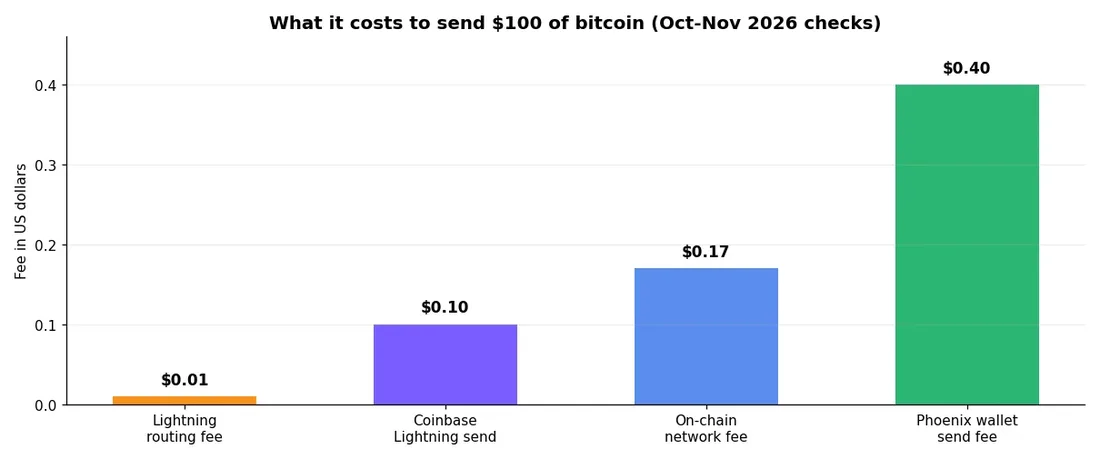
An on-chain payment cost about 12 to 23 cents in October 2026, when the network was quiet, and it takes 10 to 30 minutes to confirm. Lightning beats it on both cost and speed for small payments, but the advantage shrinks on large ones, because percentage-based wallet fees grow with the amount.
One cost that no chart shows is the channel opening fee on your first deposit. Treat it as a one-time setup cost, not a per-payment fee, and it stops distorting the comparison.
Which Lightning wallet should you use in 2026?
The right wallet depends on how much control you want and where you live. Self-custodial wallets give you the keys, while custodial wallets give you simplicity and a company that holds the funds for you.
| Wallet | Custody | Best for | 2026 availability note |
|---|---|---|---|
| Phoenix | Self-custodial | Beginners who want self-custody without channel work | Left US stores May 2024; 2026 reports on its return disagree |
| Breez | Self-custodial | Beginners and merchants who want automatic channels | Widely available, including the US |
| Wallet of Satoshi | Self-custody in US, EU, Australia, NZ; custodial elsewhere | First-timers who want the simplest start | Back in the US as a self-custody wallet; EU custodial service wound down January 2026 |
| Blink | Custodial, with a non-custodial option since version 3.0 | Travellers in El Salvador and Latin America | Not available in the United States |
| Cash App | Custodial | US users who already hold bitcoin there | US only, and it also sends on-chain |
For most beginners, the choice comes down to Phoenix or Breez for self-custody, or Wallet of Satoshi for the easiest first payment. Wallet of Satoshi added its self-custody mode in October 2025, built on Spark, and its custodial mode is now being phased out.
Note that independent reviewers still rate the app as custodial in practice, because the Spark operator co-signs transfers.
Keep only spending money in a Lightning wallet. Lightning funds live in a hot wallet that must stay online to sign, so treat it like the cash in your pocket and keep savings in an on-chain wallet you control.
If you live in the US
US availability changed more than any other detail in this guide. Wallet of Satoshi left in November 2023 and returned as a self-custody app, Phoenix left in May 2024 with conflicting reports about its return, and Blink never came back.
Check the app store on your own phone before you commit to a wallet. A guide written last year, including this one if you read it late, can go stale fast.
The payment methods hub covers every way to buy bitcoin, so you can switch rails if your first-choice wallet is not available where you live.
Where you can actually pay with Lightning in 2026
Lightning stopped being a demo years ago. The biggest change in 2026 came from Square, which switched bitcoin payments on by default for eligible sellers in the US on March 30, 2026.
By May, around a million sellers could accept it, with a $600 limit per transaction and no availability in New York.
At a Square till, the seller shows a QR code and you pay from any Lightning wallet, including Cash App. Most sellers receive dollars rather than bitcoin, so the experience feels like any other card tap to the shop.
The burger chain Steak ‘n Shake has taken bitcoin over Lightning at its US restaurants since May 2025.
Online, plenty of smaller shops accept bitcoin through processors such as BitPay, BTCPay Server, or Strike. Gift card sites also take Lightning at checkout, which turns bitcoin into spending at stores that never touch crypto themselves.
BTC Map lists more than 27,000 merchants worldwide that accept bitcoin, with over half verified in the past year. If you travel, check the map before you go, because Lightning acceptance clusters in specific cities and neighborhoods rather than spreading evenly.
Lightning vs on-chain: when to use each
Lightning and on-chain payments solve different problems, and using the wrong one causes most beginner frustration. The table below makes the choice simple.
| Factor | Lightning | On-chain |
|---|---|---|
| Speed | Seconds | 10 to 30 minutes |
| Typical fee | Under $0.01 routing, plus any wallet fee | About 12 to 23 cents in October 2026 |
| Best for | Coffee, tips, small online purchases | Large transfers, savings, first funding |
| Needs | A funded channel or a custodial balance | Only a Bitcoin address |
| Reversible | No | No |
| Works offline | No, your wallet must be online | Yes, once broadcast |
Use Lightning for anything under about $100 where speed matters. Use on-chain for moving savings, paying an invoice that gives you a Bitcoin address, or any amount where a $0.20 fee is trivial next to the value moved.
If you need bitcoin fast in the first place, our guide on how to buy bitcoin instantly compares the fastest funding methods.
One more distinction matters for sellers. If you run a shop and want to take bitcoin yourself, our guide to how to accept Bitcoin payments on Shopify walks through the full setup, including Lightning checkout.
If you are selling as an individual rather than a shop, our guide to selling bitcoin on P2P platforms safely explains escrow, payment methods ranked by reversal risk, and the seven scams that target sellers.
5 mistakes beginners make
Most Lightning losses are avoidable, and they all come from treating it like a bank app. Bitcoin payments do not reverse, so each mistake below costs real money.
First, beginners skip the seed phrase backup. Your 12 words are the wallet.
Lose them and lose the phone, and nobody can recover your funds.
Second, beginners load a Lightning wallet with savings. Lightning is a spending wallet, and its funds must stay online to sign.
Keep the bulk of your bitcoin on-chain, and top up Lightning only with what you plan to spend soon.
Third, beginners pay an invoice without checking the amount. An invoice carries a fixed amount, but a scammer can swap the QR code at a till or in a chat.
Check the amount and the recipient name on your own screen before you confirm.
Fourth, beginners re-pay a pending payment. A payment that shows as pending may still settle, and paying twice means paying twice.
Wait for a final result first.
Fifth, beginners send bitcoin to the wrong network. An on-chain address and a Lightning invoice look similar as QR codes, but they are not interchangeable.
Match the string to the rail before you send anything. The same care applies when you send money abroad with Bitcoin, where the wrong rail can strand funds for hours.
FAQs
Short answers to the questions beginners ask most about paying with Bitcoin Lightning.
How do I pay with Bitcoin Lightning for the first time?
Download a Lightning wallet such as Phoenix or Breez, fund it with a small amount of bitcoin, then scan the seller’s Lightning invoice and confirm. The payment usually settles in seconds and costs under a cent in routing fees.
Is paying with Bitcoin Lightning free?
No, but it is close. Routing fees usually stay under $0.01 per payment, though wallets add their own fees, such as Phoenix at 0.4% with a 4 satoshi minimum, and your first channel opening costs a normal on-chain fee.
Why did my Lightning payment fail?
The most common causes are an expired invoice, too little spendable Lightning balance, no route with enough liquidity, or a wrong address type. Ask for a fresh invoice, check your Lightning balance rather than your total balance, and retry once after a minute.
Can I pay with Bitcoin Lightning in the US?
Yes, Breez and Cash App work in the US, and Wallet of Satoshi is back on the US App Store as a self-custody wallet. Phoenix left US app stores in May 2024, so check your own store before you plan around it.
Do I need a Lightning wallet to pay a Lightning invoice?
Yes, you need a wallet that speaks Lightning, or an exchange account that supports Lightning withdrawals. A normal on-chain Bitcoin wallet cannot pay a Lightning invoice.
Is Bitcoin Lightning safe for everyday payments?
Lightning is safe for small everyday payments if you treat it like cash. Keep only spending money in it, back up your seed phrase on paper, and double-check the amount and recipient before you confirm, because payments do not reverse.
Conclusion
Once you know how to pay with bitcoin lightning, the four steps feel simple, and the six failures above stop being scary. Get a wallet, fund it with a little bitcoin, scan the invoice, and confirm.
Start with a $5 or $10 payment at a shop that takes Lightning, or a small gift card purchase online. A cheap first payment teaches you more than any guide, including this one, and the failures above will look familiar instead of frightening when they show up.
For a first gift card, see turning Bitcoin into gift cards, which compares Bitrefill, Coinsbee, CoinGate and Fold on what $100 of Bitcoin actually buys.
Once the first payment lands, the next step is choosing the right wallet for how you actually spend. Read the best Bitcoin Lightning wallet for beginners guide, pick one that works in your country, and set it up before your next purchase.
If you want the broader picture first, the payment methods hub lists every way to pay for bitcoin in 2026, and our Bitcoin debit cards guide covers the card option for shops that never touch crypto. If you are still new to the basics, start with what Bitcoin is before you spend any of it.