


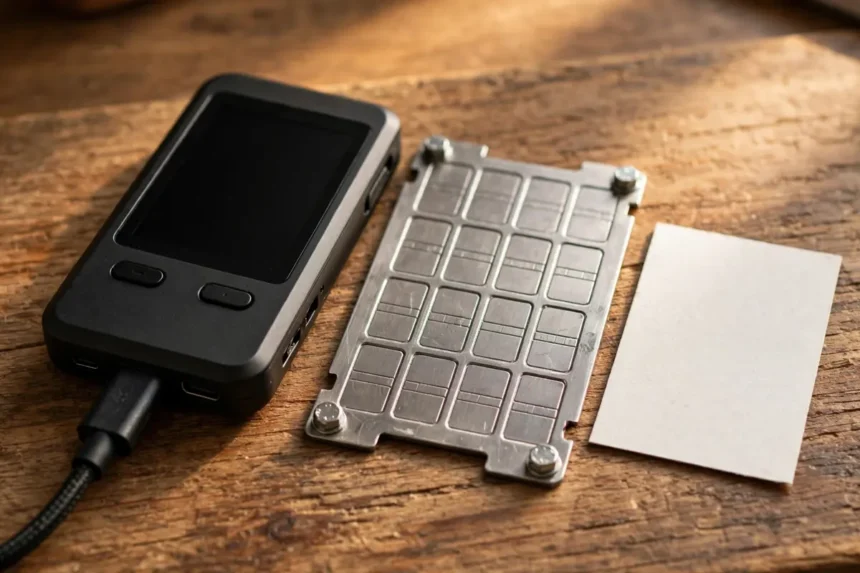
If you want to know how to store bitcoin offline long term, here is the short answer first. Buy a hardware wallet from the maker, create the seed phrase on the device itself, write it on steel, keep three copies in separate places, and test a full recovery before you send serious money to it.
That sounds like a lot. In my view, it is the honest price of owning an asset with no bank and no password reset. Get these few steps right once, and your setup can sit quietly for years.

Plenty of guides stop at hot wallet versus cold wallet. This one is narrower on purpose. It is about the long term holder who plans to hold for five or ten years, not the trader who moves coins every week.
- What storing Bitcoin offline really means
- Hardware wallet, paper or steel: which backup lasts?
- How to store Bitcoin offline long term in 7 steps
- The 3-copy rule, explained plainly
- How much protection do you actually need?
- Why people still lose offline Bitcoin
- Common mistakes that ruin cold storage
- How to look after the setup over the years
- FAQs
- Conclusion
Key takeaways
- Offline means your keys and seed phrase never touch the internet. The coins themselves always stay on the blockchain.
- A hardware wallet creates and holds the keys. A steel backup protects the seed phrase from fire, water and fading ink.
- Follow the 3-copy rule: one copy at home, one in a second secure place, and one spare device or copy you can reach if the first two fail.
- Test the recovery before you fund the wallet properly. An untested backup is a hope, not a backup.
- For larger holdings, a 2-of-3 multisig setup removes the single point of failure that one device and one seed create.
What storing Bitcoin offline really means
Bitcoin does not sit inside a wallet like cash in a drawer. Your coins are records on the blockchain. What you store is the private key, usually shown to you as a seed phrase of 12 or 24 words.
Whoever has those words can spend the coins, with or without your device. That one fact explains almost every rule in this guide. Offline storage means those words are made and kept away from any internet connected machine.
Why the seed phrase matters more than the device
Hardware wallets can break, get lost or be replaced. The seed phrase restores everything on a new device, even from a different brand, because most wallets follow the same BIP39 standard.
So protect the words first and the device second. Our separate guide on how to store Bitcoin safely covers the wider hot versus cold choice, while this article goes deeper on the offline setup itself.

Hardware wallet, paper or steel: which backup lasts?
People often mix up two different jobs. Signing is one job, and backup is the other. A hardware wallet signs transactions offline. Paper and steel do not sign anything, they only store the seed phrase.
For long term holding, you need both jobs done well. A good signing device with a weak paper backup is still a weak setup, because paper is usually the part that fails first.
The three options compared
| Option | What it does | Main weakness | Best for |
|---|---|---|---|
| Hardware wallet | Creates keys offline and signs without exposing them | Can break or be lost, and costs money | Almost every long term holder |
| Paper backup | Stores the seed phrase in handwriting, fully offline | Burns, soaks and fades over years | A first backup, made on day one |
| Steel backup | Stores the seed phrase stamped or tiled in metal | Costs more and takes time to stamp correctly | The copy you want to survive a house fire or flood |
| Paper wallet | A printed key pair made to receive coins offline | Easy to make badly, and spending from it is risky for beginners | Very few people today, hardware wallets do this job better |
My honest take is simple. Paper is fine for the first week. Steel is what you want for the next decade. The price gap is small compared with the amount most long term holders are trying to protect.

How to store Bitcoin offline long term in 7 steps
Here is the full setup in order. Do not skip ahead to funding the wallet. The order is the point, because each step protects the next one.
Set aside an hour with no rush and no audience. Most mistakes I hear about happened when someone set up a wallet quickly, late at night, with other people around.
The setup, step by step
- Buy the device from the maker or an authorized seller. Never buy a used hardware wallet, and never use a device that arrives with a pre-filled seed card. A genuine device creates its seed during your own setup.
- Check the packaging and update the firmware from the official app. Follow only the maker instructions inside the box and the official site you type in yourself. Ignore links from emails or messages.
- Create a new wallet on the device and write the seed phrase by hand. Write the 12 or 24 words in exact order, on paper first, and check each word twice against the device screen.
- Set a strong PIN, and consider a passphrase only if you fully understand it. A passphrase acts like an extra word. Lose it, and the seed alone will not restore your coins.
- Copy the seed onto steel within the first few weeks. Stamp or tile it carefully, then read it back word by word. This steel copy becomes your main long term backup.
- Test the recovery before you trust it. Wipe the device or use a second device, restore from your backup, and confirm the same addresses appear. Only then send a small test amount and send it back out.
- Move the main amount, then store every copy apart. Keep the copies in separate secure places, tell no one the locations in full, and record in your notes where a trusted person could find instructions, not the words themselves.
If desktop software enters your plan later, our walkthrough on how to use Sparrow Wallet shows how a hardware wallet pairs with a watch-only wallet for checking balances without exposing keys.
The 3-copy rule, explained plainly
One backup is a single point of failure. A fire, a flood or one bad memory can end the story. The 3-copy rule spreads that risk without making the setup silly.
Copy one lives at home, in steel, somewhere private and fire resistant. Copy two lives in a second location you control or trust, such as a safe deposit box or a sealed envelope with a trusted family member who does not know what the words can do alone. Copy three can be a second hardware wallet already restored from the same seed, stored apart from both.
What never counts as a copy
A photo on your phone is not a backup, it is a leak waiting for a cloud sync. The same goes for a note in email, a password manager, a chat message to yourself, or a file on a laptop.
The rule that keeps people safe is boring but firm. If the seed words ever appeared on a screen connected to the internet, treat that wallet as hot, create a fresh seed offline, and move the coins. Our ranked guide to backing up a Bitcoin seed phrase safely compares five backup methods in more detail.
How much protection do you actually need?
Not everyone needs the same setup, and overbuilding has its own risk. A setup so complex that you cannot restore it under stress has failed at its only job.
For a starter amount, one hardware wallet and one steel backup, tested once, is a solid and honest setup. If you are still choosing a first device, start with our roundup of the best Bitcoin wallets for beginners and pick simple over fancy.
When multisig starts to make sense
As the amount grows into money you truly cannot afford to lose, consider 2-of-3 multisig. Three keys are created, any two can spend, and the keys live on different devices in different places.
That design fixes the biggest weakness of a single seed. One stolen or destroyed key cannot move the coins, and one lost key cannot lock you out. The cost is time and learning, which is why I would not push it on a beginner with a small balance.
Paper wallets sit at the other end of this scale. They sound pure and offline, but generating them safely is hard to verify, and spending from them trips up beginners. If you already hold one, our guide on how to sweep a Bitcoin paper wallet shows the safer way to move those coins into a modern wallet.
Why people still lose offline Bitcoin
Offline storage stops remote hackers. It does not stop human error, and human error is the bigger enemy over ten years.
Estimates of lost Bitcoin vary a lot, which tells you how hard this is to count. CoinShares put lost coins near 1.58 million in 2025. River estimated 3 to 4 million in 2023. Chainalysis said in 2020 that about 3.7 million coins had not moved in more than five years.
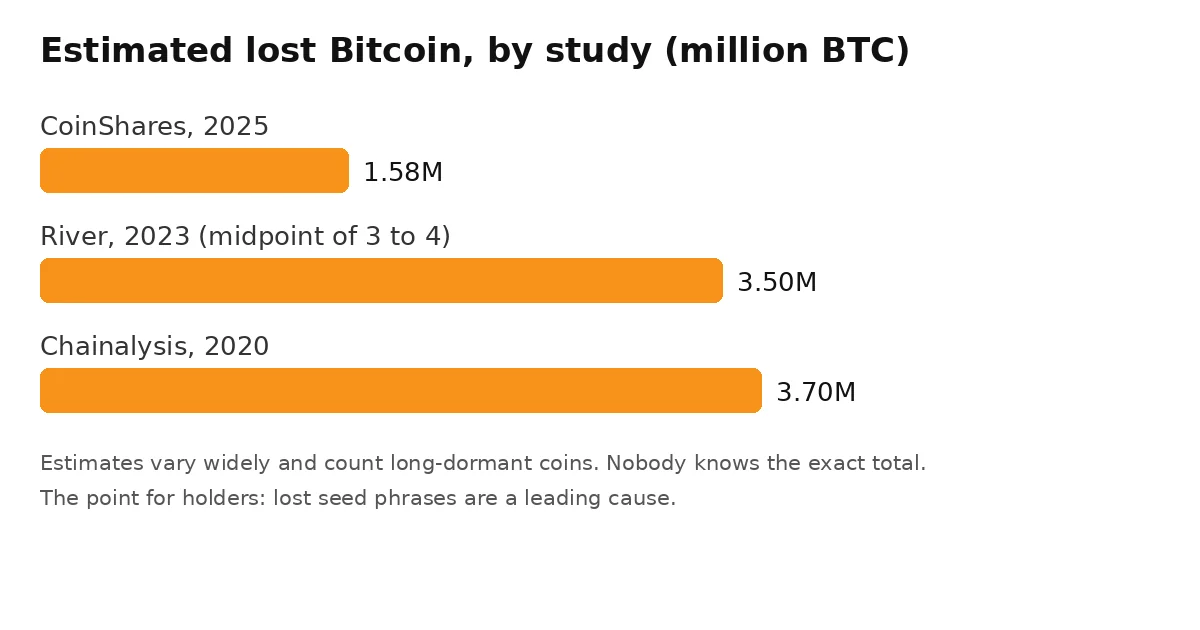
Those studies count long dormant coins, so they mix patient holders with truly lost keys. Still, the lesson holds. Very few of those losses needed a genius hacker. Most needed one lost sheet of paper or one forgotten passphrase.
That is also why inheritance belongs in a storage plan, not as an afterthought. Our guide to Bitcoin inheritance planning explains how heirs can find instructions without ever seeing your seed words during your lifetime. And for the full menu of storage choices, see 7 proven methods to protect your BTC.
Common mistakes that ruin cold storage
The first mistake is typing the seed into a website or app that offers to check or validate it. No real wallet maker will ever ask for your full seed online. That request is a theft attempt, every time.
The second mistake is buying the device and never testing the backup. People learn their handwriting was unclear or a word was copied wrong only during a panic, years later, when the original device is already dead.
Three quieter mistakes
Storing all copies in one building is a quiet mistake, because one fire takes the device and the backup together. Telling too many people that you hold Bitcoin is another, because physical pressure is a real risk for known holders.
The third is adding a passphrase, splitting the seed, or building multisig before you understand the recovery. Advanced tools multiply both safety and ways to lock yourself out. Master the simple setup first, rehearse it, then upgrade.
How to look after the setup over the years
Long term storage is not set and forget forever. It is set, test, and check on a calm schedule.
Once a year, power on the device, confirm it works, and check that your steel copy is still legible and where you left it. Before any firmware update, confirm your backup is complete and reachable first.
A simple yearly routine
- Check the device powers on and the PIN still works.
- Read the steel backup once and compare it against your paper copy.
- Confirm the second location copy is still secure and untouched.
- Review who knows about the setup, and update inheritance instructions if life has changed.
- Every few years, rehearse a full restore on a spare device, not just a quick look.
That routine takes less than an hour a year. In my opinion, it is the difference between people who still have their coins in ten years and people telling a sad story about a drawer they cleaned out.
FAQs
What does storing Bitcoin offline actually mean?
It means your private keys and seed phrase are created and kept on a device that does not connect to the internet. The coins stay on the blockchain. Only the keys are offline, and those keys are what let you spend the coins.
Is a hardware wallet enough on its own?
No. The device can break or be lost, so the seed phrase backup is what actually protects you. A hardware wallet with a tested steel backup is a complete setup. A hardware wallet with no backup is a risk.
Should I use paper or steel for my seed phrase?
Use paper on day one so the words are written down right away, then move the backup to steel within the first few weeks. Paper burns, soaks and fades. Steel resists fire, water and corrosion, which is what a long term backup needs.
How many backup copies should I keep?
Keep three copies in separate places. One at home, one in a second secure location, and one spare copy or restored second device. Separate places matter because one fire or theft should never be able to take every copy at once.
When should I use multisig instead of one wallet?
Consider 2-of-3 multisig when the amount is large enough that one lost or stolen key would be a disaster. Any two of three keys can spend, so one key can be lost without locking you out and one stolen key cannot move the coins alone.
Conclusion
Learning how to store bitcoin offline long term is mostly about respect for one fact. There is no help desk that can restore a lost seed phrase, and that is the trade you make for full control.
My recommended next step is unglamorous and it works. Order the device from the maker this week, set it up slowly, stamp the steel copy, and rehearse the recovery while the amount is still small. Future you, ten years from now, will be very glad you did the boring part properly.
And when you later move coins out of cold storage, it also helps to know how to check if your Bitcoin transaction is confirmed, so you can verify the transfer landed before you relax.