



You can learn how to buy bitcoin with cash app in about five minutes, and your first purchase can cost as little as $1. Open Cash App, tap the Money tab, tap Bitcoin, tap Buy, enter an amount, and confirm with your PIN. That really is the whole buying flow.
The catches sit underneath that simple flow. Small buys carry a fee that takes a bigger bite in percentage terms, Cash App holds your coins for you until you move them, and identity checks stand between you and your first purchase. This guide covers the steps, the real costs after the February 2026 fee change, and the withdrawal move that gives you full control of your Bitcoin.

Key takeaways
- Buy from the Money tab: tap Bitcoin, tap Buy, enter an amount from $1 up, and confirm with your PIN or face scan.
- Since February 2026, one-time buys over $2,000 carry no fee and no spread. Recurring Auto Invest buys, Round Ups, and Paid in Bitcoin buys are also fee free.
- Smaller one-time buys still carry a fee. Cash App shows the exact fee and the exchange rate before you confirm, so check that screen every time.
- Verified users can now withdraw up to $10,000 of Bitcoin a day and $25,000 a week to their own wallet, five times the old limits.
- Bitcoin traded near $82,873 on October 10, 2026, so a $100 buy gets you roughly 0.0012 BTC before fees.
What you need before your first buy
Cash App is a US payments app from Block, Inc. To buy Bitcoin in it, you need to be 18 or older, live in the United States, and verify your identity. The app asks for your full legal name, date of birth, and Social Security number or ITIN, and enabling withdrawals can also require a photo ID and a selfie. If the whole idea is new to you, our plain-English guide to what Bitcoin is and how it works is worth a quick read first.
- What you need before your first buy
- How to buy Bitcoin with Cash App in 7 steps
- What it really costs: fees after the February 2026 change
- Limits you will actually run into
- How to withdraw Bitcoin to your own wallet
- Cash App vs a crypto exchange vs other payment apps
- Common mistakes beginners make
- FAQs
- Conclusion
- Sources
You also need money in the app. Buys come out of your Cash App balance, and you can top that balance up from a linked bank account or debit card. Standard bank deposits are free but can take a few days. Instant deposits cost extra, so most beginners are better off funding the balance ahead of time.
Cash App sells Bitcoin only
One thing surprises new users: Cash App does not sell Ethereum, Solana, or any other coin for investing. Bitcoin is the only cryptocurrency you can buy and hold there. If you want a shelf of different coins, you need a proper exchange account instead. For most first-time buyers who only want Bitcoin, the limit is a feature, not a bug: there is simply less to get wrong.
How to buy Bitcoin with Cash App in 7 steps
Here is the full walkthrough, exactly as it appears in the current app. The screens are the same on iPhone and Android, give or take a label.
Do the identity check before you need the money moved. Verification can take minutes, but it can also take longer if the app asks for extra documents, and a buy you planned for today should not depend on it clearing in time.

The buying steps, one by one
- Open Cash App and tap the Money tab at the bottom left of the home screen.
- Scroll to Bitcoin and tap it. First-time users get a short setup flow and the identity verification described above.
- Tap Buy. You will see the live Bitcoin price and a simple chart above the button.
- Enter an amount. Pick a preset amount or type your own, starting from as little as $1. You are buying a slice of a coin, never a whole coin at a time unless you spend about $82,873 at October 10 prices.
- Choose one-time or recurring. A one-time buy happens now. A recurring buy sets up Auto Invest, which, as the fees section explains, is the cheapest way to use this app.
- Review the confirmation screen. It shows the dollar amount, the amount of BTC you will receive, the exchange rate, and any fee. If the fee looks heavy for the amount, this is your last free chance to back out.
- Confirm with your PIN, Touch ID, or Face ID. The Bitcoin lands in your Cash App Bitcoin balance right away.
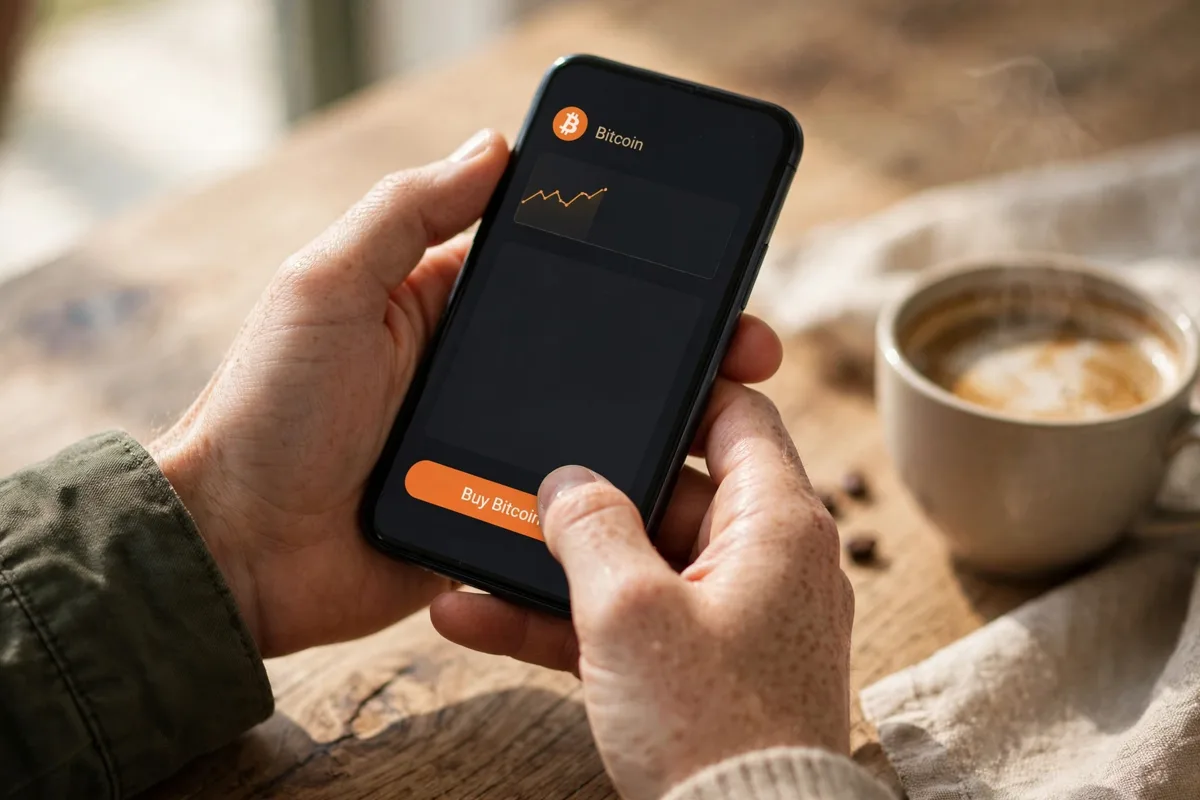
That is the purchase done. What you own at this point is real Bitcoin, but it sits in a wallet that Cash App controls. The sections below explain what that means and how to change it when your balance grows.
What it really costs: fees after the February 2026 change
In February 2026, Cash App cut Bitcoin pricing in a way that changed the math for two kinds of buyers. One-time purchases over $2,000 now carry no fee and no spread at all. Recurring buys through Auto Invest, spare-change Round Ups, and Paid in Bitcoin direct-deposit buys also carry no fee and no spread.
Everyone else still pays. A smaller one-time buy carries a fee that Cash App displays on the confirmation screen before you commit. The company does not publish one simple rate card for these buys, and the percentage bites hardest on tiny amounts. A fee that looks small in dollars on a $10 buy can equal several percent, while the same habit on a $500 buy costs far less per dollar of Bitcoin.
The cheapest ways to buy on Cash App
Three routes avoid fees entirely. Auto Invest buys a set amount on a daily, weekly, or monthly schedule, which also spreads your purchases across different prices instead of betting on one day. Round Ups round each Cash Card purchase up to the next dollar and buy Bitcoin with the spare change. Paid in Bitcoin converts a slice of each direct-deposit paycheck straight into BTC.
Compare that with the app next door and the pattern is familiar. Our guide to buying Bitcoin with Venmo shows the same trade: a payments app charges for pure convenience, and the bill shrinks only when you buy bigger or automate. Cash App at least now has a genuine zero-fee lane, which Venmo does not match.
Limits you will actually run into
Buying limits on Cash App depend on your verification level and account history, and the app shows your personal limits inside the Bitcoin section. New and lightly verified accounts start lower. Full verification is what unlocks the higher tiers, so finish it before you plan anything large.
Withdrawal limits are clearer, because February 2026 changed them in a big way. Eligible verified users can now withdraw $10,000 worth of Bitcoin per day and $25,000 per week, up from $2,000 a day and $5,000 a week before the change.
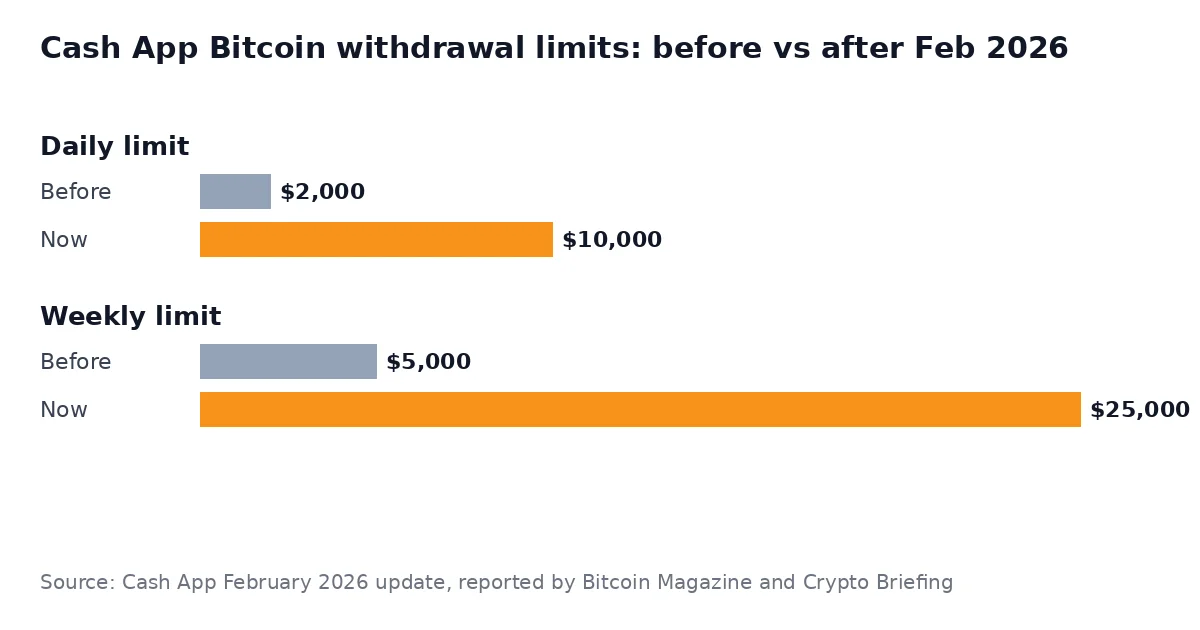
Those higher limits matter for one simple reason: they make it realistic to buy on Cash App and still move a meaningful amount into your own wallet, instead of dribbling it out $2,000 at a time.
How to withdraw Bitcoin to your own wallet
Cash App holds your Bitcoin in a custodial wallet. The company says customer Bitcoin is held 1:1 and that most of it sits in offline cold storage, which is reassuring, but the keys are still theirs. If the account is frozen or the company fails, your access goes with it. That is why experienced holders move larger balances out.
If you do not have an external wallet yet, start with our tested roundup of the best Bitcoin wallets for beginners, then follow the withdrawal steps below.
Withdrawal steps and speeds
- Open the Money tab, tap Bitcoin, then tap the send or withdraw option (the paper-plane style icon on the Bitcoin screen).
- Choose to send to an external wallet, then paste the wallet address or scan its QR code. Check the first and last characters of the address before going further.
- Enter the amount. First withdrawals may trigger an extra identity check, including enabling withdrawals and deposits in settings.
- Pick a speed. The standard option is free and can take up to about 24 hours to reach the chain. Faster options cost extra and settle in roughly two hours or about ten minutes.
- Confirm with your PIN and wait for the transaction to appear in your wallet. Send a small test amount first if the sum matters to you.
Once the coins are in a wallet you control, the job changes from buying to keeping. Our guide on how to store Bitcoin safely covers seed phrase backups and the hot versus cold wallet choice in plain language.
Cash App vs a crypto exchange vs other payment apps
Cash App wins on speed and simplicity, and now on fees for automated or large buys. A dedicated exchange still wins for small one-off buys at the tightest prices, for limit orders, and for any coin that is not Bitcoin. Other payment apps sit in between.
The Zelle route shows the opposite end of the spectrum. Our guide to buying Bitcoin with Zelle explains why Zelle itself sells no crypto at all, so buyers end up on peer-to-peer markets with escrow and scam risks that Cash App users never face. And if you would rather pay from your bank card directly, our debit card buying guide compares that route fee by fee.
Cash App strengths
- $1 minimum and a buy flow that takes under a minute
- Zero fees on buys over $2,000 and on all recurring buys
- Withdrawals to your own wallet, up to $10,000 a day
- Round Ups and Paid in Bitcoin automate stacking
Cash App weaknesses
- Bitcoin only, no other coins and no advanced order types
- Small one-time buys still carry a fee
- Custodial by default: Cash App holds the keys until you withdraw
- US only, with full identity verification required
Common mistakes beginners make
The first mistake is buying tiny amounts one at a time and never looking at the fee line. On Cash App, five $20 buys can cost noticeably more than one $100 buy, and switching to a weekly Auto Invest removes the fee entirely. The confirmation screen tells you the cost of every buy, so read it.
The second mistake is treating Cash App like a vault. It is a buying app with a wallet attached, and the $10,000 daily withdrawal limit exists so you can move real balances out. The third mistake is sloppy withdrawals: pasting an address without checking it, or sending a large amount before a small test. Bitcoin payments cannot be reversed, and Cash App support cannot pull a confirmed transaction back.
One more, quieter mistake is forgetting taxes. In the US, selling Bitcoin, spending it, or swapping it is a taxable event, and Cash App provides tax documents for your activity. Keep them, even if your first buy was $10.
FAQs
How do I buy Bitcoin on Cash App for the first time?
Open Cash App, tap the Money tab, tap Bitcoin, and complete the identity verification. Then tap Buy, enter an amount from $1 up, review the fee and exchange rate on the confirmation screen, and confirm with your PIN or face scan. The Bitcoin appears in your Cash App Bitcoin balance right away.
Does Cash App charge a fee to buy Bitcoin?
It depends on how you buy. Since February 2026, one-time buys over $2,000, recurring Auto Invest buys, Round Ups, and Paid in Bitcoin buys carry no fee and no spread. Smaller one-time buys carry a fee that Cash App shows on the confirmation screen before you confirm.
What are the Cash App Bitcoin withdrawal limits in 2026?
Eligible verified users can withdraw up to $10,000 worth of Bitcoin per day and $25,000 per week. Cash App raised these limits in February 2026 from $2,000 a day and $5,000 a week. Your personal limits are shown inside the Bitcoin section of the app.
Can I move Bitcoin from Cash App to my own wallet?
Yes. Enable withdrawals in the Bitcoin section, tap send, paste or scan your external wallet address, choose an amount and a speed, and confirm. The standard speed is free and can take up to about 24 hours, and sending a small test amount first is a smart habit.
Is Cash App a safe place to keep Bitcoin long term?
Cash App holds customer Bitcoin 1:1 and keeps most of it in offline cold storage, but it is a custodial wallet, which means Cash App controls the keys. For small learning amounts that is fine. For larger sums, withdraw to a wallet you control and back up its seed phrase.
Conclusion
For a US beginner who already uses Cash App, this is now one of the easiest honest ways to buy a first slice of Bitcoin. The February 2026 changes fixed the two biggest complaints: automated and large buys are free, and you can withdraw up to $10,000 a day when you are ready to hold your own keys.
A sensible first run looks like this: verify your account, set up a small weekly Auto Invest so the fee is zero, and learn the withdrawal flow with a tiny test amount. When the balance starts to feel like real money, move it to your own wallet. Simple, cheap, and under your control.
To compare Cash App with bank transfer, Venmo, Zelle, and debit card side by side, see our Bitcoin payment methods hub.