



Yes, you can buy Bitcoin right inside the Venmo app, and it takes about two minutes once your account is verified. Open the Crypto tab, tap Bitcoin, enter an amount, and confirm. That is the short version of how to buy bitcoin with venmo, and for a small first buy, it is honestly hard to beat.
But easy is not the same as cheap, and it is not the same as safe. Venmo charges a trading fee plus a spread, your buys are capped, and the Bitcoin sits with a custodian until you move it. This guide walks through the real steps, the real costs, and the one extra step most beginners skip: sending the coins to a wallet you control.

Key takeaways
- Venmo sells Bitcoin in the app’s Crypto tab. You pay with your Venmo balance, a linked bank account, or a debit card. Credit cards do not work for crypto buys.
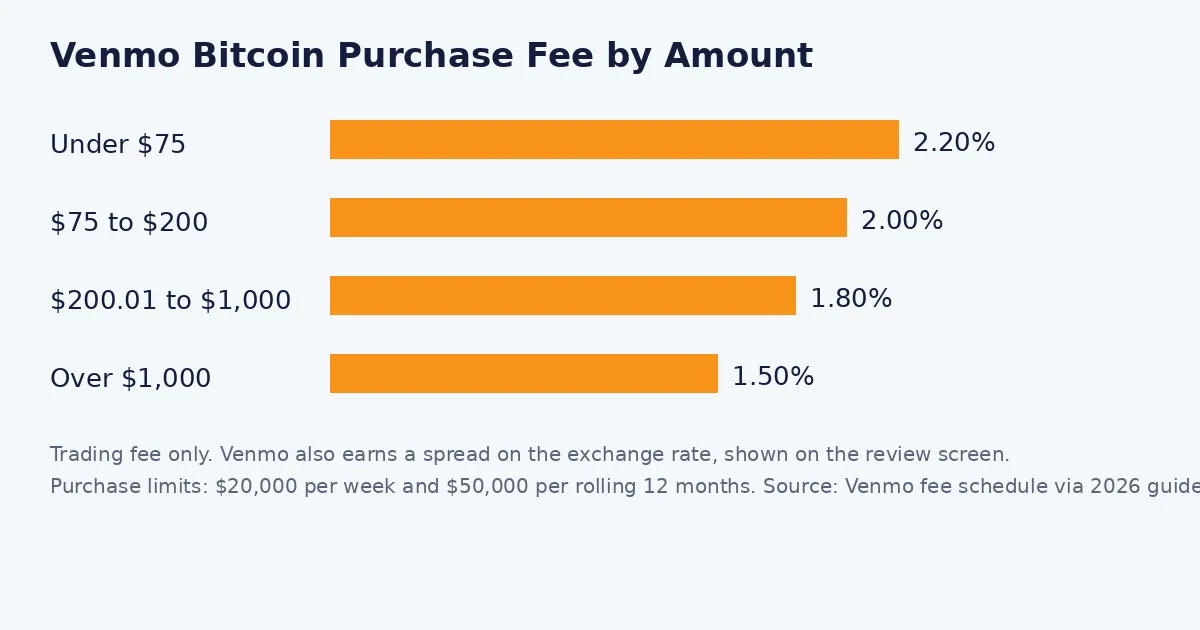
- Trading fees run from 2.20% on buys under $75 down to 1.50% on buys over $1,000, and Venmo also earns a spread on the exchange rate.
- Purchase limits are $20,000 per week and $50,000 per rolling 12 months.
- Since April 2023 you can send Bitcoin from Venmo to an external wallet. Small buys can stay in the app, larger amounts belong in self-custody.
- Bitcoin traded near $82,680 on October 9, 2026, so a $100 buy gets you roughly 0.0012 BTC before fees.
What You Need Before You Start
Venmo’s crypto feature is built for US users with a personal account. Business and charity profiles cannot buy crypto, and you need to verify your identity before your first purchase. If you are new to all of this, our plain-English explainer on what Bitcoin is and how it works is worth five minutes before you spend a dollar.
- What You Need Before You Start
- How to Buy Bitcoin With Venmo in 6 Steps
- Step 1: Open the Crypto tab
- Step 2: Pick Bitcoin
- Step 3: Tap Buy and enter an amount
- Step 4: Choose how to pay
- Step 5: Read the review screen properly
- Step 6: Confirm the buy
- Venmo Bitcoin Fees: What a Buy Really Costs
- Venmo Limits You Should Know
- How to Move Your Bitcoin to Your Own Wallet
- Venmo vs a Regular Exchange: Which Should You Use?
- Common Mistakes Beginners Make on Venmo
- Other Ways to Buy Bitcoin
- FAQs
- Conclusion
- Sources
Verification asks for your legal name, address, date of birth, and a tax ID number such as a Social Security number or ITIN. Venmo may also ask for a photo ID. Approval is often quick, though document reviews can take up to 48 hours, so do this step before the day you actually want to buy.
The payment methods that work
You can fund a buy three ways: your Venmo balance, a linked bank account, or a debit card. Credit cards, including the Venmo Credit Card, cannot be used to buy crypto. One nice exception: cash back earned on the Venmo Credit Card can auto-convert into crypto with no purchase fee.
What Venmo actually sells
The Crypto tab lists a short shelf: Bitcoin, Ethereum, Litecoin, Bitcoin Cash, Chainlink, Solana, and PayPal USD (PYUSD). Your coins are held by Paxos Trust Company, a regulated custodian that also powers PayPal’s crypto service. You do not hold the keys while the coins sit in Venmo, which is fine for learning and small amounts, and a real limitation for large ones.
How to Buy Bitcoin With Venmo in 6 Steps
Here is the full walkthrough, exactly as it happens in the app. The whole thing takes about two minutes if your identity is already verified.

Step 1: Open the Crypto tab
Open the Venmo app and tap “Crypto” in the bottom menu. You will see the list of available coins with live prices. If this is your first visit, the app will start the identity verification flow before it lets you buy.
Step 2: Pick Bitcoin
Tap Bitcoin (BTC). The coin page shows the current price, a simple chart, and your balance if you already own some. Take one second to note the price, because the review screen later quotes your exact rate.
Step 3: Tap Buy and enter an amount
Tap the “Buy” button and type a dollar amount. You can start as small as $1, which is a sensible way to learn the flow before committing real money. First buys should be practice buys.
Step 4: Choose how to pay
Select your Venmo balance, bank account, or debit card. A bank account is usually the calmest option, since debit card buys can hit your bank’s own daily limits. Remember that credit cards are not accepted for crypto.
Step 5: Read the review screen properly
This screen matters more than any other. It shows the exchange rate, the exact trading fee for your amount, and how much Bitcoin you will receive. The rate includes Venmo’s spread, so the fee line is not your whole cost. If the numbers look off, back out and check the fee table below.
Step 6: Confirm the buy
Tap “Buy” to finish. The Bitcoin appears in your Venmo crypto balance almost instantly, and the purchase is final. You cannot undo it. If you change your mind, the only route back is selling, which triggers a second fee and possibly a tax event.
Venmo Bitcoin Fees: What a Buy Really Costs
Venmo keeps its fee table simple, and that is a point in its favor. The trading fee depends on how much you buy, and it applies to both buys and sells.
| Purchase amount | Venmo trading fee |
|---|---|
| $1.00 to $74.99 | 2.20% |
| $75.00 to $200.00 | 2.00% |
| $200.01 to $1,000.00 | 1.80% |
| Over $1,000.00 | 1.50% |
On top of the trading fee, the exchange rate you get includes a spread that Venmo earns. Venmo does not publish a fixed spread number, and it moves with the market, so treat the review screen as the truth: it shows your final rate and fee before you confirm.
A real cost example
Say you buy $100 of Bitcoin. The trading fee is 2.00%, so $2.00, before the spread. A $500 buy lands in the 1.80% tier, so the fee is $9.00. On a large exchange’s advanced trading desk, that same $500 trade can cost around 0.60%, roughly $3, after a free bank deposit. Below about $100, the gap is a couple of dollars and Venmo’s speed wins. Above that, the gap starts to matter.
Fees for moving Bitcoin
Sending crypto to another Venmo or PayPal account costs nothing. Sending to an external wallet carries a network fee that varies with blockchain traffic, and Venmo shows it before you confirm. Receiving crypto is free.
Venmo Limits You Should Know
Venmo caps crypto purchases at $20,000 per week and $50,000 per rolling 12 months. Those numbers are generous for a beginner and a hard ceiling for anyone building a serious position.
Outbound crypto transfers have their own cap: $25,000 per week to external wallets and other accounts. There is one more quiet limit to know. If you buy with money that has not fully cleared, Venmo can hold your ability to sell or send that crypto for up to seven days while the payment settles.
Quick numbers
- Minimum buy: $1
- Weekly purchase limit: $20,000
- 12-month purchase limit: $50,000
- Weekly transfer limit: $25,000
- Cheapest fee tier: 1.50% (buys over $1,000)
How to Move Your Bitcoin to Your Own Wallet
Here is the part most Venmo guides bury. Since April 2023, Venmo lets you send Bitcoin out to an external wallet address. That one feature turns Venmo from a closed price tracker into a real on-ramp.
Why bother? While your coins sit in Venmo, Paxos holds the keys and you hold a claim. If the app freezes your account, you wait. In your own wallet, the coins move when you say so. If you do not have a wallet yet, start with our tested picks for the best Bitcoin wallets for beginners, then read our guide on how to store Bitcoin safely before moving anything large.
The transfer, step by step
Open the Crypto tab, tap Bitcoin, and choose the transfer or send option. Pick “external wallet,” paste your wallet address, and double-check the first and last characters. Enter the amount, review the network fee, and confirm. Then verify arrival with our walkthrough on how to track a Bitcoin transaction using the transaction ID.
Two habits save beginners real money here. First, send a small test amount, about $5 to $10 worth, and wait for it to land before moving the rest. Second, never retype an address by hand. Paste it, then compare the start and end against your wallet screen.
Venmo vs a Regular Exchange: Which Should You Use?
Venmo wins on convenience and loses on cost and coin choice. A regular exchange asks more of you up front, then charges far less per trade.
| Feature | Venmo | Typical large exchange |
|---|---|---|
| Trading fee | 1.50% to 2.20%, plus spread | About 0.40% to 0.60% on advanced desks |
| Coins available | 7, including BTC and PYUSD | Hundreds |
| Minimum buy | $1 | Often $1 to $10 |
| Withdraw to own wallet | Yes, network fee applies | Yes, network fee applies |
| Purchase limits | $20,000 per week, $50,000 per year | Usually much higher |
| Best for | First small buys, learning | Regular or larger buys |
A pattern that works for many readers: learn on Venmo with $20 to $50, move the coins to your own wallet once the amount feels meaningful, and switch to an exchange when your buys pass a few hundred dollars. There is no prize for staying loyal to an app.
Common Mistakes Beginners Make on Venmo
The app is simple, which is exactly why these slip past people. A quick pass through this list costs nothing and can save you a fee, a scare, or a lost transfer.
- Skipping the review screen. The fee and rate live there. Glancing at them takes five seconds and tells you your true cost.
- Buying with a credit card in mind. It will not work. Fund with a balance, bank account, or debit card instead.
- Leaving a large balance in the app. Venmo crypto is custodial and crypto itself has no FDIC insurance. Move meaningful amounts to your own wallet.
- Sending the full amount first. Always test a transfer with a small amount. A wrong address cannot be reversed.
- Ignoring taxes. Selling, swapping, or spending Bitcoin is a taxable event in the US. Keep the app’s transaction records.
- Forgetting the settlement hold. Freshly bought crypto may be locked from sending or selling for up to seven days. Do not plan a same-day transfer of a large buy.
Other Ways to Buy Bitcoin
Venmo is one door into Bitcoin, not the only one. If someone handed you a prepaid card instead, our guide on buying Bitcoin with a gift card covers that route and its higher costs. Readers outside the US need a local route instead, like our step-by-step on how to buy Bitcoin in Pakistan, since Venmo crypto is a US-only feature.
Whichever route you pick, the order of operations stays the same: verify the platform, start small, read the fee screen, and move the coins to a wallet you control.
FAQs
Can you buy Bitcoin with Venmo?
Yes. US users with a verified personal Venmo account can buy Bitcoin in the app’s Crypto tab using a Venmo balance, a linked bank account, or a debit card. Credit cards cannot be used for crypto purchases.
What are Venmo’s Bitcoin fees?
Venmo charges a trading fee of 2.20% on purchases under $75, 2.00% from $75 to $200, 1.80% from $200.01 to $1,000, and 1.50% on purchases over $1,000. The exchange rate also includes a spread, and the review screen shows your fee and rate before you confirm.
Can I send Bitcoin from Venmo to my own wallet?
Yes. Since April 2023, Venmo lets you send Bitcoin to an external wallet address for a network fee that varies with blockchain traffic. Transfers to another Venmo or PayPal account are free, and outbound transfers are capped at $25,000 per week.
What are the Venmo crypto purchase limits?
Venmo limits crypto purchases to $20,000 per week and $50,000 per rolling 12 months. The minimum purchase is $1.
Is Venmo or an exchange cheaper for buying Bitcoin?
An exchange is usually cheaper. Venmo charges 1.50% to 2.20% plus a spread, while a large exchange’s advanced trading desk can charge about 0.40% to 0.60%. For buys under about $100 the difference is small, so Venmo’s convenience can be worth it.
Conclusion
Learning how to buy bitcoin with venmo is really two skills: the two-minute in-app buy, and the judgment to know what the buy costs and where the coins should live afterward. The app handles the first part well. The second part is on you.
Your next step is simple. Verify your account, make a $10 practice buy, read every line of the review screen, and then send a small test amount to your own wallet. Once that loop feels boring, you understand Bitcoin buying better than most people who own it.
Prefer the Cash App route instead? Our step-by-step guide shows how to buy Bitcoin with Cash App, including its current fees and withdrawal limits.
For the cheapest route of all, skip the app fees and fund an exchange from your bank – learn how to buy Bitcoin with a bank transfer in our step-by-step guide.