



Yes, you can accept Bitcoin as a freelancer, and the setup takes one afternoon. Price your work in dollars, send the client a Bitcoin invoice, and get paid straight to a wallet you control.
The technology is the easy part. The hard part is pricing in dollars, picking a route with low fees, and writing one contract clause that protects you when the price moves.

This guide covers how to accept Bitcoin as a freelancer, with real fee math on a $2,000 invoice at today’s Bitcoin price.
- Why Freelancers Keep Coming Back to Bitcoin
- The $2,000 Invoice Test: Five Ways to Get Paid
- PayPal: familiar, and the most expensive familiar option
- Upwork: you pay for clients, not for payments
- Zaprite: built by a freelancer, for freelancers
- BTCPay Server: free, but you run it yourself
- Lightning: the cheapest way to get paid
- Price in Dollars, Not in Bitcoin
- Your Setup in One Afternoon
- Step 1: Get a wallet you control
- Step 2: Claim a Lightning address
- Step 3: Pick your invoicing tool
- Step 4: Send a test invoice to yourself
- The Contract Clause That Protects You
- Taxes: Two Taxable Events, Not One
- Mistakes That Cost Freelancers Real Money
- Frequently Asked Questions
- Do I need a business to accept Bitcoin as a freelancer?
- How do I invoice a client who has never used Bitcoin?
- What is the cheapest way to accept Bitcoin as a freelancer?
- Is Bitcoin income taxable for freelancers?
- Can I get paid in Bitcoin for work I find on Upwork or Fiverr?
- What happens if Bitcoin crashes after a client pays me?
- Sources
- Conclusion: Take the $200 Back
Key takeaways
- Price in dollars, settle in Bitcoin. Never price a project in Bitcoin.
- A $2,000 invoice keeps about $2,000 on Lightning or BTCPay Server, $1,929.71 on PayPal, and $1,800 on Upwork.
- Bitcoin is ordinary income at its dollar value on the day you receive it. Selling it later is a second, separate tax event.
- One contract clause fixes the volatility problem: rate set at payment time, client pays the network fee.
- Start with a Lightning address. Add BTCPay Server when your volume justifies it.
Why Freelancers Keep Coming Back to Bitcoin
Freelance platforms take a real cut of your work. Upwork charges most freelancers about 10% per contract, and PayPal takes 3.49% plus $0.49 on every commercial invoice.
Bitcoin removes the middleman. Nobody freezes your payout, nobody holds your money for a week, and nobody asks you to prove you are a real business before releasing your own earnings.
Cross-border work is where the gap gets wide. A client in Berlin can pay a designer in Lahore in seconds, and neither side touches a wire transfer or a currency conversion desk.
Who Bitcoin suits best
Bitcoin fits freelancers with international clients, high-value projects, and clients who already hold crypto. It fits less well if your clients are small local businesses who pay by bank transfer and have never owned a wallet.

Who should skip it for now
Skip Bitcoin if every client pays through a platform that handles tax forms for you. Skip it too if you need every dollar in your bank account the same week, because converting Bitcoin to cash adds a step and a fee.
The $2,000 Invoice Test: Five Ways to Get Paid
Guides love to list tools. Lists hide the only question that matters, which is how much of your invoice actually reaches you.
So I ran one $2,000 invoice through five real payment routes, using Bitcoin near $64,500 on November 16, 2026. That invoice equals about 0.031 BTC, or roughly 3.1 million sats.
Every route below uses published fees, not estimates. PayPal lists 3.49% plus $0.49 for commercial invoices.
Upwork charges most freelancers about 10%. Zaprite charges $25 a month.
Zaptrain charges a flat 1%. BTCPay Server charges nothing.
| Route | What you pay | You keep |
|---|---|---|
| PayPal invoice | $70.29 (3.49% + $0.49) | $1,929.71 |
| Upwork (10%) | $200.00 | $1,800.00 |
| Zaprite (1 invoice/month) | $25.00 subscription | $1,975.00 |
| Zaptrain (Lightning) | $20.00 (1%) | $1,980.00 |
| BTCPay Server (on-chain) | $0 platform fee | About $2,000.00 |
| Direct Lightning address | Under $0.01 | About $2,000.00 |
The gap is $200 on a single invoice. Run ten invoices like that in a year and the route you pick is worth $2,000, which is a whole extra invoice.
PayPal: familiar, and the most expensive familiar option
PayPal wins on trust. Clients know it, they already have accounts, and disputes have a process.
It loses on cost. The $70.29 fee on a $2,000 invoice is the price of that familiarity, and international payments add currency conversion on top.
Upwork: you pay for clients, not for payments
Upwork is a marketplace, not a payment method. The 10% fee buys you clients, escrow, and dispute help, and for many freelancers that is money well spent.
Just do not confuse it with a cheap way to move money. A $2,000 contract leaves you $1,800 before withdrawal fees, and you cannot take Bitcoin payouts from Upwork at all.
Zaprite: built by a freelancer, for freelancers
Zaprite was founded by John Magill, who built it because he wanted to get paid in Bitcoin for his own freelance work. It sends professional invoices priced in dollars and payable in Bitcoin, on-chain or over Lightning.
The catch is the subscription. At $25 a month, one invoice a month costs you $25, but four invoices a month cost $6.25 each.
Zaprite never touches your funds and charges no transaction fee, so the math improves fast as you send more invoices.
BTCPay Server: free, but you run it yourself
BTCPay Server is free, open-source software that turns a small rented server into your own payment processor. Funds go straight to a wallet you control, and the software takes no cut.
The trade is setup time. Expect two to four hours if you are comfortable with a server, or about 30 minutes with a one-click host.
Our complete guide to accepting Bitcoin payments walks through the business setup in full.
Lightning: the cheapest way to get paid
Lightning payments settle in seconds and cost under a cent. For a freelancer, that means a $2,000 invoice arrives as $2,000, not $1,929.71.
The catch is that your client needs a Lightning wallet. Most Bitcoin holders have one now, and if yours does not, you can still take the on-chain route for that client.
Learn how to pay with Bitcoin over Lightning before your first invoice, so you can explain it in one sentence when a client asks.
Price in Dollars, Not in Bitcoin
This is the mistake that burns new freelancers. They quote 0.05 BTC for a project, the price drops, and the job that was worth $3,000 is suddenly worth $2,600.
Price every project in dollars. Let the invoice convert to Bitcoin at the moment of payment, and the exchange rate stops being your problem.
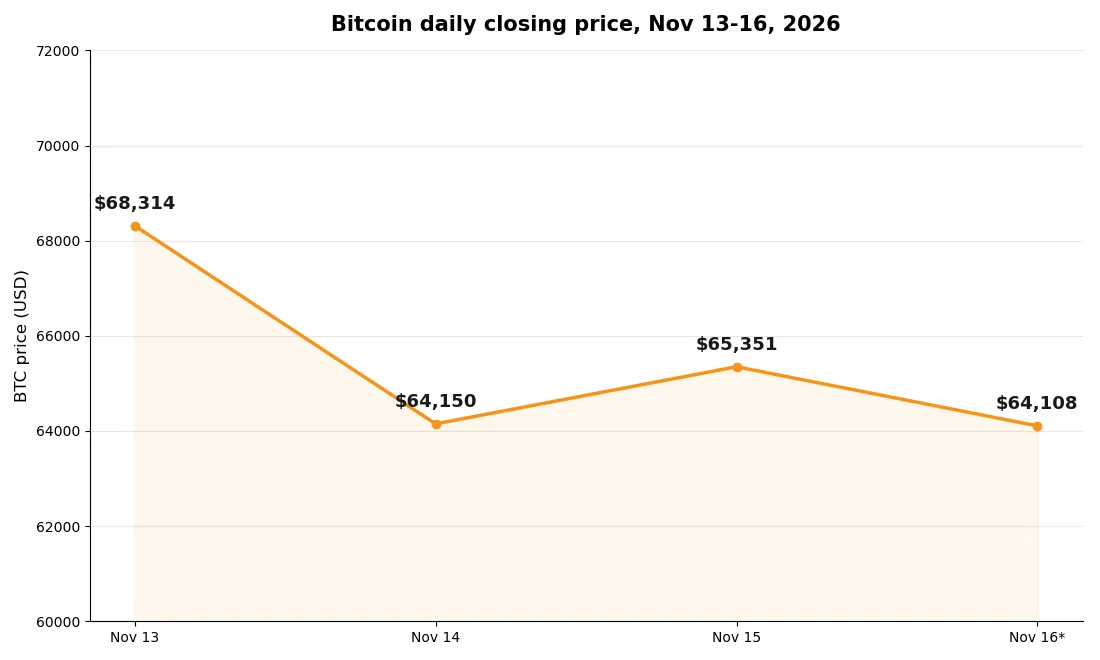
Here is the real example from this week. Bitcoin opened Friday, November 13, near $71,460 and traded near $64,108 by midday Monday, November 16.
That is a drop of about 10% in three days.
An invoice priced at 0.027987 BTC on Friday was worth $2,000 then and $1,794 on Monday. Same work, same client, $206 gone, and the only error was pricing in Bitcoin instead of dollars.
Your Setup in One Afternoon
You need three things: a wallet you control, a way to receive Lightning payments, and an invoicing tool. Set them up in this order, and test each one before a real client depends on it.
Step 1: Get a wallet you control
Start with a wallet where you hold the keys, not an exchange account. A mobile wallet works for small amounts, and a hardware wallet is the right home for anything you plan to keep.
Write down the recovery phrase on paper and store it somewhere safe. A screenshot of your seed phrase is a gift to whoever finds your phone.
Step 2: Claim a Lightning address
A Lightning address looks like an email address, such as yourname@getalby.com, and anyone can pay it from any Lightning wallet. It hides your long Bitcoin address and makes you look professional on an invoice.
Alby, Strike, and Zebedee all issue Lightning addresses in minutes. Pick one, test it with a tiny payment from your own wallet, and put it on your invoice template.
Step 3: Pick your invoicing tool
If you send one or two invoices a month, a Lightning address plus a simple invoice PDF is enough. If you send more, Zaprite or BTCPay Server earns its keep by tracking what is paid, what is late, and what each payment was worth in dollars.
Request Finance is another option for crypto-native invoicing, with a free plan for freelancers. Its paid plans start at $250 a month, so it only makes sense once your volume is serious.
Step 4: Send a test invoice to yourself
Before your first real client, invoice yourself $10 and pay it. Watch the payment land, check the dollar value recorded, and confirm the funds sit in the wallet you expect.
A test that costs you a few cents now saves you a panicked message to a client later. Do not skip it.
The Contract Clause That Protects You
Most freelancer contracts say nothing about crypto payments, and silence is where disputes grow. Four lines fix it.
Payment clause: Client pays the invoice amount in US dollars, settled in Bitcoin at the BTC/USD exchange rate at the time of payment. The client pays all network and transaction fees.
The freelancer is not responsible for changes in the Bitcoin price between the invoice date and the payment date.
Four lines, four protections. Currency, rate source, rate-setting time, and who pays the fee.
Add it to every contract before you send your first Bitcoin invoice. A client who refuses the clause is telling you they want you to carry their exchange-rate risk, and that is a client worth declining.
Taxes: Two Taxable Events, Not One
The IRS treats cryptocurrency as property, not currency. That single fact creates two tax events where freelancers expect one.
Event one happens when the payment lands. The Bitcoin you receive is ordinary business income at its dollar value on that day.
A $2,000 invoice paid in Bitcoin is $2,000 of income, and that value becomes your cost basis.
Event two happens when you sell or spend the Bitcoin. Sell your 0.031 BTC at $70,000 per coin and you have $2,170, which is a $170 capital gain.
Sell at $58,000 and you have $1,798, which is a $202 capital loss.
Keep a record of every payment: date, dollar value, amount of Bitcoin, and the wallet it landed in. Since January 1, 2025, the IRS requires basis tracking wallet by wallet, so pooled records no longer work.
If you later turn that Bitcoin into cash or everyday purchases, the same two-event logic applies. You can sell Bitcoin on P2P platforms or spend Bitcoin in everyday life, but each disposal is still a taxable event measured against the basis you recorded at receipt.
What about 1099 forms?
A US client should still send you a 1099-NEC for the dollar value of your work. Exchanges report your sales on Form 1099-DA.
Neither form replaces your own records, and neither one is tax advice. Talk to a CPA who knows crypto before you file, because the rules differ by country and they change often.
Mistakes That Cost Freelancers Real Money
Reusing one address for every client is the privacy mistake. Anyone who pays you can see every other payment on the blockchain, including your rates.
Keeping everything on an exchange is the custody mistake. Exchanges freeze accounts, and your rent money should never depend on a support ticket.
Forgetting the tax record is the expensive mistake. Reconstructing a year of payments from wallet history is miserable, and the IRS does not accept “I forgot” as a method.
Sending an invoice with no expiry is the quiet mistake. A Bitcoin invoice that never expires lets a client pay three weeks late at a price that no longer matches your quote.
Accepting a price in Bitcoin without a clause is the mistake this whole guide exists to prevent. Price in dollars, set the rate at payment time, and move on.
Frequently Asked Questions
These are the questions freelancers ask most about how to accept Bitcoin as a freelancer, answered plainly.
Do I need a business to accept Bitcoin as a freelancer?
No. You need a wallet you control and a way to send an invoice.
A sole freelancer can start with a Lightning address and a free invoicing tool, and formalize the business side later as volume grows.
How do I invoice a client who has never used Bitcoin?
Send a normal invoice priced in dollars, with a Bitcoin payment option and a QR code. Explain that the client can pay from any Bitcoin or Lightning wallet, and offer a card or bank transfer as a backup so the client never feels trapped.
What is the cheapest way to accept Bitcoin as a freelancer?
A direct Lightning address costs under a cent per payment, and BTCPay Server charges no platform fee at all. Both beat PayPal at 3.49% plus $0.49 and Upwork at about 10% on a $2,000 invoice.
Is Bitcoin income taxable for freelancers?
Yes. In the United States, the IRS treats Bitcoin received for work as ordinary income at its dollar value on the day you receive it.
Selling or spending that Bitcoin later is a second, separate capital gain or loss.
Can I get paid in Bitcoin for work I find on Upwork or Fiverr?
No, not through the platform. Upwork and Fiverr pay out in fiat only, and they take their fee first.
Bitcoin works for direct clients you invoice yourself, outside the marketplaces.
What happens if Bitcoin crashes after a client pays me?
You keep the Bitcoin, and its dollar value falls with the market. That is why you should price in dollars, set the exchange rate at payment time, and convert to cash quickly if you need the money for rent or bills.
Sources
- IRS Notice 2014-21: Virtual Currency Guidance
- BTCPay Server Documentation
- Zaprite: Bitcoin Invoicing
Conclusion: Take the $200 Back
Here is my honest take. Bitcoin will not make you a better freelancer, and it will not find you clients.
What it does is stop other people taking a cut of work you already did. Learning how to accept Bitcoin as a freelancer is mostly about avoiding three mistakes: pricing in Bitcoin, skipping the contract clause, and forgetting the tax record.
A $2,000 invoice is worth $2,000. PayPal keeps $70.29 of it, Upwork keeps $200, and Lightning keeps under a cent.
That is not a small difference, and over a year of invoices it becomes real money.
Start small. Claim a Lightning address today, add the payment clause to your next contract, and invoice one friendly client in Bitcoin.
If it works, make it your default. If it does not, you lost an afternoon, not a client.
Want the bigger picture first? Read our complete guide to accepting Bitcoin payments, check where you can spend Bitcoin in 2026, and see how to convert Bitcoin to gift cards when a store does not take crypto yet.
The full set of ways to pay with Bitcoin rounds out the picture.