



Key Takeaways
- A Bitcoin point of sale system is just a screen at your counter that shows a QR code. The customer scans it with a wallet app and pays. No special hardware is needed.
- Only three gateways offer a proper POS app in 2026: BTCPay Server at 0%, BitPay at 1 to 2% plus $0.25, and CoinGate at 1%. Every other gateway is online only.
- Lightning payments settle in under 2 seconds, while on-chain Bitcoin takes 10 to 60 minutes. That timing gap decides everything at a busy till.
- On $10,000 of monthly in-store sales, card processing costs about $300, BitPay costs about $200, CoinGate and Square (from January 2027) cost about $100, and BTCPay Server costs about $20 in hosting.
- Square finished switching on Bitcoin payments for its eligible US merchants on November 10, 2026. The fee is 0% through the end of 2026 and 1% from January 1, 2027.
A Bitcoin point of sale system sounds like expensive hardware. It is not.
It is a tablet on your counter, a QR code on its screen, and a customer with a phone.

This guide explains bitcoin point of sale systems in plain words. You will see how the payment flows, which three apps actually work at a real till, what each one costs on real sales, and how to set your counter up this week.
- Key Takeaways
- What Is a Bitcoin Point of Sale System?
- How a Bitcoin POS Payment Works
- The 3 POS Apps That Actually Work
- 1. BTCPay Server POS: Free and Fully Yours
- 2. BitPay POS: The Simplest Setup With Bank Payout
- 3. CoinGate POS: Best for Europe and Many Coins
- Square Bitcoin Payments: The Fourth Option Most Shops Already Own
- The Confirmation-Time Math That Decides It
- What It Costs: The Fee Math on $10,000 of Sales
- How to Set Up Your Counter: A Hands-On Walkthrough
- Hardware: What You Need and What You Do Not
- Common Mistakes at the Till
- FAQs
- Do I need special hardware to accept Bitcoin at my counter?
- How long does a customer wait for a Bitcoin POS payment?
- What is the cheapest Bitcoin POS system?
- Can customers pay with a card and Bitcoin on the same terminal?
- Do I need KYC to run a Bitcoin POS?
- What happens if the Bitcoin price moves after a sale?
- Your Next Step
- Sources
It also covers the one number most guides skip: how long a customer waits. A payment that takes 10 minutes kills a queue.
A payment that takes 2 seconds does not.
What Is a Bitcoin Point of Sale System?
A Bitcoin point of sale system lets a shop take Bitcoin from a customer standing at the counter. The cashier enters the price, the screen shows a QR code, and the customer scans it with a Bitcoin wallet app.
That is the whole transaction. The Bitcoin moves from the customer’s wallet to the shop’s wallet, and the till screen marks the sale as paid.

It differs from a card terminal in one big way. A card terminal reads a card and talks to a bank.
A Bitcoin POS never touches a bank. It talks to the Bitcoin network, or to the Lightning Network that runs on top of it.
Most crypto gateways cannot do this job. They work fine for online checkout, but they have no app for a physical counter.
Only three gateways offer a proper POS app in 2026: BTCPay Server, BitPay, and CoinGate.
Square is the fourth option, but it works differently. It built Bitcoin payments into its existing card terminals, so shops that already run Square get Bitcoin as one more button on the same screen.
How a Bitcoin POS Payment Works
The flow takes four steps, and the customer does most of the work. Your cashier only enters the amount and watches the screen.
First, the cashier rings up the sale as normal and enters the total in the POS app. The app converts the price into Bitcoin at the live exchange rate and builds a payment request.
Second, the screen shows a QR code. That code holds the payment address and the exact amount, so the customer cannot mistype anything.
Third, the customer opens any Bitcoin wallet app, scans the code, and taps confirm. The wallet sends the payment across the network.
Fourth, the POS screen flips to “paid” once the network confirms it. On Lightning, that takes under 2 seconds.
On chain, it takes 10 to 60 minutes, which is why the next section matters so much.
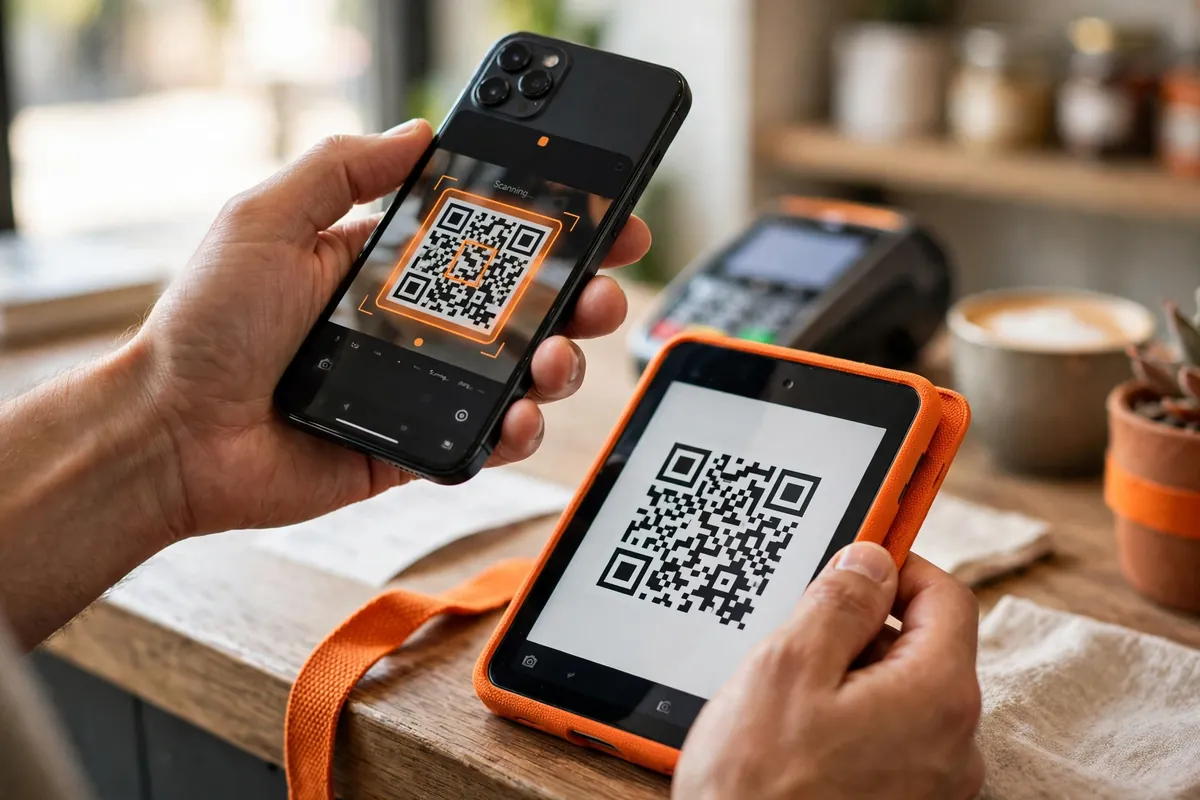
The customer needs a wallet app, and that is the only thing they need. Common choices are Phoenix or Wallet of Satoshi for Lightning, and the BitPay Wallet or Coinbase Wallet for on-chain payments.
Your shop needs a device with a screen. A cheap tablet works.
A spare phone works. Even a laptop works, though a tablet looks far more professional on a counter.
The 3 POS Apps That Actually Work
Three gateways ship a real POS app, and they suit three different kinds of shop. Here is how they compare, and then we will look at each one in detail.
The short version: BTCPay Server costs nothing and gives you full control, but you run the software yourself. BitPay costs the most and handles the paperwork.
CoinGate sits in the middle with the widest coin choice and European settlement.
| Feature | BTCPay Server | BitPay | CoinGate |
|---|---|---|---|
| Fee per sale | 0% | 1 to 2% plus $0.25 | 1% |
| Monthly cost | About $10 to $30 hosting | $0 | $0 |
| Lightning | Yes | Yes | Yes |
| Fiat settlement | No, Bitcoin only | Yes, USD, EUR, GBP | Yes, EUR, USD, GBP |
| KYC | None | Yes, 1 to 7 days | Yes |
| Coins | Bitcoin, Litecoin, Monero | 100 plus | 70 plus |
| Hardware | Any browser, tablet or phone | Phone, tablet, Verifone terminal | Phone or tablet, web based |
| Best for | Zero fees and full control | Simple setup and bank payout | Europe and many coins |
1. BTCPay Server POS: Free and Fully Yours
BTCPay Server is free, open-source software that you run on your own small server. Its point of sale app runs in any web browser, so you open it on a tablet at the counter and you have a working till.
The fee is 0%, forever. BTCPay Server never touches your money.
Payments go straight from the customer to a wallet you control.
The POS app is the most feature rich of the three. You can build a product catalog with names, prices, and photos, so staff tap items instead of typing amounts.
It supports custom amounts, tipping, and multiple currencies on screen.
It also supports Lightning out of the box, which is what makes it fast enough for a real queue. Version 1.12 added Bolt Card support, so regulars can tap an NFC card on your terminal instead of scanning a code each time.
The trade-off is setup. You deploy BTCPay Server on a small server, usually with a one-click install from a host like LunaNode, and you connect your own Lightning node or use a plugin like Breez that handles liquidity for you.
Plan on an afternoon for the first install, then almost no maintenance.
There is no fiat settlement. You receive Bitcoin and convert it yourself if you want dollars.
That suits shops that want to hold Bitcoin, or shops happy to convert once a week on an exchange.
Our step-by-step guide to setting up BTCPay Server walks through the whole install. If you can follow a setup wizard, you can run this.
2. BitPay POS: The Simplest Setup With Bank Payout
BitPay is the oldest crypto payment gateway, processing payments since 2011. Its POS app runs on iOS and Android, and it also plugs into Verifone card terminals, so shops that already rent that hardware can add crypto next to cards on the same device.
The fee runs 1 to 2% plus $0.25 per sale, on a volume tier. Small shops pay the higher end of that range, so check your tier before you commit.
What you get for the fee is convenience. BitPay handles the account, the compliance, and the conversion.
You can settle in dollars, euros, or pounds with next-business-day bank deposits in 38 countries.
BitPay supports more than 100 coins and has supported Lightning since April 2022. Its Quick Checkout runs in a browser on any phone or tablet, so you do not need its app if you prefer a simple screen.
The trade-off is control. BitPay holds the funds briefly, requires full KYC, and can freeze an account that breaks its rules.
That is the price of a hosted service.
Pick BitPay if you want the fastest path to a bank payout and you do not mind paying for it. It suits shops that take a few crypto payments a week and want zero technical work.
3. CoinGate POS: Best for Europe and Many Coins
CoinGate is a European gateway that supports more than 70 coins with a flat 1% fee and no monthly charge. Its POS app is fully web based: you open it on any device, enter the amount, and the customer scans the code.
CoinGate was one of the first major gateways to add Lightning, back in 2018, and every merchant gets Lightning by default. It holds a MiCA CASP licence from the Bank of Lithuania and operates in 61 countries.
One limit matters: the United States is excluded. CoinGate suits European shops, or shops anywhere else outside the US that want euro settlement by SEPA transfer.
Pick CoinGate if you run a shop in Europe, you want euro payouts, or your customers pay with coins beyond Bitcoin. It is the simplest of the three to run, since the whole POS lives in a browser tab.
Square Bitcoin Payments: The Fourth Option Most Shops Already Own
Square changed the picture in 2026. Instead of asking shops to adopt a crypto gateway, it added Bitcoin to the card terminals millions of shops already use.
Square launched Bitcoin payments for more than 4 million US merchants on November 10, 2025. It then switched the feature on automatically for eligible merchants, and it finished that rollout on November 10, 2026.
The customer pays by scanning a Lightning QR code on the Square screen. The merchant can settle in Bitcoin, in dollars, or in a mix of both.
There is no new hardware and no separate app.
The fee is 0% through December 31, 2026, then a flat 1% from January 1, 2027. That still beats the roughly 2.6% plus $0.10 a shop pays on a standard card tap.
Two limits apply. The feature covers US merchants only, and New York businesses are excluded because of that state’s BitLicense rules.
Single payments cap at $600, with a daily total of $20,000 per merchant.
If you already run Square, this is the easiest Bitcoin POS on the market. You change nothing at the counter, and your customers get a Bitcoin button at checkout.
If you do not run Square, do not switch your whole till just for Bitcoin. Pick one of the three gateway apps above instead.
The Confirmation-Time Math That Decides It
Fees get all the attention, but time decides whether a Bitcoin POS works at a real counter. A card payment clears in about 3 seconds.
Your Bitcoin setup must come close, or the queue behind your customer will hate you.
On-chain Bitcoin confirms in about 10 minutes per block, and most merchants wait for at least one confirmation. In practice, that means 10 to 60 minutes before the till can call the sale paid.
Lightning confirms in under 2 seconds. The payment routes through payment channels instead of waiting for a block, and the till screen flips to paid before the customer puts the phone away.
That gap is the whole story. At a coffee shop with a morning rush, on-chain Bitcoin fails.
At a furniture store where one sale an hour is normal, on-chain works fine because nobody minds waiting.
Some small shops accept on-chain payments with zero confirmations, which means they hand over the goods the second the payment is broadcast. That is fast, but it carries a double-spend risk, so keep it for small amounts from people you trust, or skip it entirely.
| Payment method | Time to confirm | Works at a busy till? | Best for |
|---|---|---|---|
| Lightning | Under 2 seconds | Yes | Cafes, bars, fast retail |
| Card tap | About 3 seconds | Yes | Everyday benchmark |
| On-chain, 1 confirmation | About 10 minutes | No | High value, slow shops |
| On-chain, 0 confirmations | Instant, but risky | Risky | Small trusted sales only |
The rule is simple. If your shop serves a queue, use Lightning.
All three POS apps support it, and Square uses it by default.
If your shop sells big items slowly, on-chain is fine. A customer buying a $2,000 bike will not mind a 10-minute confirmation while you fit the frame.
What It Costs: The Fee Math on $10,000 of Sales
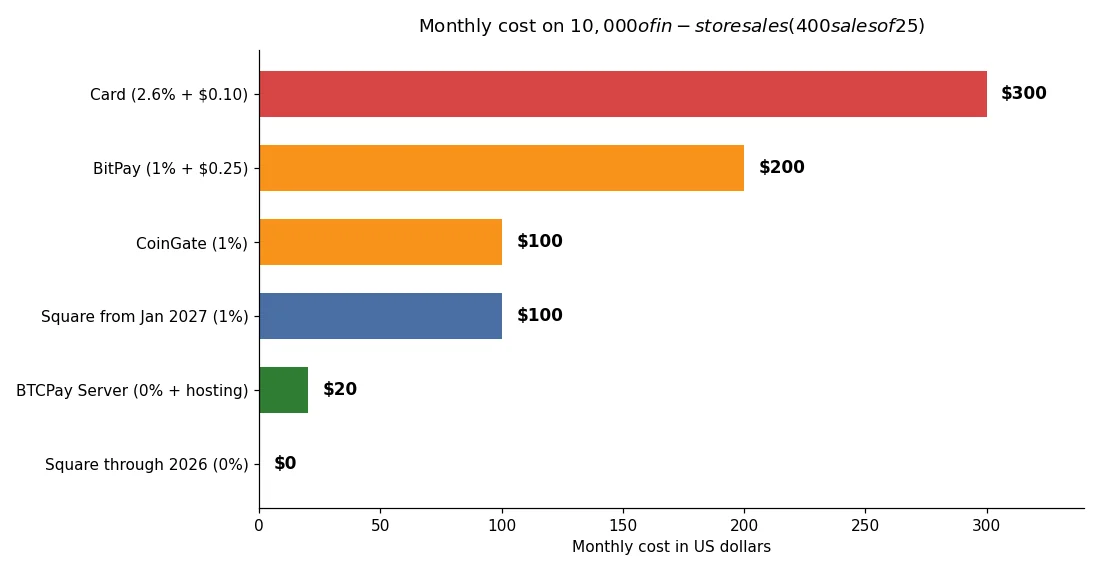
Fee percentages look tiny until you run them against a real month. Here is the math for a shop that takes $10,000 in Bitcoin sales a month, split into 400 sales of $25 each.
The numbers come straight from the published rates. Card processing at 2.6% plus $0.10 per sale costs $260 in percentage fees and $40 in per-sale fees, for a total of $300.
BitPay at its 1% tier costs $100 in percentage fees and $100 in per-sale fees, for a total of $200. Note that BitPay’s rate is volume tiered, so a small shop may pay 2% instead, which would push the total to $300.
CoinGate at a flat 1% costs $100, with no per-sale fee. Square from January 2027 also costs $100 at its flat 1%.
Square through the end of 2026 costs $0.
BTCPay Server costs $0 in fees. The only cost is the server, about $10 to $30 a month, so we count $20 here.
That makes it the cheapest option by a wide margin once your volume grows.
| Option | Fee per $25 sale | Monthly cost on $10,000 | You keep |
|---|---|---|---|
| Card (2.6% plus $0.10) | $0.75 | $300 | $9,700 |
| BitPay (1% plus $0.25) | $0.50 | $200 | $9,800 |
| CoinGate (1%) | $0.25 | $100 | $9,900 |
| Square from Jan 2027 (1%) | $0.25 | $100 | $9,900 |
| BTCPay Server (0% plus hosting) | $0.05 | $20 | $9,980 |
| Square through 2026 (0%) | $0.00 | $0 | $10,000 |
Scale it up and the gap grows. At $50,000 a month, card processing costs about $1,500, while BTCPay Server still costs about $20 in hosting.
Scale it down and the picture flips. At $500 a month, the $20 hosting bill beats the purpose of a 0% fee, and a hosted app like CoinGate or Square wins on simplicity.
Match the tool to your volume. Low volume means pick the simplest setup.
High volume means the 0% option pays for its setup afternoon many times over.
How to Set Up Your Counter: A Hands-On Walkthrough
This is the part most guides leave vague, so here is the actual sequence. We will use BTCPay Server because it is the cheapest, but the steps rhyme for every app.
First, get a tablet and a stand. Any tablet from the last five years works.
Put it where the customer can see the screen and reach it with a phone, and plug it in so it never dies mid-shift.
Second, deploy BTCPay Server. Use a one-click install from a host like LunaNode, or install it with Docker on a small server.
The installer asks for a domain name and an admin email, then builds the server for you.
Third, create a store and connect your wallet. Paste your wallet’s xpub when it asks.
That is a watch-only key, so BTCPay Server can generate fresh addresses without ever touching your private keys.
Fourth, turn on Lightning. You can run your own Lightning node inside BTCPay Server, or use the Breez plugin, which handles channel liquidity for you.
Test it with a tiny payment from your own wallet before you serve a customer.
Fifth, build your POS app. In BTCPay Server, open the POS app and create a new one.
Add your items with names and prices, set your currency, and switch on tipping if you want it.
Sixth, open the POS link on your tablet and bookmark it to the home screen. It now behaves like an app.
Lock the tablet to that page with guided access or kiosk mode, so a curious customer cannot wander into your settings.
Seventh, run a test sale. Buy something from your own shop with your own wallet, pay over Lightning, and watch the till mark it paid.
Check that the Bitcoin lands in your wallet and that the sale shows in your BTCPay Server dashboard.
Only then tell your customers. A sign that says “Bitcoin accepted here” works, and a small note on the receipt works better.
Most customers will not ask until they see the sign.
If you would rather skip the server work, the hosted route takes 15 minutes. Create a CoinGate or BitPay account, finish the KYC check, open the POS app on your tablet, and run the same test sale.
For the wider picture of taking Bitcoin across your whole business, our complete business guide to accepting Bitcoin payments covers online checkout, invoicing, and bookkeeping next to this counter setup.
Hardware: What You Need and What You Do Not
You need less hardware than you think. A tablet, a stand, a charger, and a stable internet connection cover almost every shop.
You do not need a dedicated crypto terminal. No mainstream card terminal maker sells a Bitcoin-only device, and the three gateway apps all run in a browser.
The one exception is BitPay on Verifone. If your shop already rents Verifone terminals, BitPay can add crypto to the same device, so the customer sees Bitcoin next to cards on a screen they already know.
Wi-Fi matters more than hardware. A Lightning payment needs a live connection to confirm in 2 seconds.
If your shop Wi-Fi drops, your till stalls, so keep a phone hotspot as a backup.
A receipt printer helps but is not required. BTCPay Server can print receipts, and version 1.12 improved receipt printing for the POS app.
A printed receipt with the Bitcoin amount and the dollar value at the time of sale also makes your bookkeeping far easier.
For regulars, Bolt Cards are worth a look. These are NFC cards that customers tap on your terminal to pay from a Lightning balance, with no phone and no QR code.
BTCPay Server can issue them directly since version 1.12.
Common Mistakes at the Till
Most shops that set up a Bitcoin POS still lose sales to small, fixable errors. Check your counter against this list before your first customer pays.
First, accepting on-chain payments at a busy till. A customer who waits 10 minutes blocks the queue and never pays in Bitcoin again.
Turn Lightning on before you go live.
Second, no sign. Customers cannot pay in Bitcoin if they do not know you accept it.
Put a small sign on the counter and a line on your menu or price list.
Third, staff who have never used it. Run one practice sale with every cashier.
A cashier who fumbles with the tablet in front of a customer kills the sale and the shop’s confidence.
Fourth, no test sale. Every POS app can fail quietly after an update, so test it monthly with a tiny payment from your own wallet.
Fifth, reusing one address. If your setup shows the same QR code all day, anyone can look that address up and see your takings.
BTCPay Server and the hosted gateways generate a fresh address per sale, so let them.
Sixth, forgetting the books. Record the dollar value of every sale at the moment it happens.
BTCPay Server exports each payment with its fiat value at the time, which makes this painless.
Seventh, ignoring the refund question. Bitcoin payments cannot be reversed like a card charge.
Decide your refund policy before your first sale: refund in Bitcoin at the current rate, or refund in cash for the dollar amount on the receipt.
If you also sell online, our Shopify Bitcoin guide plugs the same tools into an online store in 7 steps. And if you want the full comparison behind the fee numbers in this guide, our Bitcoin payment processors compared article breaks down BTCPay, BitPay, and Coinbase Commerce side by side.
FAQs
These are the questions shop owners ask most about Bitcoin point of sale systems. The short answers sit below, and the rest of the guide has the detail.
Do I need special hardware to accept Bitcoin at my counter?
No. A tablet or phone with a browser is enough.
The POS app shows a QR code, and the customer scans it with a wallet app.
The only exception is BitPay on Verifone terminals, which adds crypto to hardware a shop already rents. No shop needs to buy a dedicated Bitcoin terminal.
How long does a customer wait for a Bitcoin POS payment?
Under 2 seconds on Lightning, which is faster than a card tap. On-chain Bitcoin takes 10 to 60 minutes, so it does not work at a busy till.
Use Lightning for any shop with a queue. Save on-chain payments for slow, high-value sales where the customer does not mind waiting.
What is the cheapest Bitcoin POS system?
BTCPay Server costs 0% per sale, plus about $10 to $30 a month for hosting. On $10,000 of monthly sales, that works out to about $20 a month in total.
Square is free through the end of 2026 for eligible US merchants, then 1% from January 2027. CoinGate charges a flat 1% with no monthly fee.
Can customers pay with a card and Bitcoin on the same terminal?
Not on one device, except for BitPay on Verifone and Square. Every other setup runs a separate Bitcoin POS next to the card terminal.
The customer picks a payment method, and the cashier uses the matching screen. It takes one extra tablet on the counter, nothing more.
Do I need KYC to run a Bitcoin POS?
It depends on the tool. BTCPay Server needs no KYC at all, since you run it yourself and nobody holds your money.
BitPay and CoinGate both require KYC, since they hold funds briefly and settle to your bank. Square uses the verification you already passed as a Square merchant.
What happens if the Bitcoin price moves after a sale?
The price locks at the moment of the sale. The POS app converts the dollar price to Bitcoin at the live rate and builds the payment request from that figure.
If you hold the Bitcoin, later price moves are yours to keep or lose. If you settle to fiat, BitPay, CoinGate, or Square converts it at the point of sale, so your books stay in dollars.
Your Next Step
You now know how bitcoin point of sale systems work, which three apps do the job, and what each one costs on real sales. The setup takes an afternoon at most, and a tablet you already own can be the terminal.
If you already run Square in the US, switch Bitcoin on in your dashboard and test it this week while the fee is still 0%. If you want zero fees for good, set up BTCPay Server and run the test sale in this guide.
If you want the simplest hosted setup, open a CoinGate account and put its POS app on a tablet by lunchtime. Then run one real sale with your own wallet before you put the sign up.
Whichever route you pick, turn Lightning on first. A 2-second payment feels like a card tap, and that is what keeps customers coming back.
And if you want to see how the same tools work for a shop with no counter at all, our guide to accepting Bitcoin in a physical store covers the full in-store setup, from signage to staff training. For customers who want to pay with Lightning anywhere, our guide on how to pay with Bitcoin Lightning shows them how it works from their side of the counter.