



This avalon nano 3 miner guide gives you the short answer first. The Avalon Nano 3 is a neat little home miner, but at the Nov 22, 2026 hashprice it loses money on normal household electricity in every power mode.
That does not make it a bad buy for everyone. It makes it a buy that lives or dies on price.

Pay too much and you own a warm desk ornament. Pay the right price and you own a simple, quiet way to run real Bitcoin mining hardware at home.
- What the Avalon Nano 3 Is
- Avalon Nano 3 Specs at a Glance
- Avalon Nano 3 vs Nano 3S: The Comparison That Decides It
- Avalon Nano 3 Miner Guide: Earnings in 2026
- The Three Power Modes, Explained
- Noise: What the Spec Sheet Does Not Tell You
- How to Set Up the Avalon Nano 3
- Step 1: Unbox and plug it in
- Step 2: Connect it to Wi-Fi
- Step 3: Pick a mining pool
- Step 4: Enter your Bitcoin wallet address
- Step 5: Choose a power mode and check the hashrate
- Solo Mining With the Nano 3: Your Real Odds
- Who Should Buy It, and Who Should Skip It
- The Price Rule: What to Pay for a Nano 3 in 2026
- Common Mistakes With the Nano 3
- The Bottom Line
- FAQs
- Is the Avalon Nano 3 profitable in 2026?
- How much Bitcoin can the Avalon Nano 3 mine per day?
- Should I buy the Avalon Nano 3 or the Nano 3S?
- How loud is the Avalon Nano 3?
- Can the Avalon Nano 3 mine solo?
- Does the Avalon Nano 3 work as a space heater?
- Sources
Bitcoin trades near $60,000 on Nov 22, 2026, after crashing to about $55,130 on Nov 21 and bouncing back. Hashprice sits at $27.67 per PH/s per day, down from about $33 at the start of November.
Both numbers feed every calculation in this guide, and both change daily, so check them again before you order.
Key takeaways
- What it is: a Canaan home ASIC miner with 4 TH/s at up to 140W, made for a desk, not a warehouse.
- Daily earnings: about $0.04 to $0.11 gross per day at the Nov 22, 2026 hashprice, before power costs.
- Daily profit: negative in all three power modes at 10 cents per kWh, from minus $0.11 to minus $0.23 a day.
- Break-even power price: about 3 cents per kWh. Almost no household tariff is that cheap.
- The verdict: buy it only under about $140, and only if you want a hobby miner or a heater that pays a little back. At its $199 list price, skip it and buy the Nano 3S instead.
- Solo odds: about 1 in 1.8 million per day of finding a block alone, so join a pool.
What the Avalon Nano 3 Is
The Avalon Nano 3 is a small SHA-256 ASIC miner from Canaan, a publicly listed company. It mines Bitcoin and nothing else, and it plugs into a normal wall socket.
Think of it as a sealed box about the size of a paperback book. It measures 205 by 115 by 57 mm and weighs about 725 grams.

It sits on a desk, connects over Wi-Fi, and runs through a phone app.
Canaan sells it as a home miner and a small space heater in one. That claim needs a reality check.
It draws at most 140W, so it gives off at most 140W of heat, about the same as two old incandescent bulbs. It can take the chill off a small room, but it will not heat a house.
If you are new to this, start with our complete beginner’s guide to mining Bitcoin. It explains what mining is, how pools work, and what a home setup really needs.
This guide stays focused on one machine and whether it is worth your money.
Avalon Nano 3 Specs at a Glance
Here are the numbers Canaan publishes, with the two that matter most in bold. Hashrate is the work the machine does, and power draw is what you pay for.
| Spec | Avalon Nano 3 |
|---|---|
| Manufacturer | Canaan Inc. |
| Algorithm | SHA-256 (Bitcoin) |
| Hashrate | 4 TH/s |
| Max power | 140W |
| Efficiency | 35 J/TH |
| Power modes | 65W, 100W, 140W |
| Power supply | USB-C PD, 28V, 5A |
| Noise (official) | 33 to 36 dB |
| Size | 205 x 115 x 57 mm |
| Weight | About 725 g |
| Connectivity | Wi-Fi |
| List price | About $199 |
The efficiency number tells the story. At 35 joules per terahash, the Nano 3 burns far more power per unit of work than a modern machine.
The Nano 3S does the same 140W for 6 TH/s, which works out to 23.3 J/TH. Open-source boards like the Bitaxe run near 17 J/TH.
Efficiency is not the whole story for a home miner, but it sets the ceiling. A less efficient machine needs cheaper power to break even, and cheap power is the one thing most homes do not have.
Avalon Nano 3 vs Nano 3S: The Comparison That Decides It
You cannot judge the Nano 3 on its own. Its successor, the Nano 3S, costs nearly the same money and does 50% more work on the same power.
That is the whole buying decision.
| Feature | Avalon Nano 3 | Avalon Nano 3S |
|---|---|---|
| Hashrate | 4 TH/s | 6 TH/s |
| Max power | 140W | 140W |
| Efficiency | 35 J/TH | 23.3 J/TH |
| Noise (official) | 33 to 36 dB | 33 to 40 dB |
| Noise on high (measured) | 50 to 56 dB | High 30s dB |
| Size | 205 x 115 x 57 mm | 205 x 115 x 58.5 mm |
| Weight | About 725 g | About 860 g |
| Best price seen Nov 2026 | About $199 list | $215 |
| Price per TH/s | About $49.75 | About $35.83 |
The 3S wins on every number that affects your wallet. It earns about 50% more per day, it costs the same to run, and it is quieter on high mode.
Reviewers measured the older Nano 3 at 50 to 56 dB on high, which is a gaming laptop under load. The 3S measures in the high 30s on high, closer to a small PC fan.
Canaan now lists the Nano 3 off sale on its own shop, and the 3S shows off sale there too. Both machines still sell through resellers.
The Nano 3’s best recent street price is its $199 list price, while the 3S sells for $215 at AsicProfit and $219 at SoloSatoshi, down from $299.99.
That $16 gap is the problem. You pay almost the same money and get a third less hashrate.
Our guide to whether mining still pays in 2026 makes the same point at a bigger scale. Hardware price decides profit more than anything else once power costs are fixed.
Avalon Nano 3 Miner Guide: Earnings in 2026
Now the honest math. Hashprice is the pay rate for hash power, and on Nov 22, 2026 it is $27.67 per PH/s per day, according to the Luxor Hashrate Index.
That equals $0.02767 per TH/s per day.
Multiply that by the Nano 3’s hashrate and you get gross revenue before power, pool fees, or downtime. Then subtract the power bill.
We ran the numbers at 10 cents per kWh, a typical household rate, and the result is a loss in every mode.
| Power mode | Hashrate | Power | Gross per day | Power cost per day | Net per day | Net per month |
|---|---|---|---|---|---|---|
| Low | About 1.5 TH/s | 65W | $0.04 | $0.16 | Minus $0.11 | Minus $3.43 |
| Medium | About 3 TH/s | 100W | $0.08 | $0.24 | Minus $0.16 | Minus $4.71 |
| High | 4 TH/s | 140W | $0.11 | $0.34 | Minus $0.23 | Minus $6.76 |
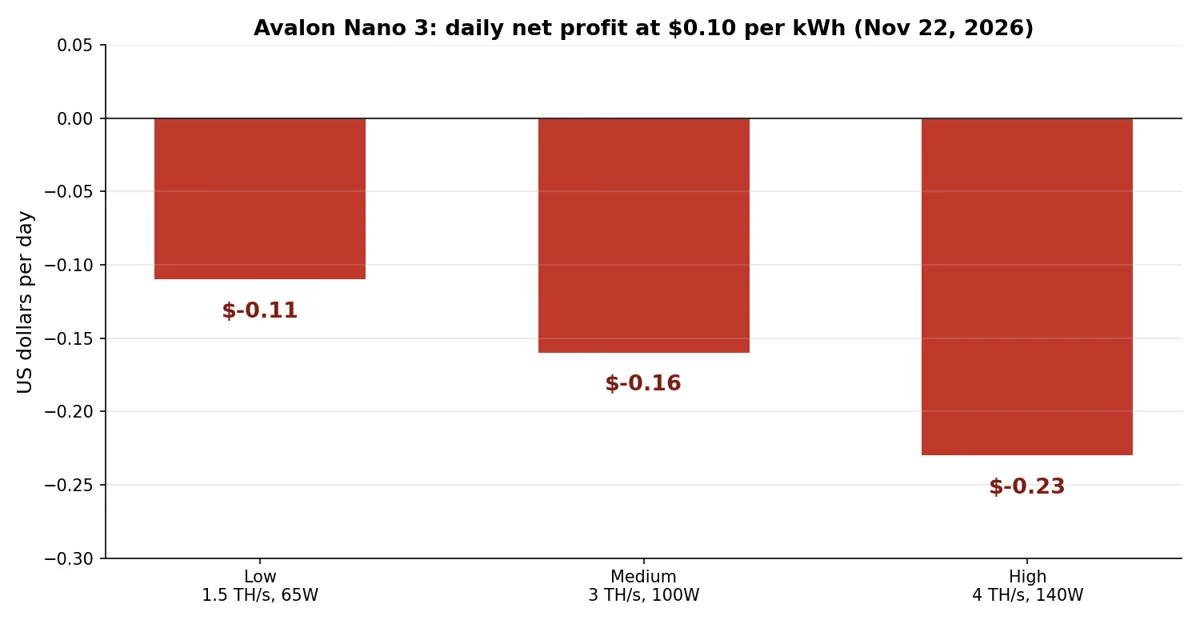
Daily net profit by power mode at $0.10 per kWh, Nov 22, 2026. Calculated from Luxor hashprice of $27.67 per PH/s per day.
Read that table twice before you buy. High mode earns the most Bitcoin and loses the most money, because the power bill grows faster than the revenue.
Low mode loses the least, but it still loses. No mode pays for itself at 10 cents per kWh.
The break-even power price is about 3 cents per kWh in every mode. Divide daily gross revenue by daily power use and you get 2.7 cents in low mode, 3.5 cents in medium, and 3.3 cents in high.
Almost no household tariff sits that low, and even cheap industrial power rarely does.
At free power, the picture flips but stays slow. High mode grosses about $3.32 a month, so a $199 machine takes about 60 months, or five years, to pay for itself.
That assumes hashprice never falls and the machine never breaks. Both assumptions are generous.
These numbers match the independent calculators. CoinWarz puts the Nano 3S, the faster machine, at minus $0.18 a day at 10 cents per kWh.
If the better machine loses money, the older one loses more.
The Three Power Modes, Explained
The Nano 3 does not run at one speed. It has three power modes, and you pick one when you set it up.
The mode you choose sets the hashrate, the power draw, and the noise, so it is really a choice about where the machine lives.
Low mode: the bedroom setting
Low mode draws about 65W and delivers roughly 1.5 to 2 TH/s. The fan barely spins, and the official noise figure of 33 to 36 dB is honest here.
It sounds like a soft hush you forget is there.
This is the mode for a bedroom or a shared room. It earns the least Bitcoin, about $0.04 a day gross, but it also loses the least money.
If you run a Nano 3 at all, this is where most people should leave it.
Medium mode: the everyday default
Medium mode draws about 100W for roughly 3 TH/s. Hashrate Index measured 2.97 TH/s here, so the figure holds up.
Noise rises a little, but most people still find it easy to live with.
This is the balanced choice, and it is where most owners settle. You get three quarters of the machine’s hashrate for about 70% of its power draw.
The daily loss at 10 cents per kWh is about $0.16.
High mode: full power, full noise
High mode draws the full 140W and delivers the full 4 TH/s. This is the mode in the marketing photos, and it is the loudest one by far.
Hashrate Index measured 50 to 56 dB on high, which is a gaming laptop under load.
High mode belongs in a utility room, a garage, or a corner nobody sleeps near. It is not a desk setting, and it is not a bedroom setting.
It also loses the most money per day, about $0.23 at 10 cents per kWh, so only run it here if you have very cheap power or you simply want the most hashrate.
Noise: What the Spec Sheet Does Not Tell You
Canaan prints 33 to 36 dB on the Nano 3 box, and that number is real. It is also the low-mode number.
The spec sheet does not shout about high mode, and high mode is where buyers get surprised.
Independent testing tells the fuller story. Hashrate Index measured 50 to 56 dB on high, and reviewers describe it as a steady fan roar rather than a whine.
That is fine in a utility room and very much not fine next to your head on a work call.
The Nano 3S fixed this. Reviewers measure it in the high 30s on high mode, which is a normal small fan sound.
If noise matters to you, and it should in a home, that alone is a reason to pick the 3S.
Before you buy any home miner, read our guide to mining Bitcoin at home in 2026. It covers placement, heat, and the practical setup mistakes that first-time buyers make.
How to Set Up the Avalon Nano 3
Setup is the Nano 3’s best feature. Canaan built it for people who have never touched a miner, and it shows.
No command line, no assembly, and no extra parts to buy.
Here is the whole process, start to finish. It takes about 15 minutes if your Wi-Fi password is handy.
Step 1: Unbox and plug it in
Take the miner and its GaN power adapter out of the box. Plug the USB-C cable into the miner first, then plug the adapter into the wall.
Push the connector in firmly until it sits flush.
Check the plug twice. Canaan has received limited reports of USB-C connectors overheating or melting on Nano 3S units under continuous high load, especially with partly seated plugs or high humidity.
The Nano 3 uses the same connector and the same 140W draw, so a loose plug is the one thing you must not ignore.
Step 2: Connect it to Wi-Fi
Download the Canaan app on your phone and follow its prompts to find the miner on your network. The Nano 3 connects over Wi-Fi, so put it within good range of your router.
A weak signal means dropped shares and lost earnings.
If your router sits far away, use a Wi-Fi extender or move the miner closer. Owners of the original Nano 3 reported Wi-Fi dropouts, and a stable connection is worth more than a perfect spot on the shelf.
Step 3: Pick a mining pool
Choose a pool in the app and enter its address. A pool combines your hashrate with thousands of other miners and pays you small, regular amounts.
Solo mining with 4 TH/s is a lottery ticket, not a plan, and we work out the real odds below.
If you have never joined a pool, our guide to how Bitcoin mining works explains pools, shares, and payouts in plain language. Pick a large, well-known pool with low fees and a payout threshold you can actually reach.
Step 4: Enter your Bitcoin wallet address
Enter the Bitcoin address where the pool should send your earnings. Double-check every character, and send a tiny test amount first if your pool allows it.
A wrong address means your Bitcoin goes nowhere, and nobody can reverse it.
Step 5: Choose a power mode and check the hashrate
Pick low, medium, or high mode in the app, then watch the dashboard for 10 to 15 minutes. The hashrate should settle near the figure for your mode.
If it sits far below, check your Wi-Fi signal and your power adapter before anything else.
Solo Mining With the Nano 3: Your Real Odds
Solo mining means you try to find a block alone and keep the whole 3.125 BTC reward. At $60,000 per Bitcoin, that reward is worth about $187,500.
It sounds exciting, and the math says to forget it.
Here is the calculation, done with the Nov 22, 2026 numbers. The Bitcoin network runs at about 1,030 EH/s, which is 1,030,000,000 TH/s.
Your 4 TH/s is about 0.0000000039 of the network.
The network finds about 144 blocks a day. Multiply your share by 144 and your chance of finding a block on any given day is about 1 in 1.8 million.
The expected wait is about 4,900 years.
Owners have won the solo lottery with small miners, including a Nano 3S in 2026, and those stories travel fast. They travel fast because they are rare, not because they are likely.
Treat solo mining as a fun gamble with money you can afford to lose, never as an income plan.
If you want the full comparison, our mining hub covers solo mining versus pool mining as part of the beginner’s guide. The short version is simple.
Pools pay small and steady, solo pays huge and almost never.
Who Should Buy It, and Who Should Skip It
Every miner has a buyer it fits and a buyer it disappoints. The Nano 3 is no different, and the line between them is mostly about what you want from it.
Buy it if:
- You want a simple first miner and you accept that it is a hobby, not an income.
- You find one well under $140, which is the fair price worked out below.
- You have power under 3 cents per kWh, or free power from solar you already own.
- You want a quiet low-mode miner for a bedroom or office, and you will run it on low.
- You like the heater idea and you value the Bitcoin it earns as a bonus, not a return.
Skip it if:
- You want to make money. At 10 cents per kWh it loses money in every mode.
- You pay anywhere near $199. The Nano 3S costs about the same and earns 50% more.
- You need it quiet on high mode. It measures 50 to 56 dB there.
- You want to tinker. The firmware is closed, with no undervolting or overclocking.
- You want a solo lottery ticket. A Bitaxe home miner costs less and plays the same game.
The Price Rule: What to Pay for a Nano 3 in 2026
This is the exclusive rule no other Nano 3 review gives you, and it is the whole verdict in one number. Price the Nano 3 by the hashrate, not by the box.
The Nano 3S sells for $215 and delivers 6 TH/s, which is about $35.83 per TH/s. The Nano 3 delivers 4 TH/s, so its fair price on the same basis is 4 times $35.83, or about $143.
Pay more than that and you are paying extra for less machine.
At its $199 list price, the Nano 3 costs $49.75 per TH/s, nearly 40% more per unit of work than the 3S. That is why the verdict is so blunt.
At $199, skip it. Under $140, it is a fair hobby buy.
Under $100, it is a good one.
Remember that Canaan lists the Nano 3 off sale on its own shop. The units on sale now come from resellers, so check the seller, the warranty, and the plug type for your country before you pay.
A cheap miner from a seller with no returns policy is not cheap.
Common Mistakes With the Nano 3
Most Nano 3 disappointments come from the same few mistakes, and all of them are easy to avoid. Here are the ones that cost buyers the most.
First, buyers run it on high mode in a bedroom and then complain about the noise. The 33 dB figure on the box is the low-mode figure, so match the mode to the room.
Low for bedrooms, high for utility rooms.
Second, buyers count gross revenue as profit and forget the power bill. At 10 cents per kWh, high mode costs $0.34 a day in power and earns $0.11.
Always subtract power before you call anything a profit.
Third, buyers point it at a solo pool and wait for a block that never comes. With odds near 1 in 1.8 million a day, a pool is the only setup that pays regularly.
Solo is a lottery ticket, not a strategy.
Fourth, buyers ignore the USB-C connector. Push it in firmly, keep the adapter ventilated, and check it now and then for heat or discoloration.
A melted connector ends the hobby fast.
Fifth, buyers forget tax. Mined Bitcoin is income in most countries, even the small amounts a home miner earns.
Our guide to how Bitcoin miners are taxed covers the hobby versus business line, and it is worth reading before your first payout.
The Bottom Line
The Avalon Nano 3 is a well-made little machine with an honest problem. It does 4 TH/s on 140W in a market where its own successor does 6 TH/s on the same power, and at the Nov 22, 2026 hashprice it loses money on normal household electricity.
Buy it only if the price is right, under about $140, and only if you want a hobby miner, a quiet desk machine, or a small heater that pays a little back. If you pay $199, or if you want profit, buy the Nano 3S instead.
And if you want to understand the bigger picture first, start with our story on why Bitcoin now trades below what it costs to mine one, then come back and run your own numbers.
FAQs
Here are the questions buyers ask most about the Nano 3, with straight answers.
Is the Avalon Nano 3 profitable in 2026?
No, not on normal household electricity. At the Nov 22, 2026 hashprice of $27.67 per PH/s per day, the Nano 3 grosses about $0.04 to $0.11 a day and loses $0.11 to $0.23 a day after power at 10 cents per kWh.
It only breaks even on power under about 3 cents per kWh.
How much Bitcoin can the Avalon Nano 3 mine per day?
About 0.0000018 BTC a day on high mode at the Nov 22, 2026 hashprice, worth about $0.11. That is roughly 0.000055 BTC a month, or about $3.32, before power costs and pool fees.
Should I buy the Avalon Nano 3 or the Nano 3S?
Buy the Nano 3S in almost every case. It delivers 6 TH/s against the Nano 3’s 4 TH/s on the same 140W, it is quieter on high mode, and it costs about the same, $215 against $199.
Only buy the Nano 3 if you find one under about $140.
How loud is the Avalon Nano 3?
About 33 to 36 dB on low mode, which is quiet enough for a bedroom. On high mode, independent testing measured 50 to 56 dB, which is a gaming laptop under load and too loud for a bedroom or a work call.
Can the Avalon Nano 3 mine solo?
Yes, but your odds are about 1 in 1.8 million per day at the Nov 22, 2026 network hashrate of about 1,030 EH/s. The expected wait for a block is about 4,900 years.
Join a mining pool if you want regular payouts.
Does the Avalon Nano 3 work as a space heater?
Only for a small room. It draws at most 140W, so it gives off at most 140W of heat, about the same as two old incandescent bulbs.
It can take the chill off a desk area, but it will not heat a house or a large room.