



You can accept Bitcoin payments in a physical store with a tablet, a QR code, and a Lightning wallet. A customer scans the code, taps confirm, and the money lands in seconds.
That is the whole trick. The hard part is picking the right tool, training your staff, and keeping clean records.

This guide runs one real $40 sale through every common route. You will see the exact fee on each one, the wait time your customer faces, and the steps to set it up this week.
- How a Bitcoin Payment Works at the Till
- The $40 Counter Test: What Each Route Really Costs
- Lightning vs On-Chain: The Wait-Time Math
- The Three POS Tools Worth Your Time
- BTCPay Server POS: Zero Fees, Full Control
- BitPay POS: The Easiest Start
- CoinGate POS: The Best Fit for Europe
- Setting Up Your Counter in One Day
- What You Need at the Counter
- Staff Training: The Part Most Guides Skip
- When a Payment Fails in the Middle of a Sale
- Refunds When There Are No Chargebacks
- Tax Records: One Line Per Sale
- Common Mistakes Shop Owners Make
- FAQs
- The Bottom Line
- Sources
Key Takeaways
- Lightning settles in under 2 seconds. On-chain Bitcoin takes 10 to 60 minutes, so never use it at the till.
- BTCPay Server POS charges 0 percent. BitPay and CoinGate charge 1 percent, while cards take 2.5 to 3 percent.
- On a $40 sale, you keep $40.00 with BTCPay, $39.60 with BitPay or CoinGate, and $38.80 to $39.00 with a card.
- You need a tablet, a Lightning wallet or POS app, and a simple refund rule. No special hardware is required.
How a Bitcoin Payment Works at the Till
Your staff member types $40 into the POS app. The app shows a QR code with the amount built in.
The customer opens any Bitcoin wallet and scans the code. The wallet shows the amount, the customer confirms, and the payment moves.
Your screen marks the sale paid. With Lightning, that happens in under 2 seconds, which is faster than a card tap.
Three things happen behind the scenes. The app creates a fresh invoice, the network settles the payment, and the app logs the sale with its dollar value.

If you want the full picture for online sales too, read our complete guide to accepting Bitcoin payments. This article stays at the counter, where speed matters most.
The $40 Counter Test: What Each Route Really Costs
Most guides list fees as percentages and stop there. Percentages hide the real cost, so I ran one $40 sale through each route and wrote down the dollars.
Here is the sale: a customer buys a $40 item and pays with Bitcoin. The card column shows what the same sale costs through a normal card terminal.
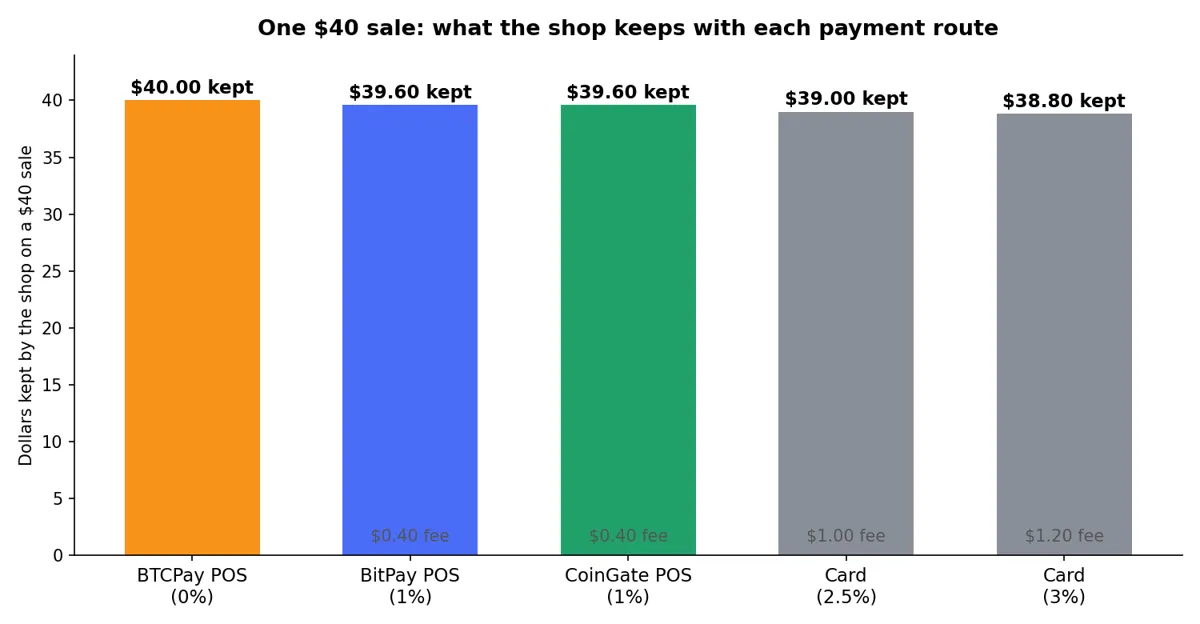
| Route | Fee | You Keep | Settles As |
|---|---|---|---|
| BTCPay Server POS | 0% ($0.00) | $40.00 | Bitcoin |
| BitPay POS | 1% ($0.40) | $39.60 | US dollars or Bitcoin |
| CoinGate POS | 1% ($0.40) | $39.60 | Euros, US dollars, or Bitcoin |
| Card terminal | 2.5% ($1.00) | $39.00 | US dollars |
| Card terminal | 3% ($1.20) | $38.80 | US dollars |
One sale looks small. Multiply it, and the gap turns serious.
A shop that rings up 50 sales of $40 a day takes in $2,000 a day. Over 26 trading days, that is $52,000 a month.
At that volume, BitPay or CoinGate cost $520 a month. A card terminal costs $1,300 to $1,560 a month, while BTCPay Server costs nothing in transaction fees.
That is my honest take on the numbers. If you process real volume, the fee you pick is a rent payment, not a detail.
BTCPay is not free to run, though. You host it yourself on a small server, which costs from about $10 a month, and you handle the setup.
Our step-by-step guide to set up BTCPay Server walks through it.
Lightning vs On-Chain: The Wait-Time Math
Bitcoin has two ways to move, and only one works at a till. Lightning moves in under 2 seconds.
An on-chain payment needs 10 to 60 minutes to confirm.
No customer will stand at your counter for 10 minutes. No queue behind them will wait either.
That is why every serious in-store setup runs on Lightning. The customer scans, the payment settles, and the line keeps moving.
On-chain Bitcoin still has a place in your business. Use it for large supplier payments or for moving funds to cold storage at the end of the day, not for a $40 sale.
Lightning fees are tiny as well. Routing a payment usually costs a fraction of a cent, which is why the $40 test above shows no Lightning fee at all.
If Lightning is new to you, start with our guide on how to pay with Bitcoin Lightning. It covers the common failures and the fix for each one.
The Three POS Tools Worth Your Time
Only three tools offer a proper POS app for a physical store. Everything else is built for websites, and it shows the moment a real customer stands in front of you.
Here is how they compare, and who each one suits.
| Tool | Fee | Settlement | Setup | Best For |
|---|---|---|---|---|
| BTCPay Server POS | 0% | Bitcoin | Self-hosted | High-volume shops |
| BitPay POS | 1% | US dollars or Bitcoin | App plus 2 to 5 day verification | Fastest start |
| CoinGate POS | 1% | Euros, US dollars, or Bitcoin | App download | European shops |
BTCPay Server POS: Zero Fees, Full Control
BTCPay Server is free, open-source software that you run yourself. Its POS app opens in any browser, so a tablet at your counter becomes a full terminal.
You pay 0 percent on every sale. Payments land straight in a wallet you control, with no middleman and no account that can freeze your funds.
The trade is effort. You need a small server, and you need to set the software up and keep it updated.
Pick BTCPay if you process real volume and you want the lowest cost. A shop doing $52,000 a month saves $520 against BitPay and up to $1,560 against cards.
BitPay POS: The Easiest Start
BitPay offers a mobile POS app for iOS and Android. You download the app, create a merchant account, and complete the verification step.
Verification takes 2 to 5 days, so plan ahead. The fee is 1 percent per sale, and BitPay can settle in US dollars if you do not want to hold Bitcoin.
Pick BitPay if you want the fastest setup and a dollar payout. It is the simplest route for a shop that takes its first Bitcoin payment this week.
CoinGate POS: The Best Fit for Europe
CoinGate supports more than 70 coins and settles in euros or US dollars. Its POS app runs on a phone or tablet like the others.
The fee is 1 percent per sale, the same as BitPay. The edge is currency: a European shop can settle straight into euros without a conversion step.
Pick CoinGate if you trade in euros or you want to accept coins beyond Bitcoin. For a US shop, BitPay usually fits better.
Setting Up Your Counter in One Day
You can go from zero to taking Bitcoin before your next opening shift. Here is the order that works.
- Pick your tool. Choose BTCPay for zero fees, BitPay for the fastest start, or CoinGate for euro settlement.
- Create the account and finish verification. BitPay verification takes 2 to 5 days, so start this step first.
- Connect your wallet. Point the POS app at a wallet you control, and test it with a $1 payment from your own phone.
- Put the tablet on the counter. Mount it where customers can see the screen, and keep the charger plugged in.
- Train your staff. Run ten practice sales and tape the failure card under the counter.
- Put up the sign. Tell customers you accept Bitcoin, and watch who walks in with a wallet ready.
What You Need at the Counter
You do not need special hardware. Here is the full list, and it fits on one line of a receipt.
- A tablet or spare phone with a browser or the POS app installed. Any recent device works.
- A Lightning wallet or a POS app connected to your BTCPay, BitPay, or CoinGate account.
- Stable Wi-Fi or mobile data. A payment cannot settle without a connection, so keep a mobile hotspot as a backup.
- A small sign at the till that says you accept Bitcoin. Customers will not ask if they do not know.
- A charger cable. A dead tablet on a Saturday evening is a lost sale.
Set the tablet to stay awake during opening hours. A screen that locks between customers slows every sale down.
Staff Training: The Part Most Guides Skip
Tools do not sell anything. Your staff does, and a cashier who freezes at the sight of a QR code will kill the whole idea in a week.
Train every person who works the till, not just the manager. Run ten practice sales with real wallets before the first customer tries it.
Give staff one script and make them use it. Say: we take Bitcoin, I will type the amount, you scan the code with your wallet, and it confirms in a second.
Teach them the three things that can go wrong. A payment can fail, a customer can scan the wrong code, and the Wi-Fi can drop.
Write the answers on a card taped under the counter. Staff should not need to call you for a $40 sale.
My view is simple: a shop that trains its staff for one hour will take more Bitcoin in a month than a shop with a perfect setup and no training. People beat software at the counter.
When a Payment Fails in the Middle of a Sale
Payments fail. A customer with a weak signal, an empty Lightning channel, or the wrong amount can stall a sale, so plan for it now.
Follow these steps in order when a payment does not go through.
- Check the screen first. The POS app tells you if the invoice expired or the amount was wrong.
- Ask the customer to check their wallet balance and their connection. Most failures are one of those two.
- Cancel the invoice and create a fresh one. Never reuse an expired invoice, because the payment can land twice.
- Offer a card or cash as a backup. Do not hold the queue while you debug a wallet.
- Log the failed attempt with the time and the amount. A pattern of failures points to a setup problem, not bad luck.
One rule covers the worst case. If a customer says they paid but your screen shows nothing, do not hand over the goods.
Ask them to show the payment in their wallet history. If it shows as sent, check your wallet or POS dashboard before you decide.
Refunds When There Are No Chargebacks
Bitcoin payments cannot be charged back. That protects you from fraud, and it changes how refunds work.
Set your refund rule before your first sale. Tell customers that refunds go back in Bitcoin to the wallet they paid from, at the dollar value of the original sale.
Write the rule on the receipt or on a sign at the till. A customer who knows the rule before they pay will not argue about it later.
Process refunds from the same wallet or POS account that took the payment. That keeps your records clean and stops a refund from going to the wrong address.
Record every refund with the date, the sale amount in dollars, and the amount of Bitcoin returned. Your accountant will thank you at the end of the year.
Tax Records: One Line Per Sale
Tax is the part shop owners forget, and it is the part that causes trouble later. Keep it simple and keep it every day.
In the United States, the IRS treats cryptocurrency as property, not currency. A shop that takes Bitcoin must report the fair market value in dollars at the moment it receives the payment.
That rule means one thing for your counter: record the dollar value of every sale at the time of the sale. Your POS app already logs this, so export the report weekly and file it.
Other countries have their own rules, and some tax the sale itself in the local currency. Ask your accountant how your country treats crypto income before your first Bitcoin sale.
Keep three records for every Bitcoin sale. Save the date and time, the dollar amount, and the amount of Bitcoin received.
That is all it takes. Three fields per sale, exported once a week, and your books stay clean.
Common Mistakes Shop Owners Make
Most shops that quit Bitcoin quit because of a mistake they could have avoided. Here are the ones I see most.
- Using on-chain Bitcoin at the till. Customers will not wait 10 minutes, and your queue will not either.
- Reusing one QR code or one address for every sale. Use a fresh invoice for each sale so payments stay separate and private.
- Skipping staff training. One untrained cashier can undo a month of setup in a single shift.
- Forgetting the tax record. A missing dollar value at the time of sale is hard to rebuild months later.
- Hiding the Bitcoin option. A sign at the till and a note on the door bring the customers who want to pay this way.
- Treating Bitcoin like a gimmick. Shops that take it seriously, train staff, and keep records are the ones that keep it.
If you also sell online, the same thinking applies to your website. Our guide on how to accept Bitcoin payments on WooCommerce covers the online till, and our guide on how to accept Bitcoin on WordPress without WooCommerce covers sites without a shop.
FAQs
Do I need special hardware to accept Bitcoin in my store?
No. A tablet or phone with a browser or POS app is enough, and no special terminal is required.
How long does a customer wait for a Bitcoin payment to confirm?
A Lightning payment settles in under 2 seconds. An on-chain payment takes 10 to 60 minutes, so use Lightning at the till.
What fee do I pay on each Bitcoin sale?
BTCPay Server POS charges 0 percent. BitPay and CoinGate charge 1 percent, while a card terminal takes 2.5 to 3 percent.
Can I receive dollars instead of Bitcoin?
Yes. BitPay settles in US dollars and CoinGate settles in euros or US dollars, so you never have to hold Bitcoin.
What happens if a customer pays the wrong amount?
Cancel the invoice and create a fresh one. Never reuse an expired invoice, because the payment can land twice.
Do I pay tax on Bitcoin sales?
Yes, in most countries. In the United States, record the fair market value in dollars at the time of each sale and report it as income.
The Bottom Line
Accepting Bitcoin in a physical store is a counter decision, not a technology project. Pick Lightning, pick one of the three POS tools, train your staff, and keep one line of tax records per sale.
My pick is BTCPay Server if you process real volume, and BitPay if you want to start this week. Either one beats a card terminal on fees, and both settle faster than a chip card.
Set it up this week. Put the tablet on the counter, tape the training card underneath, and let the first customer scan.
Want to see the other side of the counter? Read our guide on where customers can spend Bitcoin in 2026 to see what brings them through your door.
If your shop also takes donations, our guide on how to accept Bitcoin donations covers that setup too.