


Key Takeaways
- You can accept Bitcoin donations on your website today with no monthly fee. A plain QR code or BTCPay Server costs you 0% per donation.
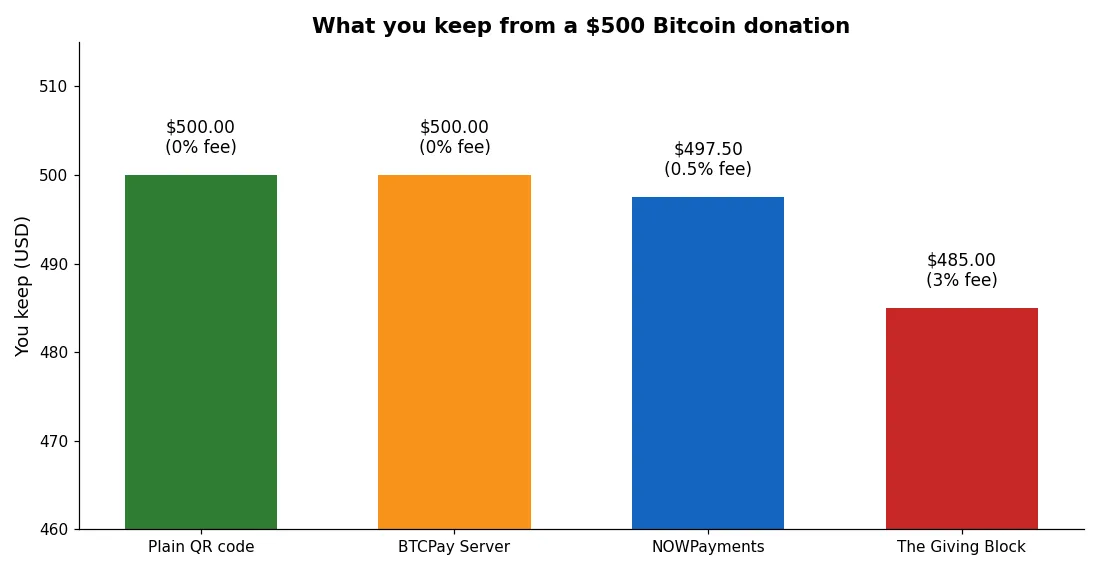
- On a $500 donation, BTCPay Server and a plain QR code keep the full $500. NOWPayments keeps $497.50 after its 0.5% fee. The Giving Block keeps about $485 after roughly 3%.
- Never reuse one Bitcoin address for every donor. A fresh address per donation protects your privacy and your donors’ privacy.
- In the US, a donor who gives Bitcoin held for more than a year to a registered charity can deduct the full fair market value and pay no capital gains tax on the growth.
- Nonprofits that need tax receipts and automatic conversion to dollars should look at The Giving Block. Creators and small projects do better with BTCPay Server or NOWPayments.
You can accept Bitcoin donations on your website in under an hour. You do not need a merchant account, and you do not need to ask a bank for permission.
A donor scans a code, sends Bitcoin, and the money lands in a wallet you control. No chargebacks can claw it back later.

That is the whole idea, and it works for charities, open-source projects, bloggers, podcasters, and anyone with supporters who hold crypto.
- Key Takeaways
- What You Need Before You Start
- The 4 Ways to Accept Bitcoin Donations
- 1. A Plain QR Code (Free, 5 Minutes)
- 2. BTCPay Server (Free, Self-Hosted, 0% Fee)
- 3. NOWPayments (Hosted Widget, 0.5% Fee)
- 4. The Giving Block (For US Nonprofits, About 3% Fee)
- One $500 Donation, Four Routes: The Math
- How to Set Up a BTCPay Server Donation Button
- How to Add a Donation Form on WordPress
- The Privacy Rule Most Sites Break
- What Your Donors Need to Know About Tax
- Common Mistakes That Cost You Donations
- FAQs
- Can I accept Bitcoin donations without a nonprofit?
- Do I need to pay tax on Bitcoin donations I receive?
- What is the cheapest way to accept Bitcoin donations?
- Can donors pay with Lightning?
- How do I give donors a tax receipt for a Bitcoin donation?
- Is it safe to put my Bitcoin address on my website?
- Start Today: Your Next Step
- Sources
This guide shows you how to accept bitcoin donations on your website, step by step. It walks you through the four routes that actually work in 2026.
You will see the fee math on a real $500 donation, a step-by-step BTCPay Server setup, a WordPress donation form walkthrough, and the tax rules your donors will ask about. Pick the route that fits your size, and you can go live today.
What You Need Before You Start
Three things sit under every donation setup, no matter which tool you pick. Get these right first, and the rest is easy.
First, you need a Bitcoin wallet you control. A hardware wallet or a reputable software wallet works fine.

Write down your recovery phrase on paper and store it somewhere safe. Never share it with anyone, and never type it into a website.
Second, decide what happens to the Bitcoin after it arrives. You can hold it as Bitcoin, or you can convert it to dollars right away.
Holding it means you ride the price up and down. Converting it means your budget stays stable.
There is no wrong answer, but you should choose before your first donation arrives.
Third, you need a page where donors land. A simple “Donate” page with a short message about what the money funds beats a bare wallet address every time.
People give more when they know what their gift does. If you run a business site and already take Bitcoin for sales, our complete business guide to accepting Bitcoin payments covers the checkout side of the same setup.
The 4 Ways to Accept Bitcoin Donations
Every method below shows you how to accept bitcoin donations in a different way, and each one fits a different kind of site. The cheapest route is not always the best route for you.
Here is how they compare, and then we will look at each one in detail.
Think of it as a ladder. A plain QR code is the bottom rung: free and instant, but bare.
BTCPay Server adds a real donation page and privacy for the same 0% fee, if you can handle a little setup. NOWPayments trades a small fee for a five-minute setup.
The Giving Block costs the most, but it hands a registered nonprofit the tax paperwork its donors need.
1. A Plain QR Code (Free, 5 Minutes)
This is the simplest way to take Bitcoin donations. You open your wallet, copy a receiving address, turn it into a QR code, and put that code on your donate page.
A donor scans it with their phone wallet and sends any amount.
The fee is zero. No company sits between you and the donor, so nobody takes a cut.
The donor pays the small Bitcoin network fee, which is tiny on Lightning and usually a few dollars or less on chain.
The catch is privacy. If you print one address on your site forever, anyone can look that address up on a block explorer and see every donation you ever received.
That is why the privacy rule later in this guide matters so much. A static QR code also gives donors no way to leave a message, pick an amount, or get a receipt.
Use this route if you want something live in five minutes, or if you run a small personal project and you do not mind the privacy trade-off. It also works well as a backup option next to a fancier tool.
2. BTCPay Server (Free, Self-Hosted, 0% Fee)
BTCPay Server is free, open-source software you run yourself. It builds a proper donation page with custom amounts, a message field, and your own branding.
Donors pay with Bitcoin on chain or through Lightning.
The fee is 0%. BTCPay Server takes no percentage, and it never holds your money.
Payments settle straight into a wallet you control. You connect it with a watch-only key (an xpub), so BTCPay Server can generate fresh addresses without ever touching your private keys.
The trade-off is setup. You need to deploy it on a small server, usually with Docker, or pay a hosting provider a few dollars a month to run it for you.
Our step-by-step guide to setting up BTCPay Server walks through the whole install with zero fees at the end. If you can follow a setup wizard, you can run this.
Use this route if you want zero fees, full control, and real privacy, and you do not mind a one-time setup afternoon. It suits nonprofits, open-source projects, and creators who plan to take donations for years.
3. NOWPayments (Hosted Widget, 0.5% Fee)
NOWPayments is a hosted payment gateway with a donation widget made for this job. You create an account, build a widget, and paste a short snippet of code onto your site.
Donors pick from 300 or more coins, not just Bitcoin.
The fee is 0.5% when the donor pays and you receive the same coin. It rises to 1% if a conversion is involved, for example when a donor pays in Bitcoin and you receive USDT.
There is no monthly fee and no setup fee on standard use.
Setup takes about 15 minutes and needs no technical skill. You only need an email address and a wallet address.
NOWPayments also offers automatic conversion to a stablecoin, so you can dodge price swings without touching an exchange yourself. Note that auto-conversion adds a small exchange spread on top of the 0.5% fee.
Use this route if you want the fastest real donation page without running a server. It fits creators, streamers, indie journalists, and international projects that do not have US nonprofit status.
4. The Giving Block (For US Nonprofits, About 3% Fee)
The Giving Block is a donation platform built only for registered US nonprofits. It powers crypto donation pages for more than 2,000 charities, including big names like Save the Children and the American Cancer Society.
It has processed more than $1.5 billion in crypto donations in total.
The fee runs about 2.5% to 3.5%, depending on volume and the services you enable. Some reports put the flat rate near 3%, and some organisations report annual participation costs around $2,500, so confirm the full terms for your size before you sign up.
That fee buys the compliance layer: donor tax receipts, IRS Form 8283 paperwork, automatic conversion of crypto to dollars on receipt, and integrations with donor databases like Salesforce.
The Giving Block only accepts registered 501(c)(3) nonprofits. Individual creators cannot use it, even for charitable work, unless they have a registered nonprofit entity.
The average crypto donation through the platform runs above $9,800, far above the roughly $200 average for online card gifts, which is why large charities accept the higher fee.
Use this route if you run a US nonprofit and your donors need proper tax receipts. The fee stings, but the receipts and the donor trust it brings can easily pay for themselves on large gifts.
One $500 Donation, Four Routes: The Math
Fees sound small until you run the numbers. Here is what a single $500 Bitcoin donation looks like through each route.
This is the worked example no other guide runs, so you can see the real cost side by side.
The math is simple. A 0% fee keeps the full $500.
NOWPayments at 0.5% takes $2.50 and leaves $497.50. The Giving Block at 3% takes $15 and leaves $485.
On one donation the gap looks small, but over a year of gifts it adds up fast.
| Route | Fee | Fee on $500 | You keep | Best for |
|---|---|---|---|---|
| Plain QR code | 0% | $0.00 | $500.00 | Quick start, tiny projects |
| BTCPay Server | 0% | $0.00 | $500.00 | Zero fees, full control |
| NOWPayments | 0.5% | $2.50 | $497.50 | Fast setup, 300+ coins |
| The Giving Block | About 3% | $15.00 | $485.00 | US nonprofits, tax receipts |
Now scale it up. If your site takes $5,000 in donations a year, the 0.5% route costs you $25, and the 3% route costs you $150.
At $50,000 a year, the gap grows to $250 against $1,500. That is why the right choice depends on volume.
A small blog loses almost nothing to a 0.5% fee, while a busy charity can save thousands a year by self-hosting BTCPay Server.
One cost hides outside this table. BTCPay Server is free software, but self-hosting needs a small server, often $5 to $10 a month.
At $500 a month in donations, that hosting still beats a 3% fee. At $20 a month in donations, a plain QR code or a hosted widget wins on simplicity.
How to Set Up a BTCPay Server Donation Button
This is the first-hand walkthrough. Follow these steps in order, and you will have a working donation button on your site.
The whole job takes about an hour if you already have a server, or a little longer on your first try.
Start by deploying BTCPay Server. The easiest path is a one-click deploy from a host like LunaNode, or Docker on your own small VPS.
The installer asks for your domain name and an admin email, then it builds the server for you.
Next, create a store inside BTCPay Server and connect your wallet. Paste your wallet’s xpub (extended public key) when it asks.
This is a watch-only key. It lets BTCPay Server generate fresh addresses and track payments, but it cannot spend your Bitcoin.
Your private keys stay in your own wallet, offline.
Then enable the donation feature. In your store settings, open the payment button or POS app and switch it to donation mode.
Set your suggested amounts, for example $10, $25, $50, and $100, plus a custom amount box. Add a short message that tells donors what their gift funds.
Upload your logo and pick your colours so the page looks like your site.
Now grab the donation link or embed code. BTCPay Server gives you a donation page URL and a button snippet.
Paste the snippet into your donate page, or link a “Donate Bitcoin” button to the page. Test it yourself before you tell anyone: send a tiny donation of a few dollars from your own wallet, and check that it shows up as paid in your BTCPay Server dashboard and in your wallet.
Finally, watch your first real donations land. Each donor gets a fresh address, so your donation history stays private.
BTCPay Server marks each invoice paid the moment the payment confirms, and the Bitcoin sits in your wallet with no middleman in between. If you want the same zero-fee setup for selling products too, our WooCommerce Bitcoin guide plugs BTCPay Server into an online store in 8 steps.
How to Add a Donation Form on WordPress
Most donation sites run on WordPress, and WordPress makes this easy. You have two solid paths, and you can even run both on the same page.
The first path is GiveWP, the most popular WordPress donation plugin. Install GiveWP, create a donation form, and set your amounts and your thank-you message.
GiveWP handles card and PayPal donors out of the box. Then add your Bitcoin option next to it: paste a BTCPay Server donation button, a NOWPayments widget snippet, or a plain QR code into the same page.
Donors pick their method, and every gift lands in one place.
The second path is the Coinsnap Bitcoin Donation plugin, free on WordPress.org. It builds donation forms with shortcodes, so you can drop a form anywhere on your site.
It accepts Bitcoin on chain and through Lightning. You can run it through Coinsnap’s own service, or connect your own BTCPay Server for a fully self-hosted setup with no middleman.
Whichever path you pick, test the form like a donor would. Load your donate page on your phone, scan the code, and send a small test gift.
Check that the thank-you page loads, the receipt (if any) arrives, and the money reaches your wallet. A donation button that fails silently costs you gifts you never hear about.
Freelancers can use the same idea for tips and client gifts. If you already take Bitcoin for client work, our guide to accepting Bitcoin as a freelancer shows how to keep more of each payment with the same zero-fee tools.
The Privacy Rule Most Sites Break
Here is the mistake almost every small donation page makes. They publish one Bitcoin address and use it forever.
That single address becomes a public record of every gift they ever received.
Bitcoin is transparent by design. Anyone can paste your address into a block explorer and see the balance, every incoming donation, and when each one arrived.
A curious donor, a competitor, or a scammer can watch your income in real time. That is a bad look for a charity, and a real risk for an individual creator.
The fix is simple: use a fresh address for every donor. BTCPay Server does this for you automatically, since it derives a new address from your xpub for each invoice.
NOWPayments also generates a unique payment address for each transaction. If you use a plain QR code, rotate the address regularly and generate a new one for each campaign at least.
Donors deserve the same protection. A donor who gives from an exchange account leaves a trail too, so never publish a list of donor addresses or transaction IDs on your site.
Thank donors by first name only, and only with their permission. Privacy is part of the gift, so treat it that way.
What Your Donors Need to Know About Tax
Many Bitcoin holders donate crypto instead of cash for one reason: the tax treatment. In the United States, the IRS treats cryptocurrency as property, not currency.
That single rule creates a real benefit for donors, and your donate page should explain it in plain words.
When a donor gives Bitcoin they held for more than a year directly to a registered 501(c)(3) charity, they can deduct the full fair market value of the gift. They also pay zero capital gains tax on the growth.
Imagine a donor bought Bitcoin for $100 and it is now worth $500. If they sell it and donate the cash, they owe tax on the $400 gain.
If they donate the Bitcoin directly, the gain never gets taxed, and they still deduct the full $500.
The deduction has limits. It is capped at 30% of the donor’s adjusted gross income for gifts to public charities, and any excess can carry forward for up to five years.
The donor must itemize deductions on Schedule A instead of taking the standard deduction. Starting in the 2026 tax year, only total charitable gifts above 0.5% of adjusted gross income are deductible.
Donors also need paperwork: IRS Form 8283 for noncash gifts above $500, and a qualified appraisal for gifts above $5,000.
Short-term holdings get a much smaller benefit. If the donor held the Bitcoin for one year or less, the deduction drops to what they originally paid for it, not the current value.
And if the crypto lost value, donating it directly is a poor move, since the donor loses the chance to claim a capital loss.
Two warnings belong here. First, only gifts to qualified charities are deductible, and donors should confirm the charity’s status with the IRS Tax Exempt Organization Search tool before they give.
Gifts to individuals never qualify. Second, this section is general information, not tax advice.
Tax rules change, and every donor’s situation differs, so point your donors to a tax professional for their own case.
As the recipient, your own tax job is simpler but still real. Record the fair market value in dollars of each donation at the moment you receive it.
That figure goes into your books as income or as a gift, depending on your structure. BTCPay Server exports each payment with its fiat value at the time, which makes this record-keeping painless.
Common Mistakes That Cost You Donations
Most sites that learn how to accept bitcoin donations still lose gifts to small, fixable errors.
Check your page against this list before you publish it.
First, a dead or untested button. Every donation tool can fail quietly after an update, so test your button monthly with a tiny payment.
Second, no suggested amounts. Donors freeze when they face a blank box, so offer $10, $25, $50, and $100, and let them type a custom amount too.
Third, hiding the Bitcoin option. If donors must dig through three menus to find it, they will give up and leave.
Put the Bitcoin button next to the card button, not on a separate page nobody visits. Fourth, no thank-you.
A fast thank-you page or email doubles the chance a donor gives again, so automate it.
Fifth, ignoring Lightning. On-chain Bitcoin takes 10 to 60 minutes to confirm, and fees can spike when the network is busy.
Lightning settles in under two seconds with fees near zero. BTCPay Server and NOWPayments both support Lightning, so turn it on.
Your donors will feel the difference at once.
Sixth, forgetting the receipt. Donors who need a tax deduction will ask for one, and a charity that cannot produce it loses the next gift.
If you are a registered nonprofit, use a platform like The Giving Block that generates receipts, or send a written acknowledgment yourself for every gift of $250 or more.
Seventh, never telling anyone the option exists. A donation button nobody sees raises nothing.
Mention it in your newsletter, pin it on your social profiles, and add a line to your email signature. People cannot give in Bitcoin if they do not know you accept it.
And if your supporters also spend Bitcoin day to day, our guide to spending Bitcoin in everyday life shows them where it works in practice.
FAQs
These are the questions readers ask most about Bitcoin donations. The short answers sit below, and the rest of the guide has the detail.
Can I accept Bitcoin donations without a nonprofit?
Yes. Anyone can accept Bitcoin donations.
A plain QR code, BTCPay Server, or NOWPayments needs no nonprofit status at all. Only The Giving Block requires a registered 501(c)(3).
The difference is tax deductibility: your donors can only deduct the gift if you are a qualified charity.
Do I need to pay tax on Bitcoin donations I receive?
It depends on your structure, and you should ask a tax professional. Charities record donations as gifts.
Individuals and businesses usually record the fair market value at receipt as income. Keep a record of the dollar value of every donation on the day it arrives.
What is the cheapest way to accept Bitcoin donations?
A plain QR code and BTCPay Server both cost 0% per donation. The QR code is free and instant but weak on privacy.
BTCPay Server is also 0%, and it gives you a real donation page with fresh addresses for every donor. Self-hosting costs a few dollars a month for a server.
Can donors pay with Lightning?
Yes, if your tool supports it. BTCPay Server, NOWPayments, and the Coinsnap plugin all accept Lightning payments.
Lightning settles in under two seconds with fees near zero, which makes it the best option for small gifts. Turn it on in the settings before you go live.
How do I give donors a tax receipt for a Bitcoin donation?
If you are a registered nonprofit, The Giving Block generates IRS Form 8283 receipts automatically. With BTCPay Server or NOWPayments, you send the receipt yourself: a written acknowledgment with the donation date, the amount in Bitcoin, and its fair market value in dollars on that date.
Keep a copy for your own records too.
Is it safe to put my Bitcoin address on my website?
It is safe from theft, since an address alone cannot move your funds. It is not private, though.
Anyone can look up the address and see your full donation history. Use a tool that generates a fresh address per donor, like BTCPay Server, and rotate any static QR code regularly.
Start Today: Your Next Step
You now know how to accept bitcoin donations on your website, and you know what each route costs on a real $500 gift. Pick the route that fits your size and go live today.
If you want zero fees and full control, set up BTCPay Server this weekend. If you want something live in 15 minutes, paste in the NOWPayments widget.
If you run a US nonprofit, talk to The Giving Block about receipts.
Either way, test your button with a small gift from your own wallet before you announce it. A working button, a clear ask, and a fast thank-you will bring in more than any fancy design ever will.
And when your supporters ask where else they can use their Bitcoin, point them to our roundup of where you can spend Bitcoin in 2026.