
Yes, you can buy Bitcoin with GCash, and you do not need a bank account or a foreign exchange to do it. The fastest route runs inside the GCash app itself, through a service called GCrypto, while two other routes suit buyers who want lower fees or more control.
This guide compares all three routes side by side. It covers the fees, the limits, the exact steps, and the safety checks that matter before you send your first peso.

Key takeaways
- GCrypto inside GCash is the simplest route, with zero cash-in fees and the cost built into the quoted price.
- Coins.ph funded by InstaPay from GCash usually costs less on larger buys, thanks to its 0.10% maker and 0.15% taker spot fees.
- P2P escrow gives you price choice, but only inside escrow, and never through a payment sent outside the trade.
- Fully Verified GCash accounts carry a PHP 100,000 wallet limit, while GCash Plus raises it to PHP 500,000.
- Move your Bitcoin to a wallet you control after you buy it, and test every new address with a small send first.
The short answer: three routes from one wallet
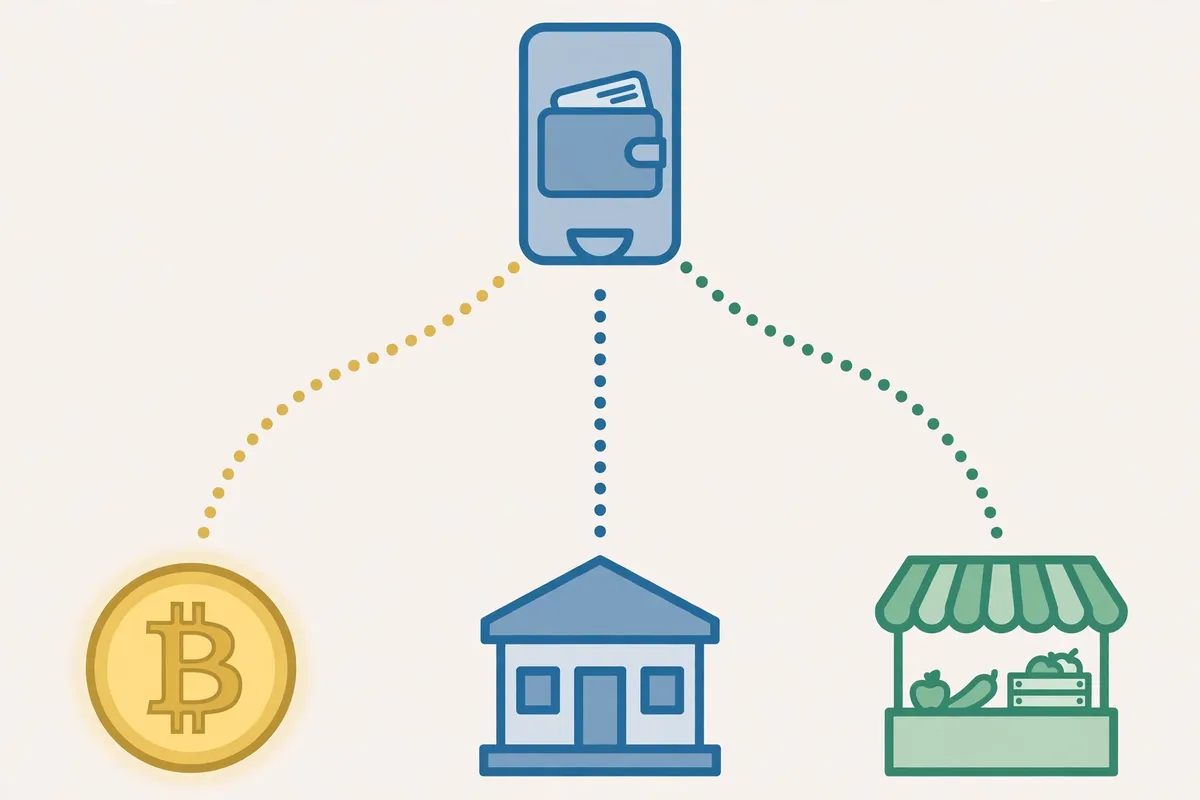
GCash works as both a wallet and a funding rail. You can buy inside the app, send pesos to a licensed exchange, or pay a peer seller, and each route trades simplicity for cost in a different way.
- The short answer: three routes from one wallet
- Route 1: GCrypto inside the GCash app
- Route 2: Coins.ph funded by InstaPay from GCash
- Route 3: P2P escrow, for buyers who want price choice
- What PHP 5,000 and PHP 50,000 actually cost
- Limits that decide your route
- Move your Bitcoin to your own wallet
- Mistakes that cost beginners money
- Frequently asked questions
- Can I buy Bitcoin directly with GCash?
- How much money do I need to start?
- Is GCrypto the same as Coins.ph?
- What fees will I actually pay?
- Can I withdraw Bitcoin to my own wallet?
- Is buying Bitcoin with GCash safe?
- Conclusion
- Sources
Beginners should start with GCrypto. Regular buyers who place larger orders should compare it with Coins.ph, because the fee gap grows with the order size.
| Route | Best for | Cost shape | Speed |
|---|---|---|---|
| GCrypto in GCash | First-time buyers | No explicit fee, spread built into the quote | Instant, in app |
| Coins.ph via InstaPay | Regular and larger buyers | PHP 10 InstaPay transfer plus 0.10% maker or 0.15% taker on spot trades | Under 10 minutes in reported tests |
| P2P escrow | Price hunters and unbanked buyers | Seller set price, sometimes above or below market | Minutes to an hour, trade by trade |
Our payment methods hub places GCash among the local rails that beginners actually use. Our Philippines country guide covers the wider licensed market, including PDAX and Maya, for readers who want the full map.
Route 1: GCrypto inside the GCash app
GCrypto is the crypto service built into GCash. It runs on PDAX, the Philippine Digital Asset Exchange, which holds a Bangko Sentral ng Pilipinas virtual asset service provider licence.
GCash describes registration as taking as little as 30 seconds for eligible users. Treat that as a company claim, not a promise, since verification checks can still slow an application down.

Who can open a GCrypto account
You must be at least 18 years old and Fully Verified on GCash. You also need a verified email address and a profile updated within the last three years, and GCash allows only one GCrypto account per user.
If your GCash account is not Fully Verified yet, finish that step first. A basic wallet cannot open GCrypto, and it also carries lower limits for everything else.
How the buy works, step by step
- Open GCash, go to the Invest tab, and select GCrypto.
- Complete the application and wait for approval.
- Top up your GCrypto trading wallet from your GCash balance, with no transfer fee.
- Select Bitcoin, enter your peso amount, and check the quoted price before you confirm.
- Confirm the trade, then check that the Bitcoin shows in your GCrypto wallet.
GCash charges no fee for moving pesos between your GCash wallet and your GCrypto wallet. The catch sits inside the quote itself, since the displayed price already includes the platform margin.
Third-party guides estimate that margin at roughly 1.5% to 2.5%. GCash does not publish a single spread figure, so treat that range as an estimate and compare the quote with a live market price before you confirm.
Limits to know before you buy
GCrypto top-ups from GCash are capped at PHP 100,000 per day. Withdrawals back to GCash are capped at PHP 100,000 per month, or PHP 500,000 on GCash Plus.
The smallest single Bitcoin order on GCrypto is 0.00002 BTC, according to the GCash Help Center. That tiny minimum makes a PHP 100 test buy realistic, even though the quoted price still carries the spread.
Route 2: Coins.ph funded by InstaPay from GCash
Coins.ph is the oldest licensed route in this guide. Its operator, Betur Inc., has held a BSP virtual asset service provider licence since September 2017.
The route works like this: you send pesos from GCash to Coins.ph over InstaPay, then you trade on Coins.ph. You leave the GCash app, but you gain a real order book and lower percentage fees.
How the transfer works, step by step
- Verify both accounts, Fully Verified on GCash and identity plus selfie on Coins.ph.
- In GCash, tap Transfer, then pick DCPay Philippines, Inc. from the bank and e-wallet list.
- Enter your Coins.ph mobile number as the account number and the amount you want to send.
- Wait for the pesos to land on Coins.ph, usually in under 10 minutes in reported tests.
- On Coins.ph, buy Bitcoin through Convert for a simple quote or through Coins Pro for order book prices.
Each InstaPay transfer costs PHP 10 and carries a PHP 50,000 per-transaction cap. A PHP 50,000 buy needs exactly one transfer, while a PHP 100,000 buy needs two.
Coins Pro charges 0.10% maker and 0.15% taker at its base tier. Convert charges no explicit fee, but it builds a spread into the price, so it suits small buys rather than large ones.
Why this route wins on larger orders
Percentage fees beat spreads once the order grows. On a PHP 50,000 buy, a 0.15% taker fee costs PHP 75, plus the PHP 10 transfer, for PHP 85 in total.
The same buy through GCrypto at an estimated 2% spread would carry roughly PHP 1,000 in embedded cost. That gap is the whole reason regular buyers leave the app, and it is the comparison other guides blur.
Route 3: P2P escrow, for buyers who want price choice
Peer-to-peer trading matches you with a seller, and an escrow lock holds the seller’s Bitcoin until you pay. The seller sets the price, so offers can sit above or below the market rate.
GCash enters here as the payment rail, not as the trading venue. You pay through GCash, the seller confirms, and escrow releases the coins to your wallet.
Escrow rules that are not optional
- Never pay before escrow locks the seller’s coins.
- Never send payment outside the trade window, even if the seller offers a discount.
- Check the seller’s completed trade count and completion rate before you start.
- Match the payment name, amount, and reference exactly, then mark the payment as sent.
- Wait for the release on the platform, and open a dispute inside the trade if anything stalls.
P2P suits buyers who cannot use the first two routes or who spot a genuinely better price. It also carries the most scam risk, so a seller who rushes you, moves the chat off the platform, or asks for payment before escrow is a seller to walk away from.
What PHP 5,000 and PHP 50,000 actually cost
This table is our own arithmetic from the published figures in this guide. It is not a live quote, and real quotes move with the market, so use it to compare routes, not to predict an exact fill.
| Buy size | GCrypto, at an estimated 2% spread | Coins.ph Pro taker, plus PHP 10 transfer | P2P escrow |
|---|---|---|---|
| PHP 5,000 | About PHP 100 embedded in the quote | PHP 7.50 plus PHP 10, about PHP 17.50 | Seller price, no fixed platform fee to compare |
| PHP 50,000 | About PHP 1,000 embedded in the quote | PHP 75 plus PHP 10, about PHP 85 | Seller price, one PHP 50,000 InstaPay cap to watch if you fund from GCash |
The pattern is clear at both sizes. GCrypto wins on simplicity, Coins.ph wins on cost, and P2P wins only when a specific seller beats both quotes.
Small first buys change the maths in a useful way. A PHP 100 to PHP 200 test buy costs almost nothing in absolute pesos on any route, and it teaches you the full flow before real money rides on it.
Limits that decide your route
Limits, not fees, stop most beginners. Check your own caps before you plan a large buy, because a plan that needs three transfers on a deadline will frustrate you.
| Limit | Figure | What it means for you |
|---|---|---|
| GCash wallet, Fully Verified | PHP 100,000 | Your GCash balance cannot sit above this size. |
| GCash wallet, GCash Plus | PHP 500,000 | The higher tier lifts both wallet size and GCrypto withdrawal caps. |
| GCrypto top-up | PHP 100,000 per day | Daily funding into GCrypto stops here, even on Plus. |
| GCrypto withdrawal to GCash | PHP 100,000 per month, PHP 500,000 on Plus | Cashing out to pesos is monthly capped, so plan large exits early. |
| InstaPay to Coins.ph | PHP 10 per transfer, PHP 50,000 per transaction | Split larger funding into several transfers. |
| GCrypto smallest Bitcoin order | 0.00002 BTC | Test buys stay cheap and realistic. |
Readers who pay with other local rails can compare notes in our BLIK guide and our Apple Pay guide. Readers without a card or wallet app can check our ACH transfer guide for the bank route instead. If you use Maya instead, see our guide to buying Bitcoin with Maya.
Move your Bitcoin to your own wallet
Bitcoin on an exchange or inside GCrypto sits under someone else’s keys. Moving it to a wallet you control removes the platform risk, and it is the step beginners skip most often.
GCrypto now supports transfers to and from external wallets, according to GCash releases from October 2026. That change matters, because it lets you leave without selling back to pesos first.
Do the test send first
Copy your wallet’s Bitcoin receive address, paste it into the send screen, and read it back character by character. Send a small amount first, wait for confirmation, and only then send the rest.
Send Bitcoin only on the Bitcoin network, and only to a Bitcoin address. A Bitcoin send to an Ethereum address or the wrong network can lose the coins for good, and no support team can reverse a confirmed transfer.
Our beginner wallet picks and our wallet setup guide walk through the choice and the setup. Write your recovery phrase on paper, store it offline, and never type it into a website, a chat, or a form.
Mistakes that cost beginners money
The first mistake is trusting a quote without checking it. Compare the quoted price with a live market price, and pause if the gap looks far wider than the spread or fee you expected.
The second mistake is sharing access. GCash will never ask for your MPIN or one-time password, and anyone who asks for either is running a scam, no matter which logo sits on their profile.
The third mistake is leaving a large balance on a trading platform. Platforms freeze, fail, and get hacked, so your own wallet is the safer home for coins you plan to hold.
The fourth mistake is rushing a P2P trade. Speed helps a scammer, not you, so slow down, read the trade terms, and keep every message inside the platform.
The fifth mistake is throwing away records. Keep every receipt, screenshot, and confirmation, since tax treatment can change and clean records make any future filing far simpler.
Frequently asked questions
These are the questions beginners ask most often, with short answers drawn from the guide above.
Can I buy Bitcoin directly with GCash?
Yes. GCrypto inside the GCash app lets Fully Verified users aged 18 and above buy Bitcoin straight from their GCash balance, with no separate bank transfer.
How much money do I need to start?
You can start with PHP 100 on Coins.ph, and GCrypto accepts Bitcoin orders as small as 0.00002 BTC. A PHP 100 to PHP 200 test buy is the smartest first move, since it teaches you the full flow at almost no cost.
Is GCrypto the same as Coins.ph?
GCrypto is the in-app service inside GCash, powered by PDAX, while Coins.ph is a separate licensed exchange that you fund from GCash over InstaPay. GCrypto is simpler, while Coins.ph usually costs less on larger orders.
What fees will I actually pay?
GCrypto charges no cash-in fee, but its quote includes a margin estimated by third-party guides at roughly 1.5% to 2.5%. Coins.ph charges PHP 10 per InstaPay transfer plus 0.10% maker or 0.15% taker on Coins Pro spot trades.
Can I withdraw Bitcoin to my own wallet?
GCrypto supports transfers to external wallets, so you can move your Bitcoin to a wallet you control without selling back to pesos first. Always test a new address with a small send, and always use the Bitcoin network.
Is buying Bitcoin with GCash safe?
Licensed platforms lower the platform risk, since GCrypto runs on PDAX and Coins.ph holds a BSP licence, but they cannot remove price risk. Bitcoin can fall sharply, so never invest money you need for bills, and never share your MPIN or one-time password with anyone.
Conclusion
GCash gives Filipino beginners a genuinely easy front door to Bitcoin. Start inside GCrypto, learn the flow with a small amount, and switch to Coins.ph when your order size makes the fee saving worth the extra steps.
Whichever route you pick, keep the same discipline: check the quote, respect the limits, keep trades inside escrow on P2P, and move your coins to your own wallet. That discipline protects more money than any single fee saving ever will.