



If you searched for crypto tax software how to report bitcoin taxes, here is the short answer. Good software in 2026 does one job above all else: it matches your Form 1099-DA against your own records and fixes the gaps before you file.
Your exchange now tells the IRS what you sold. It often does not tell the IRS what you paid.

That gap is where most Bitcoin tax mistakes happen now, and it is exactly what this guide helps you close.
- What Form 1099-DA Changed in 2026
- Why Your 1099-DA Will Not Match Your Real Gain
- What Good Crypto Tax Software Must Do in 2026
- The 4 Leading Tools Compared in 2026
- Koinly: Best for International Filers and DeFi
- CoinLedger: Best for TurboTax Filers Who Want It Simple
- CoinTracker: Best for Coinbase Users and Mobile Tracking
- TaxBit: Best for Exchanges, Not Individual Filers
- Which Tool Fits Your Situation
- How to Report Bitcoin Taxes With Software in 6 Steps
- Step 1: Connect every exchange and wallet
- Step 2: Review the flagged transactions
- Step 3: Import your 1099-DA and reconcile it
- Step 4: Fix the mismatches with your own records
- Step 5: Export Form 8949 and Schedule D
- Step 6: File and keep the audit trail
- The Manual Route: When Software Is Overkill
- 5 Mistakes That Trigger IRS Letters
- Frequently Asked Questions
- Sources
This article is about US federal tax rules. It is not tax advice.
Tax law is complex, and your situation may differ, so talk to a qualified tax professional before you act on anything here.
Key Takeaways
- Form 1099-DA changed the job. Brokers report your sales to the IRS. For 2026 sales, they must also report cost basis, but only for covered coins bought and held at the same broker.
- Most Bitcoin is noncovered. Coins bought before 2026 or moved in from your own wallet arrive with a blank basis box. You must supply the basis yourself.
- A blank basis is not a zero basis. If you file with the form alone, the IRS can treat your full sale proceeds as gain. Software rebuilds the real basis from your wallets and exchanges.
- Entry prices start at $49 a year. Koinly and CoinLedger both start at $49 per tax year. CoinTracker starts at $59. TaxBit now sells to enterprises, not individual filers.
- Free plans preview, they do not file. Every major tool lets you import and preview for free. You pay when you download the tax forms.
What Form 1099-DA Changed in 2026
Form 1099-DA is the first IRS form built only for digital assets. It is the crypto version of the 1099-B that stock investors have received for years, and it exists because the 2021 Infrastructure Investment and Jobs Act pulled digital assets into the broker reporting rules.
The rollout came in two stages. Brokers started reporting gross proceeds for sales on or after January 1, 2025, and the first forms landed in mailboxes in early 2026.

Cost basis reporting began for sales on or after January 1, 2026, and those forms arrive in early 2027.
That second stage is the one that changes your tax season. A broker must now report your cost basis, but only for covered digital assets.
A coin counts as covered when you bought it on or after January 1, 2026, in an account where the broker held it, and kept it in that same account until the sale.
Everything else is noncovered. Coins you bought before 2026 are noncovered.
Coins you moved into the exchange from your own wallet are noncovered, no matter when you first bought them. For those sales, the broker checks box 9 on the form and leaves the basis box blank.
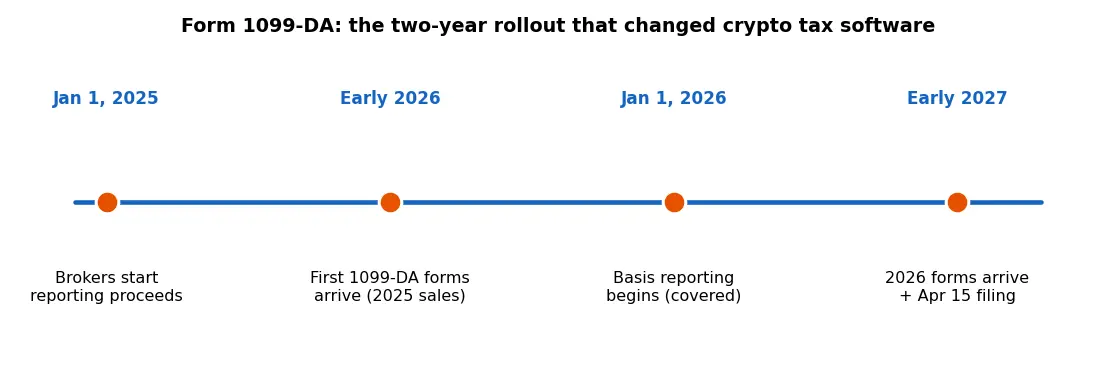
| Sale year | What the broker reports | When you get the form |
|---|---|---|
| 2025 | Gross proceeds only. Basis was optional. | Early 2026 |
| 2026 | Gross proceeds for all sales, plus basis for covered coins. | Early 2027 |
| 2027 and later | Same as 2026. Backup withholding can apply if the broker lacks your taxpayer ID. | Early the next year |
The filing deadline for your 2026 return is April 15, 2027. Your 1099-DA forms should reach you by the middle of February 2027, which leaves about two months to reconcile them.
One more detail matters. A covered coin bought and sold inside 2026 was held for a year or less, so every covered sale on a 2026 form is short term.
Long term coins from earlier years are almost always noncovered, which means their basis is missing from the form.
Why Your 1099-DA Will Not Match Your Real Gain
Your exchange only sees what happened on its own platform. It cannot see the coins you bought on another exchange, the coins sitting in your own wallet, or the swaps you made on a decentralized exchange.
That blind spot is the whole problem.
Move Bitcoin from your cold wallet to an exchange and sell it, and the exchange knows your sale price but not your purchase price. It reports the proceeds and leaves the basis blank.
If you report only what the form shows, your gain looks far bigger than it really is.
DeFi makes the gap wider. The IRS has paused broker reporting for wrapping, staking, lending, and short sales under Notice 2024-57, so those trades may not appear on any 1099-DA at all.
You still owe tax on them, and you still need records for them.
Staking rewards and airdrops add a second kind of income. The IRS treats them as ordinary income at the fair market value on the day you received them, and that income never shows up in a sale proceeds figure.
Our guide to passive income with crypto explains how those rewards work, but the tax point is simple: income and gains are two different lines, and both need records.
The risk of ignoring the mismatch is real. When the IRS receives proceeds it cannot match to a return, its automated systems can send a CP2000 underreporter notice and propose tax on the full proceeds with zero basis.
You can answer that notice with your own records, but it is far cheaper to file the right numbers the first time.
This is also why moving coins between your own wallets is not a sale. The IRS says so in its own FAQ, and good software treats a wallet to wallet transfer as a transfer, not a disposal.
Bad record keeping turns it into a phantom sale.
What Good Crypto Tax Software Must Do in 2026
The 1099-DA era raised the bar for tax software. A tool that only adds up your exchange CSV files is no longer enough, because the form your exchange sends is now part of the filing.
Here is what to demand before you pay.
First, it must import your 1099-DA and reconcile it against your own transaction history. The software should show you, line by line, where the form and your records agree and where they differ.
If it cannot do that, it cannot do the main job of 2026.
Second, it must track cost basis wallet by wallet. Since January 1, 2025, the IRS revenue procedure 2024-28 requires a per wallet and per account method.
The old habit of pooling all your coins together is gone, and software that still pools them will get your gains wrong.
Third, it must handle DeFi and NFTs. Swaps, liquidity pools, wrapped tokens, and NFT sales all create taxable events, and each one needs a cost basis and a fair market value.
A tool that only reads exchange data will miss the activity that lives on chain.
Fourth, it must export Form 8949 and a Schedule D summary that your filing software can use. Look for direct TurboTax and H and R Block export, or at least a clean CSV your accountant can work with.
If you trade on many platforms, check the integration count too: Koinly lists more than 900, CoinLedger lists more than 1,000, and CoinTracker lists more than 500.
Fifth, it should flag errors before you file. Missing cost basis warnings, unmatched transfers, and duplicate transactions are the three flags that save the most money.
A tool that quietly guesses instead of flagging is a tool to avoid.
Finally, check the cost basis methods it supports. FIFO is the default for most US filers, but HIFO and specific identification can cut your bill in the right year.
Learning how to calculate Bitcoin capital gains tax first makes these choices far less confusing.
The 4 Leading Tools Compared in 2026
Four names dominate US crypto tax software in 2026: Koinly, CoinLedger, CoinTracker, and TaxBit. They all generate Form 8949, but they serve different people and charge very different prices, so the right pick depends on your year, not on a ranking.
All prices below come from each vendor’s own pricing page, checked in November 2026. Prices change often near tax season, so confirm the current figure on the vendor site before you buy.
| Tool | Free plan | Entry paid plan | 1,000 transactions | Best for |
|---|---|---|---|---|
| Koinly | Import up to 10,000 transactions, preview only | $49 per tax year | $99 | International filers and DeFi users |
| CoinLedger | Portfolio tracking, preview only | $49 per tax year | $99 | TurboTax filers who want it simple |
| CoinTracker | Portfolio tracking, preview only | $59 per year | $199 | Coinbase users and mobile tracking |
| TaxBit | None for individuals | Custom enterprise pricing | Custom | Exchanges and institutions |
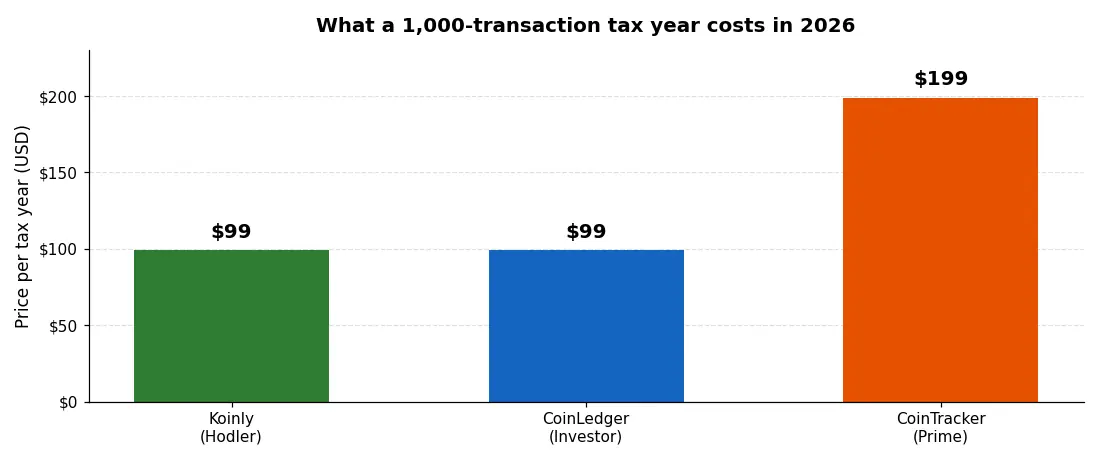
The chart tells the pricing story at a glance. For a 1,000 transaction year, Koinly and CoinLedger both cost $99, while CoinTracker costs $199.
The gap narrows once you count what each plan includes, so read the detail below before you decide on price alone.
Koinly: Best for International Filers and DeFi
Koinly is the most widely used of the four outside the US, with users in more than 140 countries. It supports FIFO, LIFO, HIFO, adjusted cost base, and the UK shared pool method, so it fits filers whose rules differ from the US default.
Its free plan is the most generous of the group. You can import up to 10,000 transactions and preview your full tax summary without paying, and you only pay when you download a report.
Paid plans are one time payments per tax year, not subscriptions, at $49 for up to 100 transactions, $99 for up to 1,000, and $199 for up to 3,000.
Koinly supports 1099-DA reconciliation on paid plans and imports the form for US filers. It also handles DeFi and NFTs well, with more than 900 integrations.
If your year spans several chains and wallets, this is usually the first tool to test.
CoinLedger: Best for TurboTax Filers Who Want It Simple
CoinLedger is the simplest of the four to use, and its TurboTax integration is the smoothest. It imports capital gains straight into TurboTax Online, TurboTax Desktop, TaxAct, H and R Block Desktop, and TaxSlayer, and it generates IRS Form 8949 plus an income report and a capital gains report.
Pricing is a one time purchase per tax year: $49 for up to 100 transactions, $99 for up to 1,000, and $199 or more for 3,000 plus. Every plan includes unlimited wallet and exchange syncs and more than 1,000 integrations, plus DeFi and NFT support.
CoinLedger also sells a Done For You service from $3,500, where its team prepares your reports. That price only makes sense for very large or messy years, but it is there if your history is a tangle of dead exchanges and missing CSV files.
CoinTracker: Best for Coinbase Users and Mobile Tracking
CoinTracker is the official tax partner of Coinbase, and it shows. It offers direct Coinbase 1099-DA import, and its cost basis method can sync from Coinbase and Kraken.
Its mobile app is the best of the four for watching your portfolio through the year.
Pricing is annual: Base at $59 for up to 100 transactions, Prime at $199 for up to 1,000, and Ultra at $499 for up to 10,000. A Full Service option starts at $3,499 and covers up to 300,000 lifetime transactions with a dedicated account manager.
One plan covers your tax forms for every past year, not just the year you file, which matters if you are catching up on several years at once. CoinTracker also reconciles your 1099-DA on paid plans, and its support team flags unmatched transfers and missing basis before you file.
The trade off is price: at $199 for a 1,000 transaction year, it costs twice what Koinly and CoinLedger charge.
TaxBit: Best for Exchanges, Not Individual Filers
TaxBit used to sell consumer plans from about $50 a year, but it has moved to enterprise work. It now builds 1099 reporting systems for exchanges, custodians, and fintech companies, and its pricing is custom and quote based.
As of October 2026, it lists no public consumer price and no free trial.
That shift matters for individual filers. If you used TaxBit years ago, do not assume the old plans still exist.
Its audit trail documentation remains the strongest in the category, which is why exchanges use it to power their own tax tools, but a retail filer in 2026 should pick from the other three tools above.
Which Tool Fits Your Situation
Pick by your year, not by the brand. A tool that is perfect for a Coinbase only holder can be a poor fit for a DeFi trader, and the cheapest plan can cost more if it counts transactions in a way that pushes you up a tier.
Use the table below as a starting point, then test your top pick on its free plan. Every tool lets you import and preview before you pay, so the test costs you an hour, not a dollar.
| Your situation | Best pick | Why |
|---|---|---|
| One exchange, under 100 trades | Koinly Newbie or CoinLedger Hobbyist | $49, and the free preview shows your numbers first |
| Many wallets, DeFi, NFTs | Koinly Hodler | 900 plus integrations, strong DeFi coverage, $99 for 1,000 trades |
| Coinbase user who files with TurboTax | CoinTracker Prime or CoinLedger Investor | Direct 1099-DA import and TurboTax export |
| Catching up on several years | CoinTracker | One plan covers forms for every past year |
| Outside the US | Koinly | 140 plus countries, local cost basis methods |
| Under 20 trades, simple year | Manual route below | Software costs more than the time it saves |
If your year includes a big loss, read our Bitcoin tax loss harvesting guide before you file. Harvesting before December 31 can cut the bill that your software is about to calculate.
How to Report Bitcoin Taxes With Software in 6 Steps
Learning crypto tax software how to report bitcoin taxes comes down to six steps. The software does the math, but you do the checking, and the checking is where the money is saved.
Step 1: Connect every exchange and wallet
Connect each exchange by API and add each wallet by address. Miss one wallet and the software will treat your transfer to it as a sale, which creates a fake gain.
CSV import works when an API is missing, so download your full history from every platform you used.
Step 2: Review the flagged transactions
Every tool flags problems after import: unmatched transfers, missing cost basis, and duplicate entries. Work through the flags one by one.
A transfer flagged as a sale is the most common error, and fixing it usually means telling the software that the two sides of the transfer belong together.
Step 3: Import your 1099-DA and reconcile it
Import the 1099-DA from each exchange that sent one, then open the reconciliation view. The software compares the form against your own records and lists the mismatches.
Pay attention to the noncovered sales, because those are the ones with a blank basis on the form.
Step 4: Fix the mismatches with your own records
Here is a worked example with round numbers. Maya bought 1 BTC on Coinbase in March 2026 for $80,000.
She also moved 0.4 BTC into Coinbase from her own wallet, coins she had bought in 2023 for $12,000. In November 2026 she sold 0.6 BTC for $60,000.
Her 1099-DA shows proceeds of $60,000 and basis of $16,000, because only the 0.2 BTC from the 2026 Coinbase purchase is covered. The other 0.4 BTC is noncovered, so its $12,000 basis is missing from the form.
Her real basis is $28,000, her real gain is $32,000, and filing with the form alone would report a $44,000 gain and overstate her tax by $12,000 of gain.
Software fixes this by tracking both lots wallet by wallet. It adds the missing $12,000 basis back, and the 1099-DA reconciliation view shows the corrected figure.
If your software cannot show you this correction, it is not doing the 2026 job.
Step 5: Export Form 8949 and Schedule D
Generate Form 8949 from the software and check the totals against your own records. Short term sales go on one part of the form and long term sales on another, and the software should split them for you.
Export the file to TurboTax or H and R Block, or hand the PDF to your accountant.
Step 6: File and keep the audit trail
File your return by April 15, 2027, and keep the software report with your records. If the IRS sends a CP2000 notice, the report is your answer: it shows the basis for every sale, including the noncovered ones the form left blank.
Keep the report for at least three years, which is the usual IRS look back period.
The Manual Route: When Software Is Overkill
Software is not always worth it. If you made fewer than 20 or 30 trades in the year, all on one exchange, and you never moved coins to your own wallet, you can file by hand without much pain.
The manual route is simple. List each sale on Form 8949 with the date you bought, the date you sold, the proceeds, and your cost basis.
Add the totals to Schedule D, and attach both to your Form 1040. Your exchange CSV gives you the dates and amounts, and a spreadsheet does the math.
Use the manual route only when your history is truly simple. The moment you add a second exchange, a wallet transfer, a DeFi swap, or staking rewards, the spreadsheet work grows fast, and a $49 tool becomes cheaper than your evening.
P2P sales count too: if you sell Bitcoin on a P2P platform, that sale is still taxable, and it still needs a basis.
5 Mistakes That Trigger IRS Letters
Most crypto tax letters come from five avoidable mistakes. Each one is easy to prevent once you know it exists.
Treating proceeds as gain. Your 1099-DA shows what you received, not what you earned.
Gain equals proceeds minus basis, and a form with a blank basis is not permission to use zero.
Leaving the basis blank. Noncovered sales need your own records.
If you cannot prove what you paid, the IRS can treat the basis as zero, which taxes the full sale as gain.
Forgetting staking and airdrop income. Rewards are ordinary income when you receive them, and they need a fair market value on that date.
They do not appear on your 1099-DA proceeds, so they are easy to miss.
Using the wrong cost basis method. Switching from FIFO to HIFO midstream without records creates a mess.
Pick a method, apply it wallet by wallet, and keep it consistent for the year.
Skipping DeFi and NFT sales. A swap on a decentralized exchange is still a sale, even when no broker reports it.
No form does not mean no tax, and the IRS has said so plainly.
Our full Bitcoin tax guide covers how these rules apply in other countries too, and India’s 2026 crypto tax rules show how fast the rest of the world is moving in the same direction.
For UK reporting, see our guide to Bitcoin tax in the UK for beginners.
Frequently Asked Questions
Do I need crypto tax software if my exchange sent me a 1099-DA? Usually yes.
For 2025 sales, the form reported proceeds only, and for 2026 sales it reports basis only for covered coins.
If you moved coins between wallets or exchanges, the form likely lacks your cost basis, and you need your own records to supply it.
What is a covered digital asset? A coin you bought on or after January 1, 2026, in an account where the broker held it, and kept in that same account until the sale.
Anything else is noncovered, and the broker leaves the basis box blank for it.
Which crypto tax software is cheapest in 2026? Koinly and CoinLedger both start at $49 per tax year for up to 100 transactions, and both charge $99 for up to 1,000 transactions.
CoinTracker starts at $59 and charges $199 for 1,000 transactions.
All three let you import and preview for free.
Can crypto tax software import Form 1099-DA? Yes.
Koinly, CoinLedger, and CoinTracker all support 1099-DA import and reconciliation on paid plans.
The software compares the form against your own history and flags the sales where the form basis is missing or wrong.
How do I fix a 1099-DA with a missing cost basis? Rebuild the basis from your own records, then report the correct basis on Form 8949.
The IRS instructions for Form 8949 explain the adjustment code to use when the basis was not reported to the IRS.
Your tax software generates the corrected form for you.
Does crypto tax software handle DeFi and NFTs? The leading tools do.
Koinly, CoinLedger, and CoinTracker all support DeFi swaps, liquidity positions, and NFT sales, though the depth of coverage differs by chain and protocol.
Check that your chains are supported before you pay.
What happens if I ignore my 1099-DA? The IRS already has a copy.
If the proceeds do not appear on your return, its systems can send a CP2000 notice proposing tax on the full proceeds with zero basis.
You can answer with your own records, but filing correctly the first time is far simpler.
Sources
- IRS: About Form 1099-DA, Digital Asset Proceeds From Broker Transactions
- IRS: Frequently Asked Questions on Virtual Currency Transactions
- IRS: Rev. Proc. 2024-28, wallet by wallet basis allocation for digital assets
- Koinly pricing page, checked November 2026
- CoinLedger pricing page, checked November 2026
- CoinTracker pricing page, checked November 2026
This article is for general information only. It is not tax, legal, or financial advice.
Tax rules change, and your situation may differ, so consult a qualified tax professional before you file.