


Yes, you can buy Bitcoin with Wise, but only through one door. Use your Wise debit card on a regulated exchange, and do not send money from your Wise balance straight to an exchange.
This guide shows the exact route that works, what it costs, and how to move your Bitcoin to your own wallet afterwards. It also flags the trap that gets accounts blocked, so you can avoid it from the start.

Key takeaways
- Wise does not sell Bitcoin, and you cannot buy Bitcoin inside the Wise app.
- A Wise balance transfer to an exchange breaks Wise rules, and repeat attempts can lead to account closure.
- A Wise debit card purchase follows a different card policy, and lawful purchases on crypto platforms are allowed in a supported region.
- On Coinbase, a simple card buy costs about 3.99 percent plus a spread, while Advanced Trade starts at 0.40 percent maker and 0.60 percent taker.
- Cash out to a traditional bank, not back to Wise, and move long term Bitcoin to your own wallet.
- Key takeaways
- What Wise actually allows, and what it blocks
- The account rule: balance transfers to exchanges are blocked
- The card rule: a lawful debit card purchase is different
- The account versus card trap, in one table
- Step by step: how to buy Bitcoin with Wise
- How much it costs: card buy versus Advanced Trade
- Moving your Bitcoin to your own wallet
- Common mistakes with Wise and Bitcoin
- Alternatives if the Wise card does not work
- FAQs
- Can I buy Bitcoin directly in the Wise app?
- Why did my Wise transfer to Coinbase fail?
- Can I use my Wise card on Binance?
- How much does buying Bitcoin with Wise cost?
- Can I withdraw Bitcoin sale money back to Wise?
- Is buying Bitcoin with Wise safe for beginners?
- Sources
What Wise actually allows, and what it blocks
Wise is a money transfer and multi currency account service, not a crypto exchange. It states plainly that it does not support the purchase, exchange, or trading of cryptocurrencies through a Wise account.
That single sentence confuses many beginners, because the card rule sits apart from the account rule. You need both rules in mind before you pay, or you can pick the wrong rail and watch the payment bounce.
The account rule: balance transfers to exchanges are blocked
Wise says you cannot send money to buy cryptocurrency from your Wise account. It names Coinbase and Binance as examples of exchanges you cannot send money to in this way, and it also blocks transfers to crypto wallets and to individuals for a crypto purchase.
Wise also warns that it may reject such payments or close your account altogether. Do not test this rule with repeated attempts, because each failed attempt adds risk for no benefit.

The card rule: a lawful debit card purchase is different
Wise says its card use policy differs from its usual Acceptable Use Policy. Its cards can be used to spend anywhere, as long as the transaction is lawful and supported in the card region, and that includes cryptocurrency platforms.
This is why a Wise card can succeed at an exchange checkout while a Wise balance transfer to the same exchange fails. The money travels on Visa or Mastercard rails as a card purchase, not as a Wise account transfer for crypto.
The account versus card trap, in one table
Most guides blur this distinction, and that blur causes most failed Wise crypto payments. Read this table once, and the rest of the guide falls into place.
| Route | Wise rule | What usually happens |
|---|---|---|
| Wise balance transfer to an exchange | Blocked under the Acceptable Use Policy | Payment rejected, repeat attempts risk closure |
| Wise debit card purchase on an exchange | Allowed under the card policy for a lawful purchase in a supported region | Purchase can succeed, exchange fee applies |
| Cash out from an exchange back to Wise | Restricted, only from platforms licensed in the UK or EU and within Wise risk limits | Wise names Binance as a sender it cannot accept, so use a traditional bank instead |
| Wise balance to your own bank, then bank to exchange | A separate transfer from your own bank, under your bank rules | Can be cheaper, but your bank may have its own crypto rules |
One more inbound rule deserves a plain warning. Wise says you cannot receive money from peer to peer crypto trading.
You also cannot use Wise only for crypto related transactions. Keep Wise as a normal money account with normal spending, not as a crypto cash register.
Step by step: how to buy Bitcoin with Wise
Coinbase is the worked example in this guide, because it accepts debit cards in Wise main markets and its fees are easy to compare. The same card logic applies on other regulated platforms that accept Visa or Mastercard debit cards in your region.
Set up both accounts before you plan to buy, so a verification delay does not rush you into a bad price. A calm first buy beats a fast first buy every time.
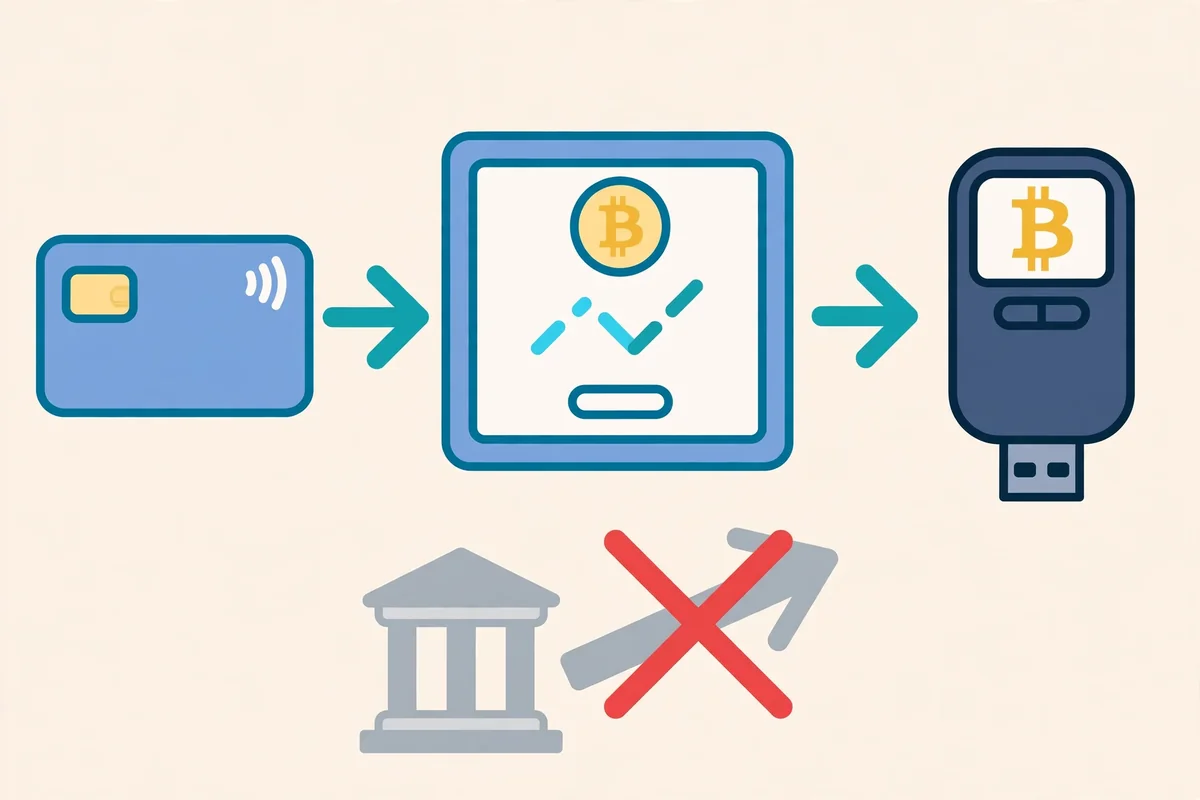
- Verify your Wise account and get your card. Order the physical card if you need it, but the digital card details in the Wise app work for an online purchase before the physical card arrives.
- Hold the currency the exchange will bill. In the UK that means GBP, in the eurozone EUR, in the US USD, and in Australia AUD. Spending a currency you already hold is free, and it avoids conversion fees and the 2 percent crypto top up fee that can apply in other currencies.
- Create and verify an exchange account in your own name. Use photo ID when asked, and make sure the exchange name matches your Wise card name. A name mismatch is a common reason for a declined card.
- Add the Wise card as a debit card payment method. Add it as a card, never as a Wise bank transfer. Coinbase requires a card that supports 3D Secure, so approve the purchase in the Wise app or by code when prompted.
- Preview the full order before you confirm. Check the Bitcoin amount, the fee, the spread in the quoted price, and the total you will pay. If the total surprises you, stop and compare the Advanced Trade route below.
- Confirm a small first purchase. A small test buy proves the card works on that exchange and shows you the real fee in your own currency. You can scale up after the first buy clears.
- Move Bitcoin you plan to hold to your own wallet. Copy the address carefully, send a small test amount first if the wallet is new, and never paste an address from a chat message or a random link.
How much it costs: card buy versus Advanced Trade
Speed costs money on Coinbase, and the gap is large enough to change your plan. A simple card buy suits a small first purchase, while Advanced Trade suits repeat buys.
Coinbase charges about 3.99 percent on debit card purchases in the simple app, plus a spread of roughly 0.5 percent built into the quoted price. Advanced Trade starts at 0.40 percent for a maker order and 0.60 percent for a taker order at entry level volume.
| Route for a 500 pound buy | Fee math | Approximate cost |
|---|---|---|
| Simple app, Wise debit card | 3.99 percent plus about 0.5 percent spread | About 22.45 pounds |
| Advanced Trade, taker order | 0.60 percent trading fee | About 3.00 pounds |
| Advanced Trade, maker order | 0.40 percent trading fee | About 2.00 pounds |
These figures are a comparison, not a quote, and fees change by region and volume. Always read the preview screen, because the preview is the price you actually pay.
Wise adds its own layer only when you spend a currency you do not hold. Wise can charge a 2 percent fee for topping up e wallets and other cash convertible accounts.
That fee does not apply in the exempt currencies on its list, which include GBP, EUR, USD, AUD, and SGD for the relevant card networks. Hold the billing currency, and that Wise fee drops away.
For a cheaper repeat route, move money from Wise to your own traditional bank account, then fund the exchange from that bank and trade on Advanced. That route uses a separate bank transfer, so it avoids the Wise to exchange block.
Your bank may still apply its own crypto transfer rules. Check your bank policy before you rely on it.
Moving your Bitcoin to your own wallet
An exchange account is convenient for buying, but it is not the safest place to store Bitcoin long term. If the exchange freezes withdrawals or suffers a security incident, your access can pause even when your coins still exist on paper.
Start with the best Bitcoin wallets for beginners if you have not picked a wallet yet, and read how to store Bitcoin safely before you move a large amount. A wallet you control, with a backup you protect, beats a large balance left on an exchange.
Test first, then move the rest
Send a small test withdrawal to your new wallet address first. Wait for it to arrive, then send the rest in one or two larger withdrawals, and keep the network fee in mind when you judge the total cost.
Write down your seed phrase on paper and store it offline in a safe place. Read how to back up a Bitcoin seed phrase safely before you rely on a photo, a cloud note, or a screenshot, because those copies can leak in ways paper cannot.
Common mistakes with Wise and Bitcoin
Most Wise crypto problems come from one of five avoidable errors. Fix these, and your first buy gets far simpler.
First, never send a Wise balance transfer to an exchange and hope it slips through. Second, never receive peer to peer crypto sale money into Wise, because Wise blocks that inbound flow too.
Third, never cash out from an exchange back to Wise as your default plan. Use a traditional bank account for withdrawals, and keep Wise for normal spending and transfers.
Fourth, never buy in a currency you do not hold in Wise without checking the conversion cost. A small conversion fee on every buy adds up fast for repeat buyers.
Fifth, never leave a large holding on an exchange because the buy felt easy. Buying easily and storing safely are two different jobs, and the second job matters more.
Alternatives if the Wise card does not work
If your card is declined, check the card region, the billing currency, and the 3D Secure approval first. A declined card often means a region or verification issue, not a permanent ban on Wise cards.
For euro buyers, how to buy Bitcoin with SEPA transfer covers the bank route in detail. For e wallet buyers, how to buy Bitcoin with Skrill compares that route and its fees.
Australian buyers can also read how to buy Bitcoin with PayID for a local instant option. For a full comparison across methods, start at the payment methods hub and pick the route that fits your country and budget.
FAQs
These answers cover the questions beginners ask most about Wise and Bitcoin. Each answer states the rule plainly, so you can check it before you pay.
Can I buy Bitcoin directly in the Wise app?
No. Wise does not sell, hold, or trade cryptocurrency, and you cannot buy Bitcoin inside the Wise app.
You buy on a regulated exchange. Wise only supplies the card payment.
Why did my Wise transfer to Coinbase fail?
A Wise balance transfer to an exchange breaks the Wise Acceptable Use Policy, so Wise can reject it. Use the Wise debit card at checkout instead, and do not repeat the blocked transfer.
Can I use my Wise card on Binance?
A Wise card can pay for a lawful purchase in a supported region, but Binance is named by Wise as a sender it cannot accept for inbound payments. Do not use Wise as your cash out route for Binance, and check Binance card support in your region before you buy.
How much does buying Bitcoin with Wise cost?
A Coinbase simple card buy costs about 3.99 percent plus a spread of roughly 0.5 percent, while Advanced Trade starts at 0.40 percent maker and 0.60 percent taker. Holding the billing currency in Wise avoids conversion fees and the 2 percent top up fee that can apply in other currencies.
Can I withdraw Bitcoin sale money back to Wise?
Do not rely on it. Wise only accepts inbound money from platforms licensed in the UK or EU and within its risk limits.
Wise names Binance as a sender it cannot accept. Cash out to a traditional bank account instead.
Is buying Bitcoin with Wise safe for beginners?
The card route is simple, but safety still depends on your habits. Verify both accounts, preview every fee, use 3D Secure approval, and move long term Bitcoin to a wallet you control.